SSH Gateway

Hi,
In RoyalTS, you can create what's called a "Secure Gateway" (just a plain old SSH server) and then Royal dynamically tunnels your connection for that object (regardless of RDP, SSH etc) through it - No need to setup port forwards etc which seems to be a thing you need to do in RDMS
Am I missing something obvious? I literally just want to create an SSH object, link it to my existing RDP & SSH connections and have it use the tunnel for the connection. Not wanting to have to set the connection to things such as 127.0.0.1:someport. Just tunnel it through the SSH connection, nice and easy.
Some screenshots of how it looks in Royal;
https://www.dropbox.com/s/0o5wt1oswep40zd/Screen%20Shot%202018-05-21%20at%209.44.51%20am.png?dl=0
https://www.dropbox.com/s/1adno93973y0fx8/Screen%20Shot%202018-05-21%20at%209.45.47%20am.png?dl=0
https://www.dropbox.com/s/ymu5o7fl5h20cjl/Screen%20Shot%202018-05-21%20at%209.47.18%20am.png?dl=0
Dave
All Comments (10)
This is something in Royal Server I think. Have you tried to connect RDM with Royal Server by using a normal SSH tunnel?
Regards
David Hervieux
Hi David,
Thanks for your reply.
This is not a Royal Server feature (although based on the screenshots you would think it is) - You can use any SSH server (and we have been)
I have tried a standard SSH Tunnel in RDM to the same SSH server used in Royal and it connected, yet the actual connection in RDM doesn't seem to tunnel through the SSH tunnel, it just connects and sits idle.
Cheers,
Dave
I will be honest, I'm not the expert in SSH tunnel at Devolutions but we have a blog about that and it seems to do exactly what you want:
https://blog.devolutions.net/2016/10/how-to-configure-ssh-tunnel-in-remote-desktop-manager
Just make sure to use the option Use dynamic port:
Regards
David Hervieux
Hi David,
We are doing exactly that, however when using ProcMon I can see RDM trying to establish a TCP connection directly and not actually stuffing the connection down the SSH tunnel.
Is there an SSH tunnel SME on the forum, or should I log a support case?
Dave
To add further information, it is possible to achieve exactly what I want on an SSH session by setting the "SSH Gateway" - But it would need to be added to every session manually, and that option is not available for RDP even though it is quite literally just stuffing a TCP connection down an SSH tunnel (which is actually a SOCKS proxy).
Could you post a small Xml data source with setup that you have. I don'need the real IP and the real password. I just want a little lab to verify how everything is linked. I will forward to other people if I can't find anything.
Regards
David Hervieux
Thanks David, I will DM it to you.
Hi Dave,
I had a chat with David and he sent me the XML file.
First, thanks for these files. Let me inform you that the session currently use is an SSH Shell (Rebex) and I could recommend you to use SSH Shell which has more features like the Proxy directly integrated not as a VPN like you configured.
That being said, the feature that you are looking is currently broken, the engineering team is currently working on it and I can inform you as soon as the feature is implemented.
That feature will be for SSH Shell entry only.
Best regards,
David Grandolfo
Thanks mate, at least I know I’m not going crazy 😂
Hi Guys,
For the one who follow this topic for SSH Tunnel Socks 5 dynamic, in the latest RDM version 13.6.5, the dynamic Socks 5 tunnel via an SSH server is now supported.
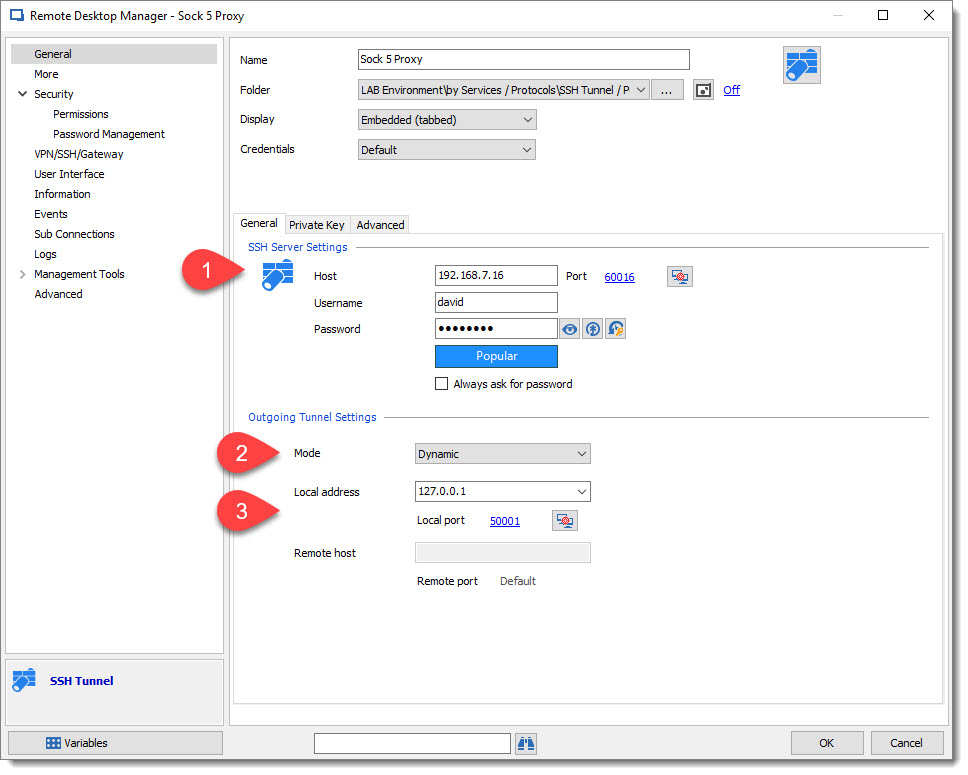
One of the good configurations is to create an SSH Tunnel entry like below:
1: SSH Server for Socks 5 tunnel
2: Mode as Dynamic
3: Local Address can be set as a local host address with a specific port (use a port outside of Windows port usage)
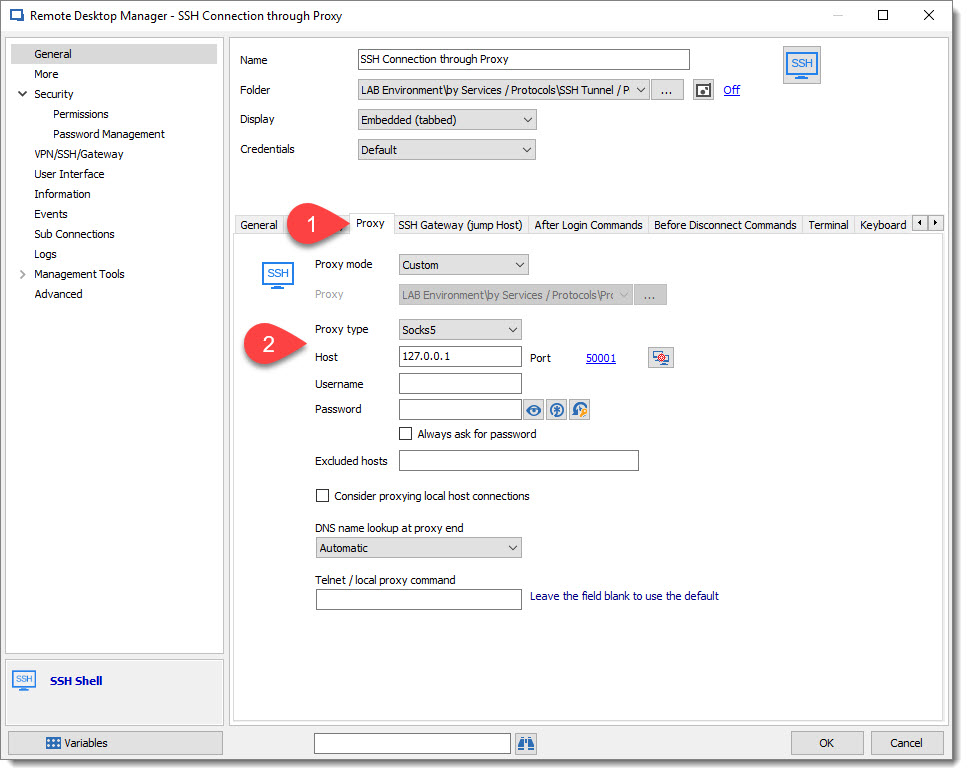
And then connect your SSH Shell, with the Proxy tab information:
1: in the SSH Shell entry go to Proxy tab.
2: Proxy Type: Socks 5
Host/Port: set the same host/port as setup on the SSH Tunnel above.
Best regards,
David Grandolfo
SSH_Shell_Proxy.jpg
SSH_Tunnel_Socks.jpg