black screen when system not reachable

Whenever i forgot to open a necessary vpn connection, or my vpn was broken and try to connect to a then not reachable windows server, it leaves me a non closable window with a black screen. When i later connect to the machine with established vpn, anything is fine, except of that black screen. The only way ii found, to get rid of these black non-connections is to shut down the whole remote desktop manager. the "close window" command has no function for these black windows.
All Comments (5)
Hello,
Do you use the RDP ActiveX or FreeRDP?
Regards
David Hervieux
Im using the rdp client which is integrated in remote desktop manager. By the way im using the Mac version...
Hi,
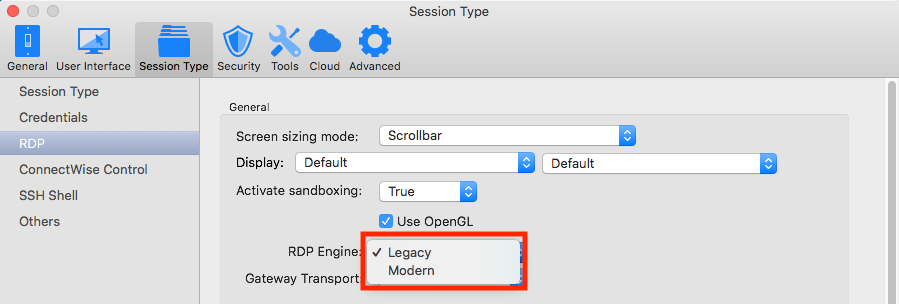
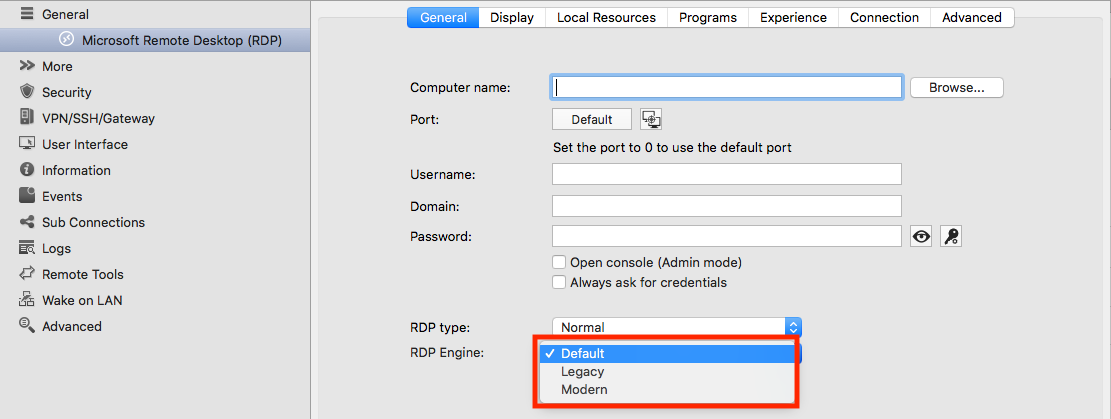
Could you try switching to the Modern RDP engine? (You can do this for all the session using the default option through the Preferences or in each sessions configuration.)
Could you tell me of any issues you encounter with this engine and if you're still encountering black screen.
Best regards,
Xavier Fortin
Preferences_RDPEngine.png
RDPEngine.png
Hi,
I think I might have missed something in my first read. The RDP session gets a black screen and stays stuck opened? You can't close it until you close the application itself?
Could you get me a print screen of those black screen sessions?
Best regards,
Xavier Fortin
these sessions where completely black with no titlebar on mouseover, so no x and did not close via the window meenu. With the modern engine, the problem seems to be gone. Thank you.