No sessions in online-mode on some clients

Hello,
since yesterday, some of my colleagues do not see the session-tree/sessions, while in online-mode.
Some colleagues did a client restart and it helped, at some it did not help.
Client/User rights are the same.
Database connection test works fine.
4/12 clients/colleagues do have this problem since yesterday.
What changed: Yesterday I did hundreds of changes to the structure like adding new sub-folders.
I did not change anything root/rights related.
I know, it's vague, but, how may we start troubleshooting?
Edit:
So far, it's some kind of rights-issue, but I can't delimit it. Root permissions are default.
If we put some users into groups with more RDM rights, wich are related to sub-sessions,
all sessions are visible...
Edit2 - our structure (example):
Groups:
- G_1stlevel
- G_admins
Tree:
- SRVRDMSQL01 (default rights)
- Customer1 (G_1stlevel)
- Secret-Folder (G_admins)
Members of G_admins do see the tree and subfolders.
Members of G_1stlevel do only see the root SRVRDMSQL01 and no subconnections
Best regards
Daniel
All Comments (9)
Hello,
My first thinking is that the local cache is not up to date for these people.
Could you ask them to do a CTRL + F5 to refresh the local cache and see if the new sessions appear.
Best regards,
Jeff Dagenais
Hello Jeff,
already did this on different machines and also a new lab testclient. No change.
Regards
Daniel
Hello,
From a non working computer please go to Files -- My Data Source information and look if the user is member of the Security Group or roles that you set on the sub root folder.
Are you using Security Group or Roles?
Best regards,
David Grandolfo
Hi David,
the user is member of the corresponding group.
We use roles and groups.
Edit:
It looks like some right of a sub-folder is inherited "backwards" - very strange...
Edit2:
Attached a PDF with screenshots. User "test123" does not see the subfolder.
Regards
Daniel
1.pdf
Hello,
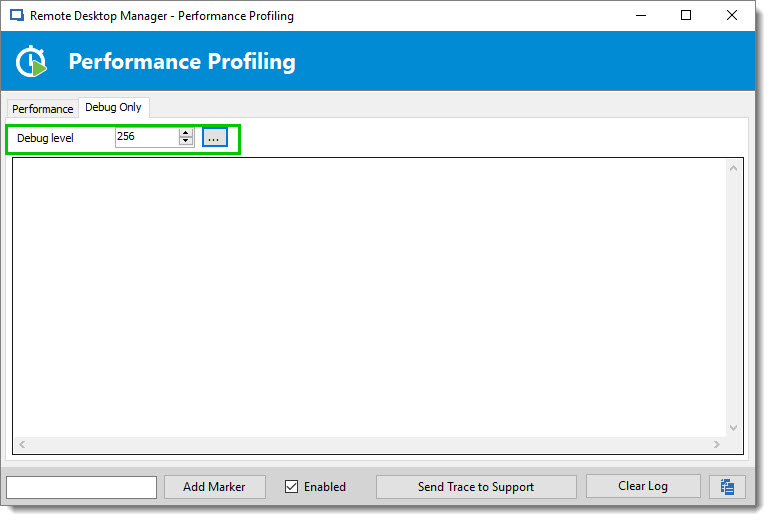
Could you, always on the non working computer, go to Help -- Profiler -- Debug Only -- set the level to 256 and send us the trace.
We should see from there the load of the session.
If you have session there, could you confirm on the data source configuration (Files -- Data Source -- Edit) that the Cache mode is set to intelligent.
Best regards,
David Grandolfo
debug_256.jpg
Hello David,
cache mode is intelligent.
I configured debug level to 256 but the window stays empty and when I click "send trace", nothing happens.
On the correspondig client(s) I do not see sessions - only the root is visible.
Regards
Daniel
Hi,
Could you try to disable the Cache Mode, close RDM and restart it.
Do you see any other session?
Thanks
David Grandolfo
Hello David,
disabled cache-mode and restarted RDM. No change.
I still do not see *any* session - only the root-object.
Edit:
Another test I did on a not functional client, where the tree is empty... I crated a new folder.
The folder could be seen on functional clients, but not on the clientm where I created the folder.
Edit2:
I'm out for one week now and will look back afterwards. Maybe you have some more suggestions.
For me it looks like some kind of database error, but I can not realy proof it.
Regards
Daniel
Hi,
Thanks for the tests, I would like to do a remote session to have a look at this. If I'm too late and you still out. I'm sorry, please contact us when you are back.
Best regards,
David Grandolfo