KeePass Import issue

I have been able to import my keepass db as an xml file. The folder is created, etc. I do not see anything. In the keepass app I have a master password that lets me see all my entries. How do I configure RDM to use the master password so I can see my entries?
All Comments (6)
Hello,
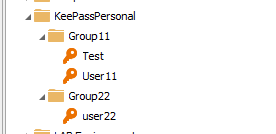
I have performed an import like you describe and here's what I see in my Navigation Pane.
What are you seeing in the Navigation Pane?
Best regards,
Jeff Dagenais
2018-05-02_13-56-55.png
I only see folders.
2018-05-02 14_03_35-Remote Desktop Manager Free [ocna-ch].png
Hello,
What version of RDM are you running?
What type of data source are you using?
Best regards,
Jeff Dagenais
4.5.3.0 (Free)
Since it doesn't look like RDM supports the Keepassextension kdbxI treid to import it as an xml. The inport showed all the entries as expected but they are not showing up inside RDM.
Hello,
After a few tests, I was able to reproduce your issue.
A ticket has been opened to our engineering department.
Best regards,
Jeff Dagenais
Hello,
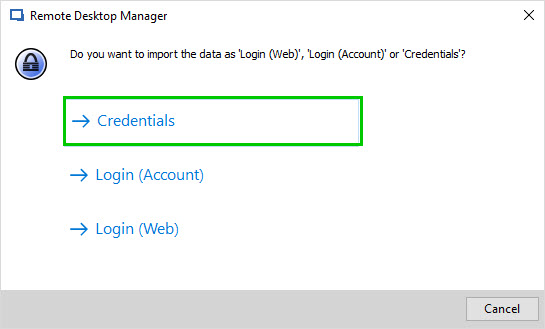
Our engineering department has found the cause of the issue. If you selected "Credential" when doing your importation from Keepass, the importation has been successful but since credential entries are not supported in Remote Desktop Manager Free, RDM is not able to show these entries.
Our engineering department will try remove the "Credential" option from the Keepass importation window in Remote Desktop Manager Free.
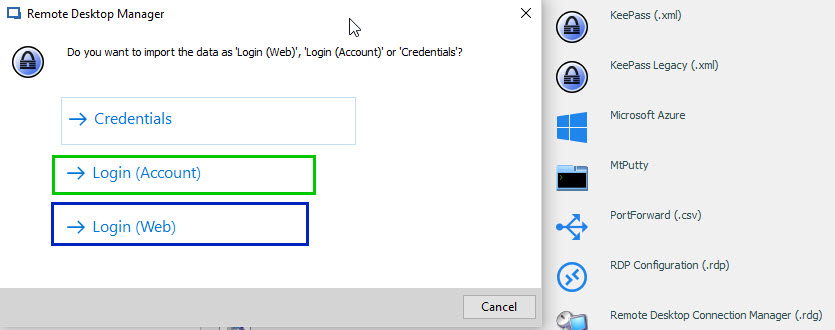
In order to be able to import your credentials from KeePass, you will need to either select "Login (Account)" or "Login (Web)"
Thanks again for reporting this issue.
Best regards,
James Lafleur
ChoiceKeepass.jpg
ImportKeePassChoice.jpg