AWS Ec2 Synchronizer

Machine Name (tag) is currently also the computer field, which I need to reflect the Public IP Address. I tried adjusting template etc, but can't get it to populate public IP in the correct field to allow connecting to public IP.
Any suggestions?
All Comments (14)
Hello,
Thank you for posting this.
I will have a look with our team and reply as soon as possible.
Best regards,
Marc Beauséjour
Hello,
We've opened a ticket to investigate this.
Thank you for your patience.
Best regards,
Marc Beauséjour
Hi,
If I understand correctly you want to use the machine tag as the host. Is that right?
Regards,
Samuel Baker
Public IP as the connection , name tag as display name.
Hello,
We added an "Import Settings" tab in the EC2 Synchonizer that allows you to choose which property to use as entry name, host and username. This should be available in the next patch.
Regards,
Samuel Baker
Fantastic. You guys are awesome as usual.
I'd also like to ask that this be considered for the console.
Basically, I want to do a quick connect, but find that the same issue occurs. I want to be able to quick connect with a particular field such as public ip or public dns entry to be the connection entry used, while the name of the connection is the name tag.
I have a custom powershell script that currently takes and organizes the entries based on tags. Maybe this could be replaced by some basic parsing/grouping functionality in the synchronize? Be easier to share and maintain if it was part of the product for sure!
This was a pretty good first found. I found it had some issues though.
For instance, I have name tags in two separate regions that both have the same name. They have different ip addresses. I need to be able to create the host name and/or the destination as a combination of values from the parsed values, like tags, region etc.
So in this case, the destination folder would be "{Tag:Enviroment}\InstanceName" or maybe "{region}\InstanceName" so I can correctly identify the instances with the same name. Is this possible?
Hello,
I want to make sure I understand the request correctly
1. About the quick connect in console you want to be able to chose the name of the quick connect tab?
2. About the second part of this message. You want more control over the destination folder in RDM?
3. About the last message you want more control over how the synchronization. Would having variables representing the current possible value right now and a text field in which you can use multiple of them be a good solution? For example: "$Tags$ - $publicIP$" as entry name
Regards,
Samuel Baker
It lost my original reply for some reason. Just came back to check and found no response posted. Here's the quick
I want to make sure I understand the request correctly
1. About the quick connect in console you want to be able to chose the name of the quick connect tab?
Yes. I want to choose the name given, as in Name Tag + Enviroment or whatever field I choose.
2. About the second part of this message. You want more control over the destination folder in RDM?
Once tags are parsed, I need to be able to parse out the tag names to use to organize, such as "Enviroment Tag: Dev/Prod/QA". Those each would have their own folders, as they might also have the name name tag too (it's not enforced as unique in AWS).
3. About the last message you want more control over how the synchronization. Would having variables representing the current possible value right now and a text field in which you can use multiple of them be a good solution? For example: "$Tags$ - $publicIP$" as entry name
Yes. You beat me to it. I think the more you provide in variables, the less long term maintenance this feature will take. For example, Name + Tag might work for me, but maybe someone else needs seperate virtual folders for a different tag. Having some variable parsing instead would give true flexibility on the selection used.
Any possible update on templated values for this?
I ended up having to create a custom script to do this, and would prefer to have flexible variable templates for this instead.
For example. I have it pull down into subfolders like:
AWS
- Machines
- EnvironmentTag (default= 'default)
- Machine. Uses external IP when available, else defaults to private IP with connection marked as JUMP when only internal IP, simplifying connectivity.
Hello,
This feature is still on our TODO list. We will bump up the priority and keep you updated on the progress.
Regards,
Michaël Beaudin
Hi,
We added custom as an option to our import settings which supports variables. More information about these variables will be added to our documentation soon.
Unfortunately at the moment we don't have a way to do tag parsing, but we'll keep it on our todo list since it's an interesting feature.
Regards,
Samuel Baker
I can't figure out the variable names. Any basic example for this?
Hello,
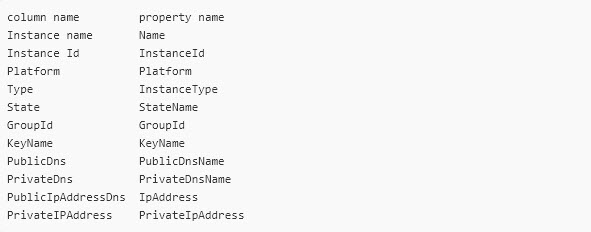
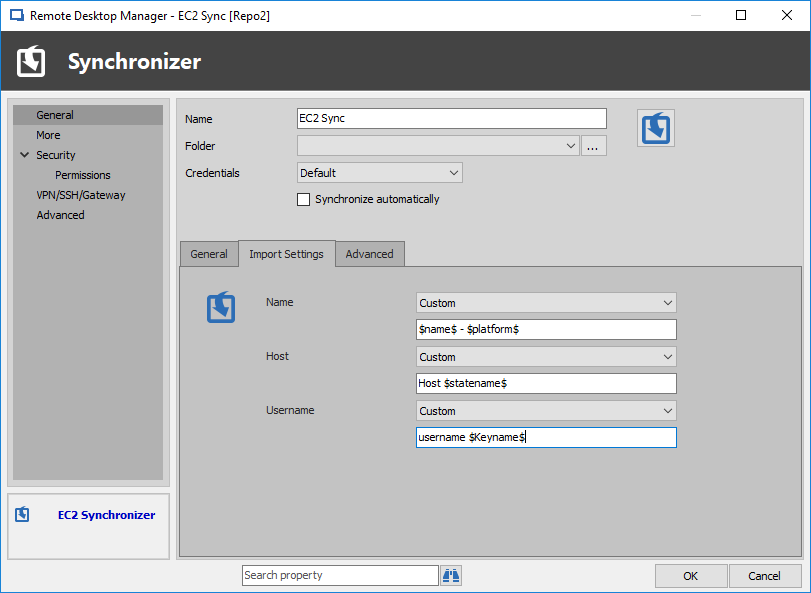
In short, every variables need to be enclosed in $ in order to work properly within RDM.
Please refer to the following table for variables names:
Also, here is an example of a variable being used in an entry:
Best regards,
James Lafleur
Example.png
VariablesTable.jpg