SoftEther VPN Client
0 vote
HI,
I would like to ask if it's possible to have a new addon for SoftEther VPN client in Remote Desktop Manager.
Regards
Yves Bender
All Comments (13)
Hello,
Do you know if they provide an API, SDK or Command-Line?
Best regards,
Marc Beauséjour
Hello,
On the website of Softether they have some API functionality, maybe it can help to make the connection with RDM.
https://www.softether.org/Template:MindTouch/OOBE/Core/User_Development
Best regards.
Yves
Hello,
Can you tell me if this feature will be added or not?
Best regards
Yves
Hello,
Unfortunately we don't have enough information to create an add-on. We would need a CLI or an executable with some parameters.
Regards
David Hervieux
Hello David,
I have a config file to configure the vpn maybe it can help you?
# VPN Client VPN Connection Setting File
#
# This file is exported using the VPN Client Manager.
# The contents of this file can be edited using a text editor.
#
# When this file is imported to the Client Connection Manager
# it can be used immediately.
declare root
{
bool CheckServerCert false
uint64 CreateDateTime 0
uint64 LastConnectDateTime 0
bool StartupAccount false
uint64 UpdateDateTime 0
declare ClientAuth
{
uint AuthType 2
byte EncryptedPassword $
string Username $
}
declare ClientOption
{
string AccountName Unitron
uint AdditionalConnectionInterval 1
uint ConnectionDisconnectSpan 0
string DeviceName VPN
bool DisableQoS false
bool HalfConnection false
bool HideNicInfoWindow false
bool HideStatusWindow false
string Hostname 84.199.97.130
string HubName VPN
uint MaxConnection 1
bool NoRoutingTracking false
bool NoTls1 false
bool NoUdpAcceleration false
uint NumRetry 4294967295
uint Port 443
uint PortUDP 0
string ProxyName $
byte ProxyPassword $
uint ProxyPort 0
uint ProxyType 0
string ProxyUsername $
bool RequireBridgeRoutingMode false
bool RequireMonitorMode false
uint RetryInterval 15
bool UseCompress false
bool UseEncrypt true
}
}

The easiest way to get SoftEther working is to set it up as a "Custom VPN"
the command line tool will allow you to connect to your pre-defined connections.
In SoftEther VPN Client Manager, "Add VPN Connection" fill out all the data and test your connections.
In RDM create a Custom VPN Session
HOST: localhost
Executable: C:\Program Files\SoftEther VPN Client\vpncmd.exe
Opening Arguments: /CLIENT localhost /CMD AccountConnect <SOME_VPN_CONNECTION_NAME>
Closing Arguments: /CLIENT localhost /CMD AccountDisconnect <SOME_VPN_CONNECTION_NAME>
Wait Interval: 10 sec
That should get you running.
Based on your configs your command will look like this:
to Connect:
C:\Program Files\SoftEther VPN Client\vpncmd.exe /CLIENT localhost /CMD AccountConnect Unitron
to DisConnect:
C:\Program Files\SoftEther VPN Client\vpncmd.exe /CLIENT localhost /CMD AccountDisconnect Unitron
Thomas
@Thomas,
Thank you very much for your feedback. This is really appreciated.
Hope this will help other users in our community.
Best regards,
Jeff Dagenais
Would be nice feature if the "Custom" VPN connection would actually show a green dot next to the element name to let us know its connected.
Hi, have this working great.
i have created a VPN connector, how to i make the RDP connection connect VIA this connection?
i know i can hard code it in the session but if i have 100 servers i want them to inherit this connection.
Cheers James.
Hello,
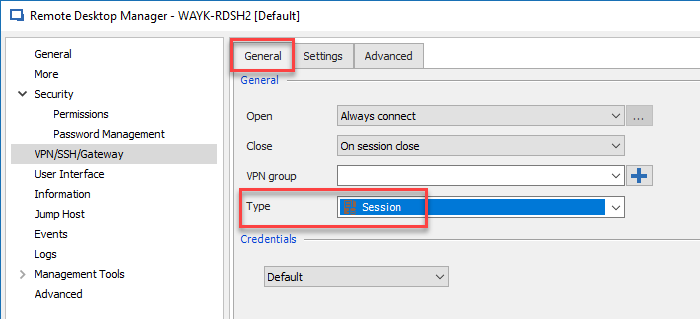
If your sessions are all under the same folder, you can edit your RDP sessions, go in the VPN section and select Inherited in the Open dropdown.
At the folder level, in the VPN section, in the General tab, select Session in the Type dropdown
Then, go in the Settings tab and select your VPN entry
This can also be done individually per session if you would like.
Best regards,

Jeff Dagenais
2019-01-08_11-38-23.png
2019-01-08_11-37-10.png
Thats it !!!!
Thank you :)
Hi all,
is there a was to use a variable in den argument Section. We using Softether VPN aus descriped above and it works fine. But it will be a nice feature to use Variables.
Please have a look of the sceeenshot example attached. There is an existing Connection "Test" on Softether VPN Cient and i need to use the Connection name "test" as a variable. When it works a second step is using a variable from a parent object, because we are using multiple RDP connections for one customer with the same VPN connection name.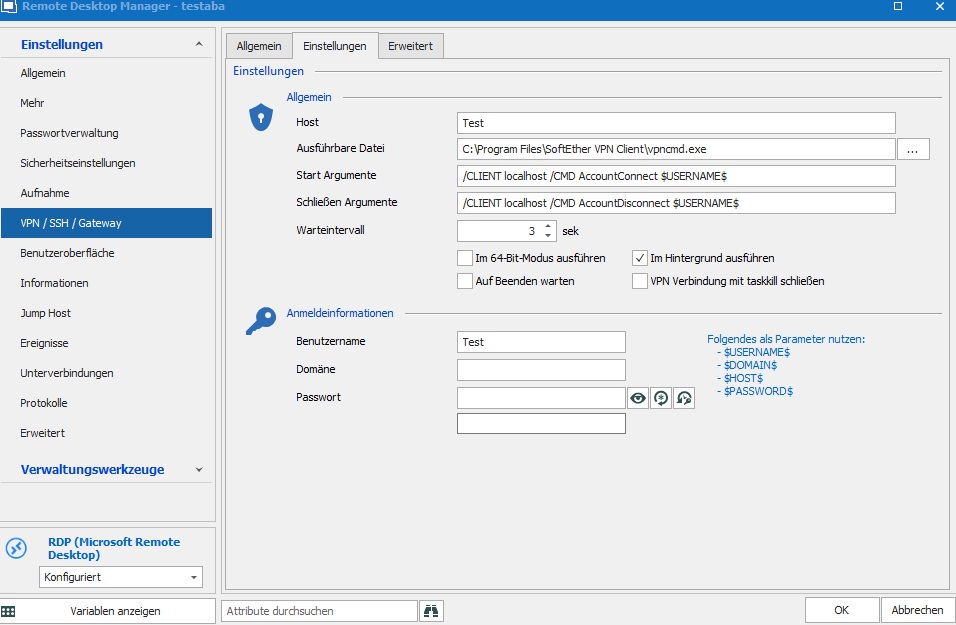
rdm.jpg
Hello,
I hope I understand it right - you want to use the "Host" (Test) as variable for all RDP sessions from one specific customer?
If so, I suggest the following procedure:
- Configure a separate VPN entry and set all the required parameters
- link the VPN entry at folder level (or, if you prefer) on session level - like Jeff's instruction
- now it is possible to use on every RDP session the variable
$VPN_HOST$
Is this what you're looking for?
Regards,
Min