Sophos SSL VPN
I am having issues setting up a Sophos VPN. I am able to import the config file to create the VPN entry, but when I click "Open Session" it goes straight to the connection status window without opening the Username and Password dialogue. So, it's trying to connect without a username and password, which of course fails.
When I go to Options > Enable automation authentication, I still am unable to get it to use or ask for a username and password.
On top of that, if Sophos is already running, I just get an error message that says it's already running, and then it doesn't try to connect at all.
-Beth
All Comments (6)
Hello Benth,
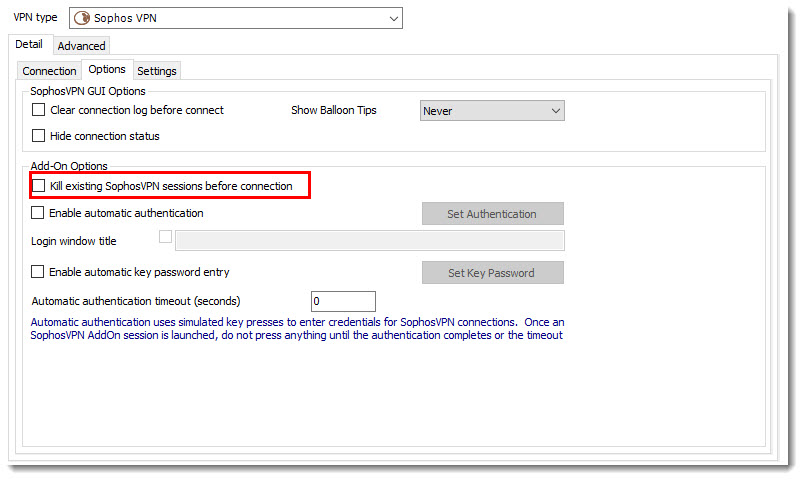
Regarding the already open issue we have an option to kill SophosVPN prior to launch the new VPN. under Options tab you could enable Kill existing SophosVPN sessions before connection.
Concerning the second parts of the issue for the credentials not sent. Do you know if the Sophos VPN used SSO for credentials if not could you try to change the Credentials type on the top to none.
Best regards,
David Grandolfo
sophos_kill.jpg
Hi David,
Regarding the already open issue, I do have Kill existing SophosVPN sessions before connection selected, but I still get an error stating "SSL VPN Client is already running."
I'm not sure if the VPN is using SSO. I was given a username and password. When I manually connect, rather than going through Devolutions RDM, I right-click on the already-running Sophos client, it pops up a window called "SSL VPN - User Authentication", and I type in the Username and Password.
I'm not using a certificate of any kind. I did notice in the log that's created while trying to connect that it seems to be looking for a certificate:
Thanks,
Beth
Hi Beth,
Regarding the Kill existing option, could you give me the exact name of the SophosVPN application when it is started. I would like to confirm if it's the same executable that we close in RDM.
The CA certificat isn't clear for me. It's look like you have a like or an information in RDM that the Sophos need.
Could you change the username/password/host information for false information and export the session please. You could send the session to support@devolutions.net .
Best regards,
David Grandolfo

Hi,
I have the same problem with the option Kill existing SophosVPN sessions before connection.
The name on the task manager is "SSL VPN Client for Windows (32 bits)", and the location of the application is the default one.
Do you know what could be wrong?
Kind Regards
@Jose Leite,
Are you running RDM as an administrator? You would need to run RDM as an administrator to make this work.
Best regards,
Jeff Dagenais
You can use OpenVPN instead of Sophos. Sophos SSL VPN is (ab)using OpenVPN under the hood... . But you will probably have just the same issue's. I always run RDM as admin ;)