Credentials problem

Hi,
since some time it is not possible to provide any credentials to RDP sessions. RDM always asks me for my credentials on connecting no matter which method i use to provide credentials (repository or direct input in the properties).
i already cleared out the repository cache and disabled NLA (sends me to the windows login page without asking for credentials)
Currently i am on RDM 5.2.0.0 but the problem already existed in the previous version.
My colleague who works with the same data source has no such problems.
Greetings
All Comments (16)
Hi,
Are you launching your sessions in external mode? If so, we don't feed the password to the Microsoft Remote Desktop app.
If this is not the case, can you make sure the "Always ask for credentials" checkbox is not checked in your session?
Best regards,
Xavier Fortin
Hi, thanks for the reply!
No i launch them in "Embedded (tabbed)" mode and prefer to use "Credential repository" as credential source, so "Always ask for credentials" is greyed out.
The problem exists with every RDP connection in my data source.
Greetings
Which RDP Engine are you using? You can see this in the session properties: Microsoft Remote Desktop (RDP) -> General -> RDP Engine. If the value is default, you can find the actual value in the application preferences: Session Type -> RDP -> General -> RDP Engine.
Could you also get me a print screen of the prompted credentials window shown when launching a session (and having the NLA enabled)?
Best regards,
Xavier Fortin
It is the same with Modern and Legacy and it was set to Modern.
Screenshot: https://ibb.co/mS25p7
Greetings
Hi,
This really look like the window that is shown if no password was sent to the RDP client. Can you make sure you're not overwriting your session credentials settings with User or Local Specific Settings?
Best regards,
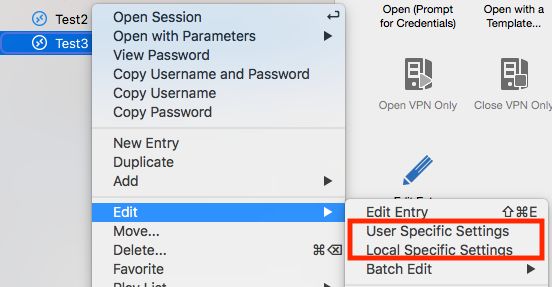
Xavier Fortin
UserAndLocalSpecificSettings.png
Hi,
checked but no override in User and Local Settings.
Greetings
Can you try to create a new RDP sessions with the strict minimum of configurations required to successfully connect to one of your server (host, port, username and password if possible)? By doing this, we can dismiss (or confirm as guilty) any other settings.
Best regards,
Xavier Fortin
Hi,
this works!
How can i fix the entries and why does it work on my colleagues mac?
Greetings
This is what we'll have to figure out.
Can you export the session that works and the corresponding session (to the same host) that doesn't work (Right click on the session -> Export Selection)? Make sure to leave the "Include credentials" checkbox unchecked.
You can than send me the files via private message.
Best regards,
Xavier Fortin
Sent it!
Greetings
Hi team.
I have the same problem, and I am using the edition Enterpise 5.4.0.0 and the software with which it connects by remote desktop is: "microsoft remote desktop 10"
I have followed all the instructions of this blog, but in my case everything its in as "local data source"
soi am using sessions in external mode, how I can do to connect to the server by RD on fullscreen
what I can do?
Hi,
Are you running your session in external mode? If so we do not feed the password to the Microsoft Remote Desktop app.
Best regards,
Xavier Fortin
hi
I using all options external, embedded and undocked and always ask the password.
what its the best way to do correctly?
Best Regards
Hi,
Which sessions are we talking about here (RDP, ARD, etc.)?
How are your credentials set in those sessions? Can you provide a screenshot of the General settings view of one of the faulty sessions? Just like this:
Best regards,
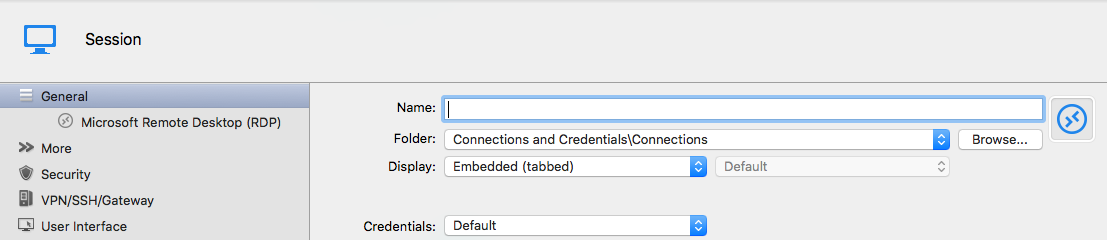
Xavier Fortin
RDPGeneralSettings.png
Hi
this its the Screenshot as you request
Thanks
Best Regards
Hi,
There seems to be an issue with the upload of your image. I cannot see it. Could you send it to me to my email address: xfortin@devolutions.net?
Best regards,
Xavier Fortin