Automatic command after SSH login

Hello.
We need to execute a command after SSH login to Linux machines, passing login password to the command (basically, "sudo -i password").
Some time ago, we had configured a macro that execute the command on "After Connect" event, using $MACRO_PASSWORD$ variable (I don't remember exactly the variable name).
Now, we need to do the same but there is more environments with different passwords (the other time, it was only one environmet with the same password for all machines... and it didn't expires, big security :-P), and we would like to change that passwords only one time, not in every session every time we change that passwords.
So, what's the best option? A credential repository with every user/password couple for every environment, then configuring "Use Credential Repository" in every session with its credentials, and then using After login commands and passing $TOOL_PASSWORD$ as command?
Thank you very much for your help.
Regards,
Héctor
All Comments (5)
Hello,
Indeed, creating Username / Password credential entries for each of your credentials would be a good solution.
https://help.remotedesktopmanager.com/credentials_usernamepassword.htm
Does the login password to the command is the same password that you will store in the credential entry for the session or it's a different password?
If it's a different password, where you do store this other password?
Best regards,
Jeff Dagenais
Until now, it is the same password. If it changes in the future... well, then we probably ask you for advice :-)
Best regards,
Héctor
Hello,
If it's the same password, using the $PASSWORD$ variable should do the trick. Please note that two options would need to be enabled to make this work;
If another password need to be used, we would need to store it somewhere else. If you are not using the Tools for this session, you can probably store the second password in that section and use the $TOOL_PASSWORD$ variable.
Best regards,
Jeff Dagenais
Thank you for the info Jeff. We have tried 4 options:
1) Directly configured usr/pwd at session --> It works like a charm, it does login and then runs the command and send the password hidden (configured as $PASSWORD$ as second command)... Perfect!!
2) Configuring usr/pwd at Folder level (all machines of that folder use the same credentials, but there are many folders, some of them also with these same credentials) and "Inherited Credentials" at session level --> OK. Same results as option 1.
3) Configuring the session with Credential Repository, then selecting the appropiate credential (usr/pwd); also, same config for "After Login" command, and password as $PASSWORD$ in second command --> Login OK but command KO. It runs the command but it does not send the correct password (I don't know what password it is sending because it is hidden). Perhaps it must be another variable?
4) Configuring the Credential Repository at Folder level and Inherited Credentials at session level --> Same results as option 3, login OK but bad password passed to command.
We would like to use the credential repository (options 3/4) so a password change could be done faster in RDM but, how can we do that?
Thanks in advance.
Best regards,
Héctor
Hello,
Point #3 and #4 are working on my workstation. I am using RDM 13.5.6.0 64Bit with a SQL Server datasource.
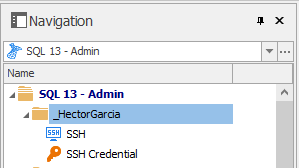
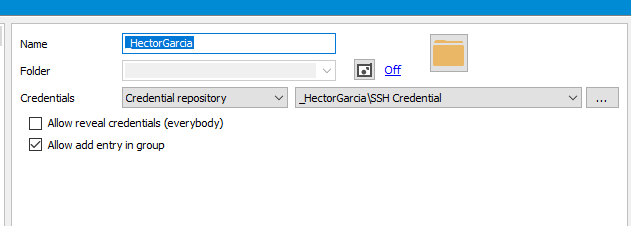
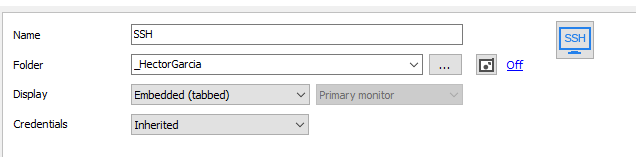
Here's what my folder structure looks like
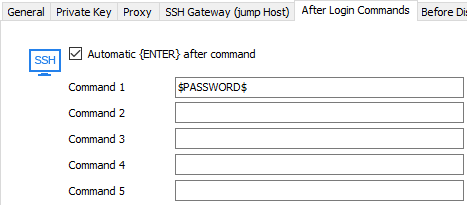
My After Login Commands tab looks like the following
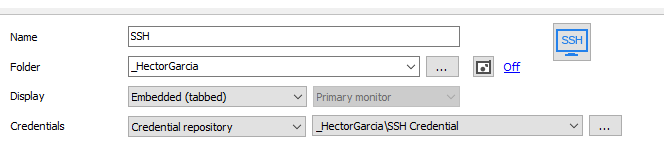
In my first test, I configure the credential repository in the SSH session
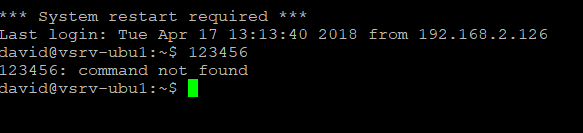
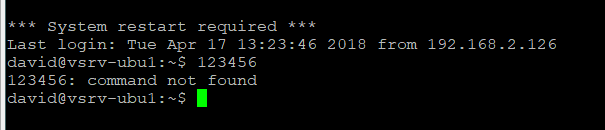
I see in the SSH tab that the password has been sent properly
In my second test, I configure the credential repository at the folder level
I see in the SSH tab that the password has been sent properly
As of now, I have two questions for you;
Best regards,
Jeff Dagenais
2018-04-17_13-27-36.png
2018-04-17_13-26-39.png
2018-04-17_13-25-38.png
2018-04-17_13-24-18.png
2018-04-17_13-23-02.png
2018-04-17_13-21-54.png
2018-04-17_13-18-38.png