Error in Cisco AnyConnect VPN connection

I have setup a new entry for Cisco AnyConnect VPN connection. When I open a session RDM open the application, enters the hostname and clicks connect. RDM then gives the following error:
Can't get pop up button 1 of window 1 of process "Cisco AnyConnect Secure Mobility Client". Invalid index.
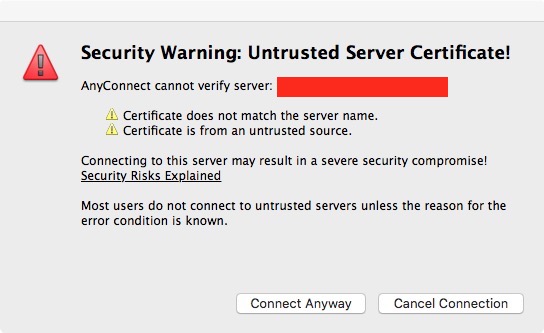
The reason might be because the host to which I am connecting to has a self installed certificate and AnyConnect after connecting to it gives me a warning error that it is unsafe either click continue or cancel. Once I click continue then I am presented with the username and password dialog. RDM thinks that after connect the dialog will appear (which doesn't) and thus the error.
All Comments (12)
Hello,
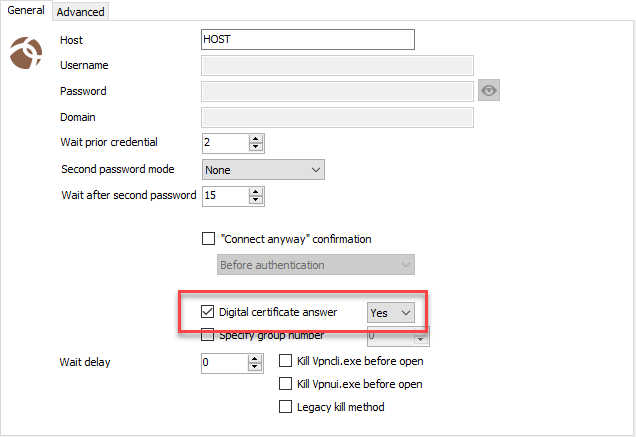
Have you tried to enable the Digital Certificate option in the Cisco AnyConnect VPN properties?
Best regards,
Jeff Dagenais
2018-04-12_18-48-39.png
Hi Imran,
I've looked into the script we use to launch Ciscy AnyConnect Secure Mobility Client in RDM Mac and there is no step to handle the window you're talking about, so I'd say you're right.
To implement this though I'll probably need your cooperation, when I first added this session we were getting help from another user since we don't have the application (nor any cisco vpn) ourselves.
First, a print screen of the Window in question will be a good start for me to get an idea of what is needed.
Best regards,
Xavier Fortin
Jeff, I am using a Mac machine, and I believe the screenshot you are showing is for a Windows, as I do not see any of those options.
Xavier,
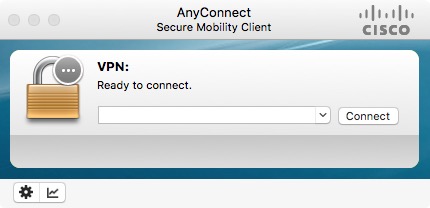
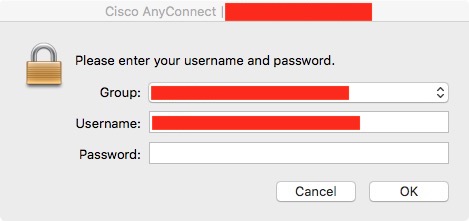
Sure I can help you out. I have attached 3 screenshots.
This is the main login screen.
This is the screen which pops up giving us the warning
Once you click the continue button, this screen comes up to enter your password
In the last 2 screenshots I have added a red banner to hide my server information
cisco_03.jpg
cisco_02.jpg
cisco_01.jpg
Hello,
I didn't noticed that you we're using RDM Mac, sorry about that.
Xavier will continue with you at this point.
Best regards,
Jeff Dagenais
Hi Brent,
I've sent you a private message with a script and instruction I'd like you to follow.
Best regards,
Xavier Fortin
I am encountering the same issue with a Mac and Cisco AnyConnect. Would please send me the script and instructions to resolve the issue?
Hi Cyndi,
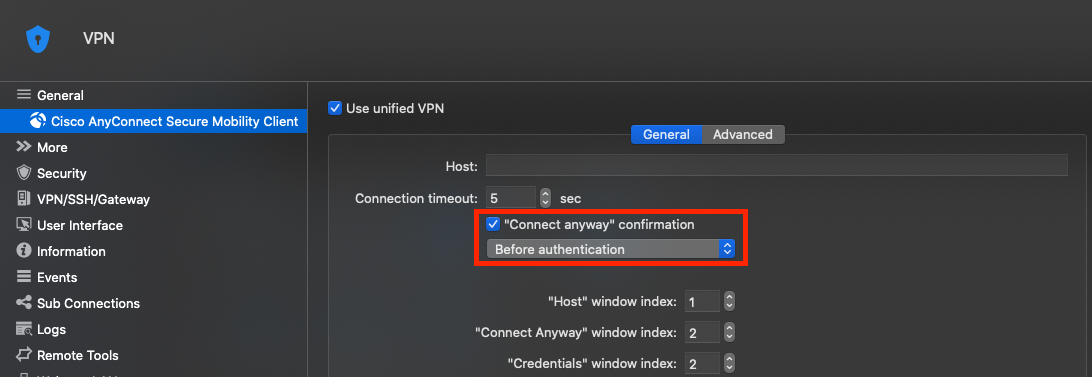
The conversation between me and imranzahid continued via private message and I did end up coming up with a fix that as since been included in RDM Mac. The old script was not handling Certificate message, so I added a "Connect anyway" confirmation checkbox that needs to be checked if you have this Certificate confirmation window. You must also select if the Certificate window appears before or after the authentication. Here is the settings view:
Please, confirm if this solves your issue or not.
Best regards,
Xavier Fortin
ConnectAnyway.png
Hi,
Just like to report that this has raised its head again.
Getting : Can't get button "Connect Anyway" of window 2 of process "Cisco AnyConnect Secure Mobility Client" when connecting although the prompt windows does close.
Can't get text field 1 of window 2 of process "Cisco AnyConnect Secure Mobility Client" invalid index.
Can't get button "disconnect" of window 1 of process "Cisco AnyConnect Secure Mobility Client" when disconnecting.
I have also just tried it with the option turned off and it is still trying to 'click' the button and throwing the error.
Remote Desktop Manager Free 2020.3.1.0
Cisco AnyConnect Secure Mobility Client 4.9.00086
Having to manually connect through Cisco client first before I can run any session through that VPN.
Regards
Paul.
Hi,
This is a very difficult entry to maintains since we have to use Accessibility features to communicates with AnyConnect windows directly. Like I ask imranzahid, can you include screenshot of the windows that appears when you authenticate with AnyConnect, in the proper order?
Best regards,
Xavier Fortin
Hi, Apologies for the late reply but I was investigating the possible reasons for this and it would appear I have found the reason.
After a recent (at the time) update of Cisco AnyConnect, when starting a fresh connection VIA RDM through Cisco i was seeing a login box pop up, then disappear, then reappear ?!? Also mixed in with this was the 'Security warning'. Then I got the message about being unable to get the button.
The obvious reason for the message 'unable to get button' was because the Cisco session was throwing up 2 login windows, one after the other, and so the 'HOST' window index setting of 1 in the VPN setup was invalid (I believe changes to these settings on the Mac have no effect ?)
I also found that when i did get the VPN session request to work, it did not connect to the VPN router requested, no matter which VPN session i requested I always ended up on the same VPN router !?
Resolution : I removed all the configured sessions within the Cisco client so no options are now available on the drop down selection menu within the Cisco AnyConnect client window.
Now the auto reply to the certificate warning works and the VPN router requested is the VPN router I connect to.
I do not know if this was a change in the latest update for the AnyConnect client, but as from then onwards, if you have pre-configured settings in your Cisco AnyConnect client, it interferes with the RDM request and sticks on the 'default' / 'first' entry in the stored Cisco client connection settings.
Paul.
Hi,
Thanks for the detailed explanation!
This is actually quite annoying, I'll see if we can't make the proper setup on our side to properly test this and bring any necessary modification (if possible).
Best regards,
Xavier Fortin