OpenVPN - enable save password
0 vote

Would it be possible to create a setting to enable 'save password' before loggin in?
I have a OpenVPN connection which times out after +- 1 hour. Because password saving is not enabled a window pops up asking for the password.
When I fill in the password and enable 'save password' option ; the VPN automatically re-authenticates (and connects) every hour.
Would be nice if the initial connection already had the option 'save password' enabled.
All Comments (20)
Hello,
Could you post a screenshot of the popup window that you are referring to for the save password.
Best regards,
Jeff Dagenais
Sure can do; i was just lazy to make my own so i googled one 
Hi Sander,
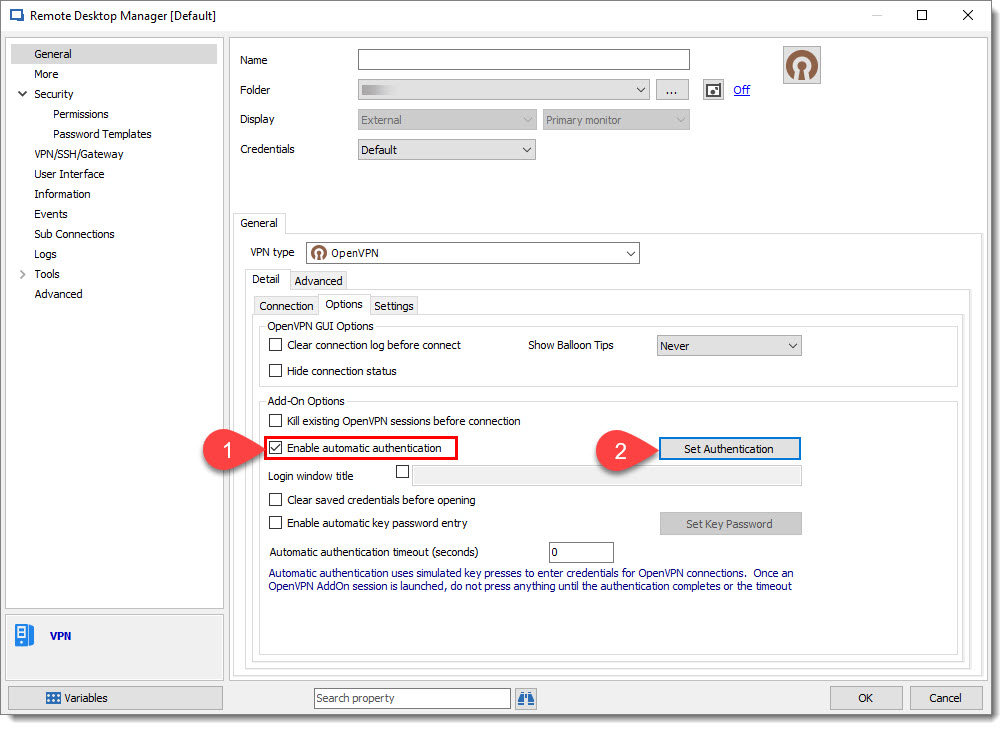
In the Options tab you could enable Enable automatic authentication and set the credential in the Set Authentication button.
Best regards,
David Grandolfo
OpenVPN.jpg
Hey this setting is already enabled : the VPN connection still shows a popup asking for the password from time to time ...
Hi,
What version of RDM are you using? and what type of data source?
I would like to test the same scenario as you.
Best regards,
David Grandolfo
I dont think it has anything todo with RDM ; just with OpenVPN which needs to re-authenticate from time to time.
Since the password is not saved when re-authentication occurs a windows pops up to ask for the password.
Should try when I connect manually without RDM.
Still here is the info you requested:
RDM: v 13.5.6.0 64 bit
OpenVPN: v 11.10.0.0
Datasource: Azure SQL
Hi Sander,
Ok I just understand the need about the reconnection. I'm sorry I probably jump over that word in the first message. All our communication for OpenVPN is in command line. Let me have a discussion with the engineering department if it could be an option to add or if it's not an option that OpenVPN have.
Thanks,
David Grandolfo
No wurries, thanks for the prompt support.
If no command line option is available the password is already filled in in the window; also checking the save box should not be hard ;)
Hi,
I just had a chat with the engineering department and this isn't integrated as a OpenVPN feature. But good news, they add this feature request on their to do list.
Best regards,
David Grandolfo
I'm still having this issue. Also i don't understand why you are dependent on this feature in OpenVPN. It is a checkbox in the dialog which appears.
The plugin fills in the username ans password already - its just a matter of filling in a extra optionbox ( => send space key to the checkbox)...
If the plugin was OpenSource I would implement it myself ;)
Hello,
the code is written in C#. I can send you the source code if you want.
Regards
David Hervieux
I would suggest putting it on github so the community can help out and so some Pull Requests ;)
It's a good idea but it requires some setup on our side to handle the builds. In the meantime here is the source code.
Regards
David Hervieux
OpenVPNAddOn.zip
Thanks, got it working by adding 2 lines in FrmSendCredentials.cs
SendKey(foundName, "{TAB}"); //goto save password box
SendKey(foundName, " "); //send a spacebar key to check the 'save password' box.
In attachment you can find the file. Dont know if this is good for every version of OpenVPN and/or server settings.
If you implement this in the plugin maybe it would be better to make a new setting to enable/disable it.
But for me this works fine ;) [Works on my machine]
FrmSendCredentials.cs
Thank you. I will forward this to our dev.
Regards
David Hervieux
Hello Sander,
I have a question for you regarding the behavior of "save the password". Since we can't pass the credentials to OpenVPN through the command line, we have to simulate key presses (as you saw in the code).
If you check the "save password", does it completely remove the prompt or only fills it automatically next time you connect? I'm worried about our key presses interacting badly with the prompt after you've already done "save password". If you can confirm it doesn't cause issues, we'll add the option.
Regards,
Hubert Mireault
You need to use it in combination with the option "clear saved credetials before opening". Otherwise you will indeed have issue's (the form is already filled in and the auto typing fails the next time you try to connect. Not that I have the same issue with/without my modification.
The option will all you to enable the "auto-reconnect" after timeout. But when you close the connection it keeps the prompt for username/password. The difference is the value of the password => filled in or empty.
That makes a lot of sense. Thank you for explaining :) We'll add it in as soon as possible so our other users can make use of it too. Thank you!
Regards,
Hubert Mireault
No problem!
PS: it would make a lot of sense to put all the plugins in github and let the community help to extend and make them better. I can understand it is hard to manage all possible versions and plugins ; but when you make it opensource a lot can happen....
Hi,
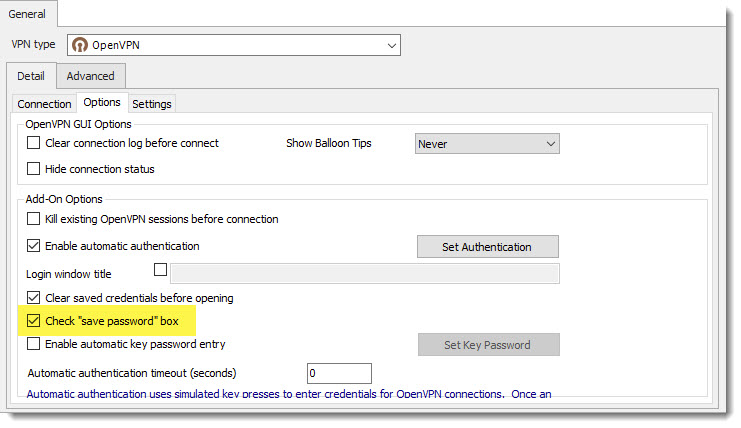
The new OpenVPN Add-on 2.5.9 include the option to save password.
The new window looks like this below after you update the Add-on from Tools -- Add-on Manager
Best regards,
David Grandolfo
OpenVPN-Save.jpg