Remote Desktop Manager with Apple Magic Keyboard num lock

When I open a session I always have to hit the "Clear" button on my magic keyboard to be able to use the number keys for my session. Is there a way to always have that enabled when I use remote desktop manager?
All Comments (8)
Hello,
I'm transferring your post to the RDM Mac Support thread.
What version of RDM are you using?
Best regards,
Mark Beausejour
Version 5.2.0.0
Hello,
Thank you for your reply.
What type of session do you open? Is it RDP?
Best regards,
Mark Beausejour
Yes, its RDP
Hi Brent,
As of yet, this is not possible.
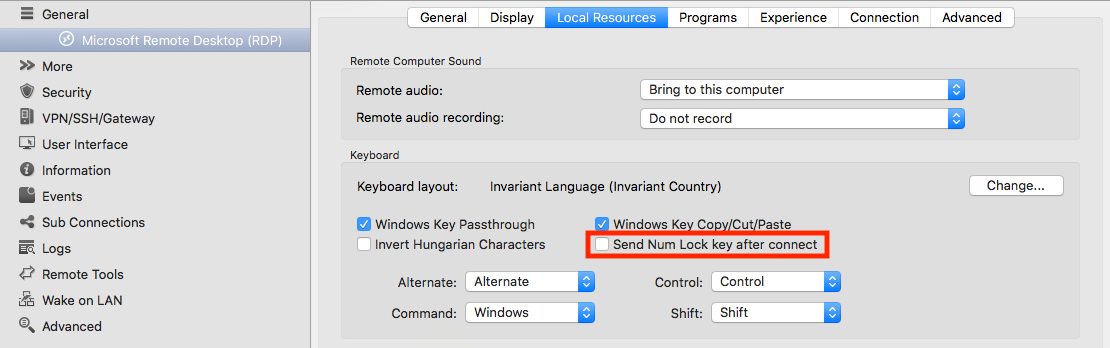
Sending the state of the Cap Lock and Num Lock is already on our TODO list though. I don't know if this is actually possible (to transfer the state from the local machine to the remote machine, e.g. Lock to Lock and Unlocked to Unlocked) but maybe we could add an option to just send the actual equivalent key code of Num Lock (clear on the Magic Keyboard). Since its a toggle, it would enable or disable the Num Lock depending on the initial status of the remote machine. This would be a case by case option. Would that be alright with you?
Best regards,
Xavier Fortin
That sounds fine. The magic keyboard doesnt actually have a num lock key. The num pad is always on and working. But just in Remote Desktop Manager I have to hit the "Clear" button that emulates the numlock key from a standard keyboard.
Good, we'll try to have this done as soon as possible.
Best regards,
Xavier Fortin
Hi Brent,
This has been done. In the next release of RDM, you'll find the option in your RDP properties under Local Resources -> Keyboard:
Best regards,
Xavier Fortin
SendNumLockKeyAfterConnect.png