Before Connect Copy to Clipboard event

Is it possible to put a variable in the Copy to Clipboard field and have it evaluated so the value is sent to the clipboard?
When using the FortiClient VPN we have to always manually enter a VPN Password. If Copy to Clipboard Before Connect could just place the password from $VPN_PASSWORD$ on the clipboard it would make it very convenient to paste into the FortiClient dialog.
Thank you.
All Comments (9)
Hello,
Not sure to understand your configuration, sorry about that.
Could you post some print screens of your configuration and what you are trying to accomplish. That would be very useful.
Best regards,
Jeff Dagenais
Hello Jamieson,
only from curiosity - is it required (because of company policy or similar) to manually enter the VPN password?
Because we use also the FortiClient VPN and the password can be hand over automatically via RDM to the Forti VPN Client
Regards,
Min
The situation is one where we are supplying support to a new client who uses the FortiSSL VPN.
I have the main RDP connection set up and specified the FortiClient VPN credentials in the Settings Tab / FortiSSL under VPN/SSH/Gateway.
When we initiate the RDP connection it first will start the VPN, however it doesn't pass in the password. The FortiClient Console is presented where I can select the connection and enter the password. Once the password is entered the VPN connects and then the RDP connection connects.
This all works fine.
I was wondering if I could use the Events section on the RDP connection and set the Before Connect Tab to use Copy to Clipboard to retrieve the VPN Password? Then when I initiate the RDP session it would copy the VPN Password to the clipboard and be ready to paste into the VPN Client.
I tried putting $VPN_PASSWORD$ in the text field of Copy to Clipboard field but the variable is not resolved. The clipboard gets the text I entered e.g. $VPN_PASSWORD$.
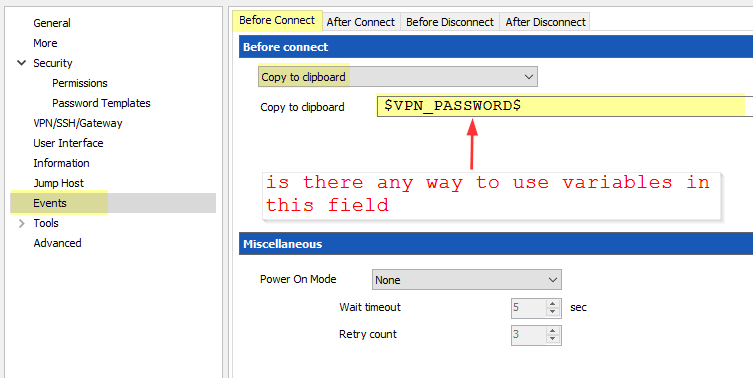
RDM_CopyToClipboard.png
Could you try to enable the Allow password in variables located in the entry security section.
Regards
David Hervieux
You could also try to create a VPN session and link it to the folder whre the RDP session within. On the RDP session's set the VPN to inherited.
The password would be automatically handled to the FotrtiSSL Client. So it is not neccesarry to copy / paste it manually or work with before connect Events.
Here a screenshot where the password are succesfull automatically send to the client:
(FortiClient SSLVPN v4.0.2317) 
Regards,
Min
Thanks David,
The Allow password in variables checkbox is checked.
I was mistaken about the end result... I thought I was getting the text I entered ($VPN_PASSWORD$) but I didn't wait long enough.
After the FortiClient Console is presented (with no password) I actually end up getting a pop-up message saying: Nothing to copy to the clipboard.
UPDATE: Just wanted to mention that I also have the Resolve Variables and the Include Sub Connections options checked in the User Interface options.
I just saw some comments on another thread that lead me to believe that the version of FortiClient I'm using just isn't currently supported? I had been directed to the latest download FortiClient 5.6.6.1167. There is the message on the VPN screen saying 'Only supported prior to version 5.4 of FortiClient' but it says it next to the FortiClient radio button. Does that apply to the FortiSSL radio button as well?
reference: https://forum.devolutions.net/topic29193-forticlient-vpn-client-support.aspx
NothingToCopyToClipboard.png
FortiClientConsole.png
Sorry Mins, I'm not sure I understand. We just got the software a few days ago and trying fit it into our process. :-)
Right now I have an RDP Session configured with the VPN details and credentials set under the VPN/SSH/Gateway section.
Are you suggesting that I configure a separate VPN Session with the Credentials drop-down set to Inherited, and make that a sub-connection of the RDP Session? (so the RDP is the parent and the VPN the sub?)
Thanks.
Jamie
Hi Jamie,
No problem, I will try to explain it more in detail - but first I think you are right - the issue is related to the Forti SSL Client. We use the SSLVPN Part in v4.0.2317 (and not the whole Client).
So first of all I want to make sure that you can connect with the "older" Client that is supported from RDM (and also works on our side perfectly). Could you try to install the SSLVPN version 4.0.2148 and set up a a new session as follow:
save the session and run it with a double click or the button Open Session. If you receive the message that the exe could not be found, navigate to the install folder (C:\Program Files (x86)\Fortinet\SslvpnClient) and click ok.
Now the vpn connection should be connected without asking username or password.
If ths steps are succesfull, i will explain my previous post more in detail :)
Regards,
Min
Min,
Thanks for the file and the suggestions. I had to install the 'old' client on another test machine because it won't install where the newer version is already present. It appears that the 'old' client will not connect to our current FortiClient user servers at all (we have a few different clients using this particular VPN). I tried connecting directly using the SSLVPN package without involving Remote Desktop Manager and it will not connect. The newer 5.6 version connects OK.
We were hoping to lock-down user access to the passwords... but FortiClient is making that problematic.
Thanks again for the help.
Jamie