VPN settings reuse

I'm new to RDM and trying to evaluate, so probably I miss something trivial.
I have a customer and I want to be able to connect to their 3 different servers via Microsoft RDP.
To do it I need first to connect Checkpoint VPN. The VPN credentials and the username/password for RDP are all the same.
So I've created a folder of "Customer" type and entered their domain, username and the password.
Then I've opened VPN settings for customer. I didn't find an option to reuse the same username/password so I entered them again (seems strange).
Now I opened RDP entry for one of their servers. I've chosen "Inherited" credentials and the username/password were indeed copied from the folder level.
But not the VPN settings - if I don't specify them for the connection, then the program just tries to open RDP session without connecting the VPN first.
And if I specify VPN settings for the specific connection, it works OK - but I need to re-enter username & password.
What am I doing wrong?
Thanks!
All Comments (6)
Hello,
I would suggest creating a Username / Password credential entry to have the possibility to reuse this entry.
https://help.remotedesktopmanager.com/credentials_usernamepassword.htm
Regarding the VPN, could you send us a few print screens of your configuration so that we can look what is not working exactly.
Best regards,
Jeff Dagenais
https://pasteboard.co/HeNn09P.png
Please find screenshot attached.
I have created folder with the name of the customer and entered its vpn settings.
Now I want these settings to be inherited for all the servers of this customer. (On the screenshot I created only one subentry, named IIS)
I don't think credential entry will solve the problem,
since I also want to define site Ip only once for the customer and not separately for each sub-entry.
Hello,
Since you have created a Customer folder type, you can use variables to retrieve the information located in the parent level folder.
However, the $CUSTOMER_USERNAME$ and $CUSTOMER_PASSWORD$ variables doesn't exist. I will ask to our engineering department if they can create them.
Best regards,
Jeff Dagenais
Great, but how can I reuse the ip for the vpn?
Anyway, I actually already found what I needed. I need to create an entry of VPN type and then use the Session->Existing settings to use it inside rdp connection. Why this should be so complicated, I do not know :(
Hello,
Your last post made me think about something. I don't know why I didn't think of this solution first.
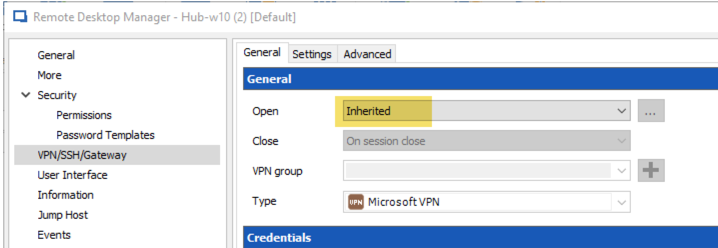
Please configure the VPN entry that you have created at the top level folder and in your RDP sessions, select Inherited in the VPN section to use the one configured at the parent level folder.
This should do the trick.
Sorry for the delay.
Best regards,
Jeff Dagenais
2018-04-03_11-11-01.png
Thanks, this works.