Teamview no longer works in latest version

Hello, installed latest RDM version 13.5.2.0 from 13.5.1.0 (installed 3/28/2018). Teamviewer worked fine in version 13.5.1.0. No longer works in version 13.5.2.0. Teamviewer is used for all of our remote support. We have maybe 200+ clients within RDM. This is a huge problem for us.
Issue: Select a client using Teamviewer (most) and hit open session, we receive a Installation path error. choco install teamviewer.
Please advise...
Thank you so much for your time.
Regards,
J
All Comments (6)
Hello,
Could you verify if the Team Viewer installation path is correctly configured. It's in File->Options | Path -> configure Path
Regards
David Hervieux
I replied back to your email, and never received a response. Yes, the path is currently point to the correct TV path. Please let us know how to resolved this issue. This is a real annoyance. If anything, is there a way to revert back to the previous version? I need this working...
Could you post a print screen of the configured path in RDM and also a print screen of the error message?
Here the link for the previous version:
https://remotedesktopmanager.com/home/previousversions
Regards
David Hervieux
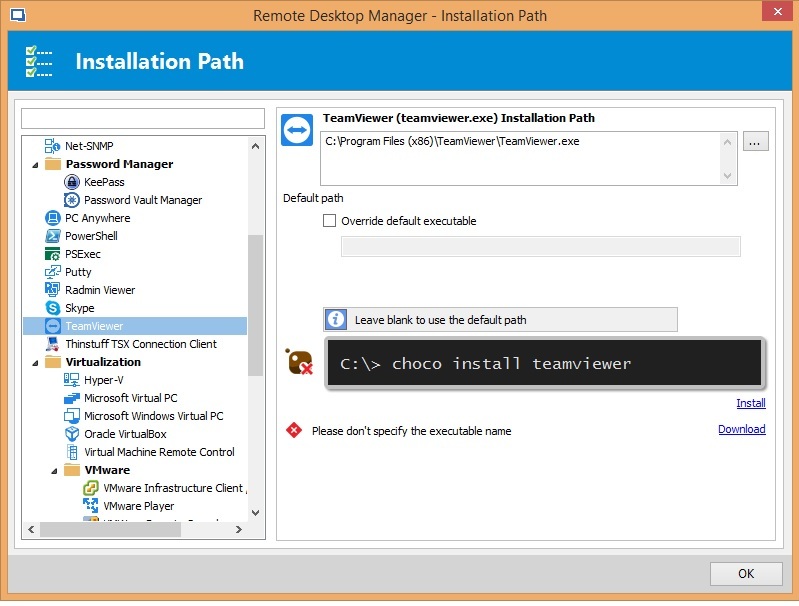
tv_path.jpg
When connecting to a TV client, the error message sent (image sent to you), is the error received. Please let me know if anything else is needed. THX
Hello, I just installed the latest version (13.5.3.0). This update has fixed the Teamviewer issue. Thank you so much for your time. Greatly appreciated.