RDP over HTTP-Proxy

Hello,
I’m looking for a way to connect to a host by RDP over a HTTP proxy, configurable per user. How can I do that in RDM Enterprise Edition (current installed version is 5.1.0.0) on Mac? Same question for the Windows version, but more of our users use Macs.
So the way would be user with RDM-Client -> proxy server -> target host RDP
The proxy is a standard HTTP proxy and doesn’t need username or password.
Best regards
Andreas
All Comments (5)
Hi Andreas,
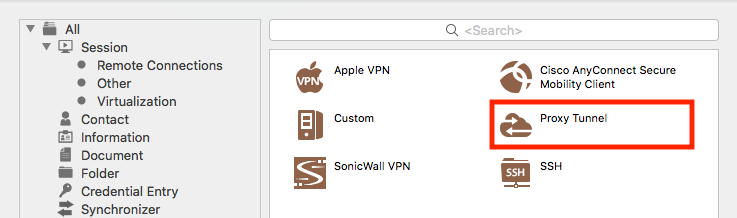
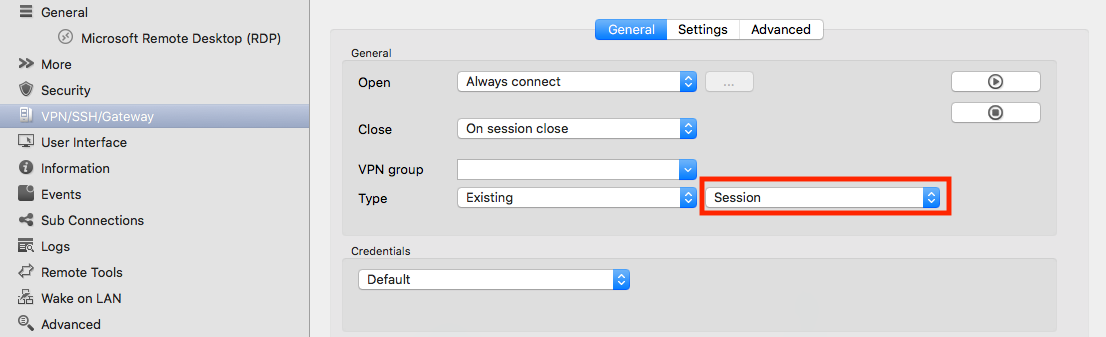
I think the Proxy Tunnel session should do what you want.
You can configure it in any session via the VPN/SSH/Gateway tab:

The only thing I'm not sure is when you say "configurable per user". You want users to use different proxy for the same sessions?
Best regards,
Xavier Fortin
Hi Xavier,
The Proxy Tunnel doesn’t work for me, but that may be because not all parameters of the Proxy Tunnel are clear to me. The status window output is as following:
Listening on 127.0.0.1:23451
proxyTunnel_Completed: SUCCESS
proxyTunnel_Disconnected: SUCCESS
Connection Status is Not connected
I tried the following values:
- Host and Port: hostname and port of the proxy.
- Username and Password: x, because empty is not allowed
- Proxy type: HTTP
- Localhost and port: 127.0.0.1, 23451
- Remote host and port: hostname and port of the proxy
Can you give me some hint here?
Configurable per user was meant like you wrote. We have different locations and on some of them it’s necessary to use the proxy for some sessions. I found no option for this. If that’s currently not possible I think we could live with the workaround to create additional sessions for them.
Best regards
Andreas