RDM freezes for 30 seconds after any add/change in offline mode
RDM freezes for 30 seconds after any add/change in offline mode

running version 13.0.5.0 in offline read/write mode.
RDM seems to try to connect to SQL server, even in offline mode.
applog:
System.Data.SqlClient.SqlException (0x80131904): A network-related or instance-specific error occurred while establishing a connection to SQL Server. The server was not found or was not accessible. Verify that the instance name is correct and that SQL Server is configured to allow remote connections. (provider: Named Pipes Provider, error: 40 - Could not open a connection to SQL Server) ---> System.ComponentModel.Win32Exception (0x80004005): The network path was not found
at System.Data.SqlClient.SqlInternalConnectionTds..ctor(DbConnectionPoolIdentity identity, SqlConnectionString connectionOptions, SqlCredential credential, Object providerInfo, String newPassword, SecureString newSecurePassword, Boolean redirectedUserInstance, SqlConnectionString userConnectionOptions, SessionData reconnectSessionData, DbConnectionPool pool, String accessToken, Boolean applyTransientFaultHandling)
at System.Data.SqlClient.SqlConnectionFactory.CreateConnection(DbConnectionOptions options, DbConnectionPoolKey poolKey, Object poolGroupProviderInfo, DbConnectionPool pool, DbConnection owningConnection, DbConnectionOptions userOptions)
at System.Data.ProviderBase.DbConnectionFactory.CreatePooledConnection(DbConnectionPool pool, DbConnection owningObject, DbConnectionOptions options, DbConnectionPoolKey poolKey, DbConnectionOptions userOptions)
at System.Data.ProviderBase.DbConnectionPool.CreateObject(DbConnection owningObject, DbConnectionOptions userOptions, DbConnectionInternal oldConnection)
at System.Data.ProviderBase.DbConnectionPool.UserCreateRequest(DbConnection owningObject, DbConnectionOptions userOptions, DbConnectionInternal oldConnection)
at System.Data.ProviderBase.DbConnectionPool.TryGetConnection(DbConnection owningObject, UInt32 waitForMultipleObjectsTimeout, Boolean allowCreate, Boolean onlyOneCheckConnection, DbConnectionOptions userOptions, DbConnectionInternal& connection)
at System.Data.ProviderBase.DbConnectionPool.TryGetConnection(DbConnection owningObject, TaskCompletionSource`1 retry, DbConnectionOptions userOptions, DbConnectionInternal& connection)
at System.Data.ProviderBase.DbConnectionFactory.TryGetConnection(DbConnection owningConnection, TaskCompletionSource`1 retry, DbConnectionOptions userOptions, DbConnectionInternal oldConnection, DbConnectionInternal& connection)
at System.Data.ProviderBase.DbConnectionInternal.TryOpenConnectionInternal(DbConnection outerConnection, DbConnectionFactory connectionFactory, TaskCompletionSource`1 retry, DbConnectionOptions userOptions)
at System.Data.ProviderBase.DbConnectionClosed.TryOpenConnection(DbConnection outerConnection, DbConnectionFactory connectionFactory, TaskCompletionSource`1 retry, DbConnectionOptions userOptions)
at System.Data.SqlClient.SqlConnection.TryOpenInner(TaskCompletionSource`1 retry)
at System.Data.SqlClient.SqlConnection.TryOpen(TaskCompletionSource`1 retry)
at System.Data.SqlClient.SqlConnection.Open()
at Devolutions.RemoteDesktopManager.Business.DataSources.DatabaseConnectionDataSource.ExecuteNonQuery(String sql, IDbDataParameter[] parameters)
at Devolutions.RemoteDesktopManager.Business.DataSources.DatabaseStateSubDataSource.ReleaseLockEdit(Connection connection)
at Devolutions.RemoteDesktopManager.Managers.ActionManager.EditConnection(IConnectionSource source)
at Devolutions.RemoteDesktopManager.Managers.SessionMenuManager.cd94813672b0ecea85dc17deccf3b307e(Object c19f185fd70cefc696ba148af1c4faf54, EventArgs cf1018bb83ec7debd818319fd3cb4844e)
at System.Windows.Forms.ToolStripItem.RaiseEvent(Object key, EventArgs e)
at System.Windows.Forms.ToolStripMenuItem.OnClick(EventArgs e)
at System.Windows.Forms.ToolStripItem.HandleClick(EventArgs e)
at System.Windows.Forms.ToolStripItem.FireEventInteractive(EventArgs e, ToolStripItemEventType met)
at System.Windows.Forms.ToolStripItem.FireEvent(EventArgs e, ToolStripItemEventType met)
at System.Windows.Forms.ToolStripItem.PerformClick()
at Devolutions.RemoteDesktopManager.Frames.FreDashBoardBase.ButtonOnClick(Object sender, EventArgs eventArgs)
at System.Windows.Forms.Control.OnClick(EventArgs e)
at DevExpress.XtraEditors.BaseButton.OnClick(EventArgs e)
at DevExpress.XtraEditors.BaseButton.OnMouseUp(MouseEventArgs e)
at System.Windows.Forms.Control.WmMouseUp(Message& m, MouseButtons button, Int32 clicks)
at System.Windows.Forms.Control.WndProc(Message& m)
at DevExpress.Utils.Controls.ControlBase.WndProc(Message& m)
at DevExpress.XtraEditors.BaseControl.WndProc(Message& msg)
at System.Windows.Forms.Control.ControlNativeWindow.OnMessage(Message& m)
at System.Windows.Forms.Control.ControlNativeWindow.WndProc(Message& m)
at System.Windows.Forms.NativeWindow.Callback(IntPtr hWnd, Int32 msg, IntPtr wparam, IntPtr lparam)
ClientConnectionId:00000000-0000-0000-0000-000000000000
Error Number:53,State:0,Class:20
****************************** SqlError ******************************
Message:A network-related or instance-specific error occurred while establishing a connection to SQL Server. The server was not found or was not accessible. Verify that the instance name is correct and that SQL Server is configured to allow remote connections. (provider: Named Pipes Provider, error: 40 - Could not open a connection to SQL Server)
All Comments (7)
ok, issue "solved". I went in online mode, and all my offline edits/adds were not synced and were gone.
Went back to offline mode, and now no 30 sec freeze anymore nor sql exceptions.
too bad all my offline work is gone.
next update: issue not solved .
When I'm in offline mode, while the SQL server is accessible (local network or VPN), no freeze.
However, when I'm in offline mode without any connection possible to SQL server (at home, remote, at customers, no VPN,...) then I Get those freezes of 30 seconds and the System.Data.SqlClient.SqlException (0x80131904) message in the applog.
Hello,
We have fixed multiples issue in RDM 13.5 for that.
Regards
David Hervieux
ok, upgraded and works.
As for the lost offline edits, you might be able to recover them.
We added code, at some point, that would backup the offline file if it contained changes. If the code is in the 13.0.5 you are in luck. Look for files with a date/time stamp in the offline directory. File -> My Data Source Information, double click on the Offline file size, this will copy the file path, paste that in Windows Explorer, remove the file name and hit enter. Is there a file there with a time stamp? if so your edits might be saved. Note, if you've already installed the v13.5 that the offline file directory structure is slightly different, have a look one folder lower for the file.
Let me know if you've found the file and I will help you try to recover the offline changes tomorrow when I'm in the office.
Best regards,
Stéfane Lavergne
hi,
When I'm at the company or connected over VPN, then the program goes into offline mode immediatly.
But since the upgrade to 13.5.4, there is a 30 sec freeze when starting the program when no connection to the SQL is possible.
Hello,
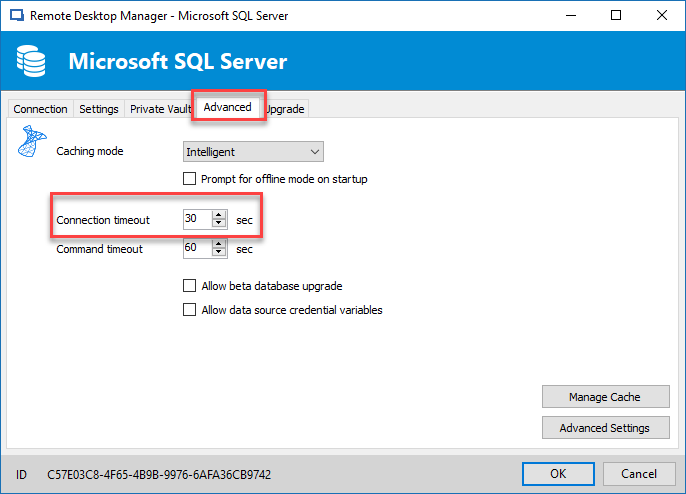
You can try to change the connection timeout option in the Advanced tab of your data source configuration.
This option is present when you edit your data source in the File -> Data Sources menu.
Best regards,
Jeff Dagenais
2018-04-08_12-12-54.png