131085 Issues

I have an 8-node cluster. 3 of the nodes setup using MSFT RD setup work fine. The other 5 nodes I get 131085. I created an RDP connection using RDP 8.0 and that worked fine. I imported that RDP into RDM and it works. What causes this issue? As now I need to re-create the RDM entries for the 5 that don't work. And I'm just getting started as I have another 20 node cluster to check for this same issue.
Help....
All Comments (46)
The other interesting thing is if I re-create new RDM entries that doesn't work. I need to create in RDP 8.0 and export/import into RDM to get them to work.
Hello,
Are you using RDM Mac or RDM Windows?
Best regards,
Jeff Dagenais
MacBook Pro
Hello,
I have moved your topic into RDM Mac - Support.
Is it possible that you encounter the same issue reported here?
https://forum.devolutions.net/topic29290-unable-to-connect-after-march--patches.aspx
Best regards,
Jeff Dagenais
i tried switching to RDP Engine 5 and no go.
Hi,
Could you try with this version: https://www.dropbox.com/s/d3fsphhjo1w61pf/Devolutions.RemoteDesktopManager.Mac.5.1.0.1521122932.dmg?dl=0
Best regards,
Xavier Fortin
Will this upgrade or do I need to remove/install new.
You should only have to run the .dmg file and than move the app to your Applications folder. This should override the previous version.
Best regards,
Xavier Fortin
I was also getting 131085 messages when connecting to some (not all) servers.
Always the same servers that did not work.
When trying this version, I can connect to some servers that previously didn't work.
But now on most others, I cannot connect and I do not get any error message (just "not connected").
Open external always works fine.
Edit: I now also sometimes get the popup: Unable to connect to host
Hi Naftali,
Could your try generating your RDP log on one of the session that fails to connect and post back with it? Here are the instructions: https://helpmac.remotedesktopmanager.com/howto_rdplogs.htm
Best regards,
Xavier Fortin
I've attached the log file.
These are two connection attempts to the same machine.
The first one terminated without any message.
The second I tried connecting to the IP address of the machine directly instead of its DNS name, and it returned the popup message "unable to connect"
SP001 - HYV1
5.1 build you gave me does not work for embedded. It does work with External use case.
I don't get 131085 with the new build just a "not connected" like Naftali mentioned.
Hi Naftali,
Does the log contains the attempt with the IP address to?
Hi Barkz,
Could you also get me the RDP log of your session?
Best regards
Xavier Fortin
Yes, the log contains both attempts
Hi Naftali,
Except for the fix for the Windows March 13 update, I don't see what could cause your issue. We changed how we handle Security Negotiation settings, maybe this is it. We see to attempt being made in your log one with NLA and TLS On and one with NLA and TLS Off:
Maybe trying the other combinations could help (NLA: On + TLS: Off and NLA: Off + TLS: On).
You can change those in your RDP session properties: Microsoft Remote Desktop (RDP) -> Connection -> Authentication -> "Active network level authentication NLA" and "Enable Transport Layer Security (TLS)".
Best regards,
Xavier Fortin
I'll try changing the NLA and TLS settings and let you know.
However, note that I did not change NLA or TLS settings between those two tries, just the host/IP of the.server.
This issue is also not as consistent as the 131085 error I had before, as now I am able to connect sometimes just by retrying.
[14:08:38:527] [31375:095dc000] [DEBUG][com.freerdp.channels.cliprdr.client] - VirtualChannelEntryEx
[14:08:38:527] [31375:095dc000] [INFO][com.freerdp.client.common.cmdline] - loading channelEx cliprdr
[14:08:38:529] [31375:095dc000] [DEBUG][com.freerdp.core.nego] - Enabling security layer negotiation: TRUE
[14:08:38:529] [31375:095dc000] [DEBUG][com.freerdp.core.nego] - Enabling restricted admin mode: FALSE
[14:08:38:529] [31375:095dc000] [DEBUG][com.freerdp.core.nego] - Enabling RDP security: TRUE
[14:08:38:529] [31375:095dc000] [DEBUG][com.freerdp.core.nego] - Enabling TLS security: TRUE
[14:08:38:529] [31375:095dc000] [DEBUG][com.freerdp.core.nego] - Enabling NLA security: TRUE
[14:08:38:529] [31375:095dc000] [DEBUG][com.freerdp.core.nego] - Enabling NLA extended security: FALSE
[14:08:38:529] [31375:095dc000] [DEBUG][com.freerdp.core.nego] - state: NEGO_STATE_NLA
[14:08:38:529] [31375:095dc000] [DEBUG][com.freerdp.core.nego] - Attempting NLA security
[14:08:38:529] [31375:095dc000] [ERROR][com.freerdp.core] - freerdp_set_last_error ERRCONNECT_DNS_NAME_NOT_FOUND [0x00020005]
[14:08:38:529] [31375:095dc000] [ERROR][com.freerdp.core] - unable to set TCP_NODELAY
[14:08:38:529] [31375:095dc000] [WARN][com.freerdp.core] - setsockopt() SOL_SOCKET, SO_KEEPALIVE
[14:08:38:529] [31375:095dc000] [WARN][com.freerdp.core] - setsockopt() IPPROTO_TCP, TCP_KEEPIDLE
[14:08:38:529] [31375:095dc000] [WARN][com.freerdp.core] - setsockopt() SOL_TCP, TCP_KEEPCNT
[14:08:38:529] [31375:095dc000] [WARN][com.freerdp.core] - setsockopt() SOL_TCP, TCP_KEEPINTVL
[14:08:38:529] [31375:095dc000] [WARN][com.freerdp.core] - setsockopt() SOL_SOCKET, SO_NOSIGPIPE
[14:08:38:529] [31375:095dc000] [DEBUG][com.freerdp.core.nego] - RequestedProtocols: 3
[14:08:38:529] [31375:095dc000] [ERROR][com.freerdp.core.transport] - BIO_should_retry returned a system error 32: Broken pipe
[14:08:38:529] [31375:095dc000] [ERROR][com.freerdp.core.nego] - Protocol Security Negotiation Failure
[14:08:38:529] [31375:095dc000] [ERROR][com.freerdp.core.connection] - Error: protocol security negotiation or connection failure
I have some of them working now in the 5.1 build you posted. Here is what I did:
- Edited entries, changed RDP type to a different option (Azure)
- Then changed RDP Type back to Normal
- Then changed RDP Engine to Default then back to Modern
- Connect
This has worked with some. The problem is I can't touch 100+ entries individually and the above steps just seem odd to get things to work.
Thoughts?
I try this same above method on our entries and it does not work. This is very frustrating.
This is normal, if the connection first fails, we're trying with different security negotiation settings since these are frequently overlooked settings.
I think you are both hitting a known issue with the RDP session Modern Engine (previously V5). The issue being that some connections can sometime fails multiple times before succeeding. There is two thing I'd like both of you try.
Could you try disabling Sandboxing and see if this helps in any way?
If this does not fix the issue, could you than try switching to the Legacy (previously V4) engine? I'd guess that you were both using the Legacy engine before this version (since this was the default value) and if nothing else works, this should.
Best regards,
Xavier Fortin
Hi Naftali --
Legacy mode is working. The strange thing is some of my RDPs are set to Legacy and others to Modern. They all work now but it's like a mix mode.
Thanks,
Barkz
I'm fairly new to RDM so based on the Legacy changes I need to make how do I mass update all Entries?
Hi,
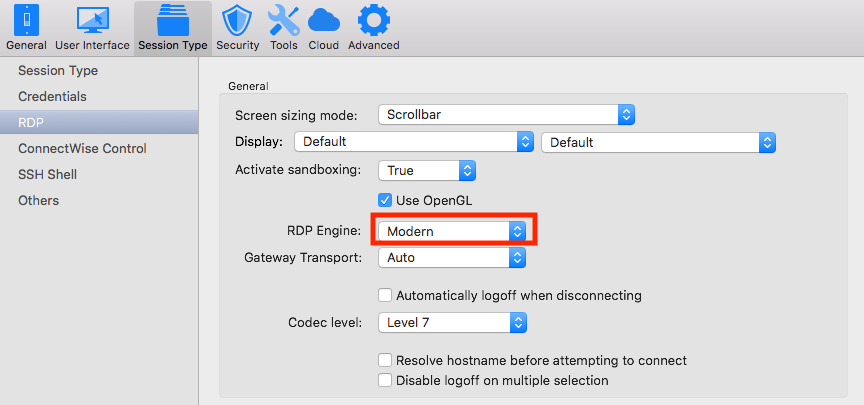
Usually most entry should be set to Default, which mean they will fallback to the value in the preferences:
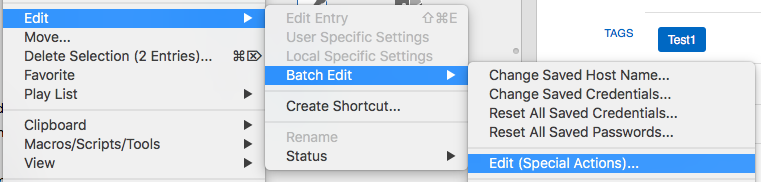
If you want to make sure all your entries are set to Default, you can run an AppleScript through the Batch Edit action on all your RDP entries. Just select all your RDP entry en than open the Batch Edit Action menu:
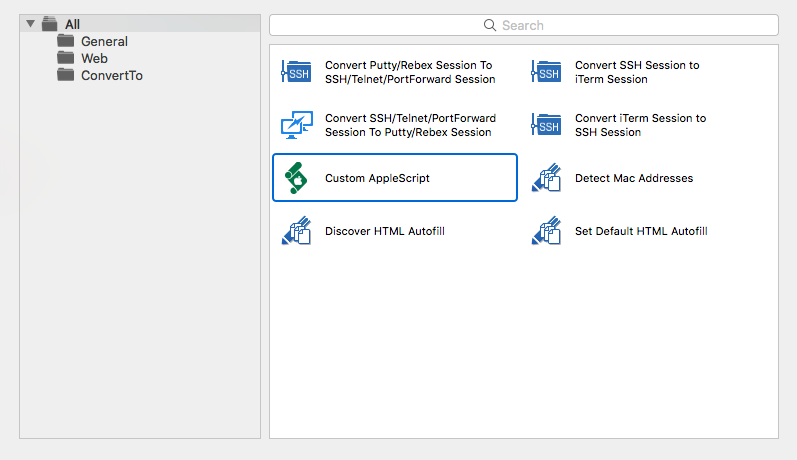
Than select Custom AppleScript:
Finally copy the following script in the text view and press OK:
set value of _connection of property "RDP.EngineMac" to "Default"
save _connection
Best regards,
Xavier Fortin
BatchEditActions.png
AppleScriptAction.png
RDPEnginePreferences.png
Using legacy mode seems to have solved the issue for me as well.
Establishing the connection is a lot faster now as well.
Hi Naftali,
Have you also tried keeping the Modern engine but disabling Sandboxing?
We'd really like to fix this issue with the Modern engine and this information could help us pinpoint the issue.
Best regards,
Xavier Fortin
Xavier, it very much seems like the issue I have with "black screen" in Legacy mode vs. the "Host not connected!" in Modern mode. It didn't seem to matter one bit whether Sandboxing was on or off.
I'd like to help with another dataset, if you need it. Tell me what settings to switch on/off and I'll give you results. Only caveat is that I can't produce log files with the Modern engine when it doesn't connect, while the black screen in Legacy mode seems to at least produce something.
Let me know.
Hi Jesper,
I would agree, but I don't think there was mention of black screen in the Lecacy engine.
I remember at the time you shared with us an Entry that we could access via a VPN. I couldn't reproduce the "Host not connected" issue with it (though I could reproduce the black screen with the Lecacy engine). Did you? Maybe this would be the start of a clue.
If you can reproduce the issue with the session you shared with us (and if I still have an access to it) you could try exporting the session itself and sending it to me. That and a print screen of the RDP section in the Preferences. This way I'll be able to try and reproduce your situation as accurately as possible. Because If I couldn't reproduce it at the time, but you can, there must have been a difference our sets of settings.
Best regards,
Xavier Fortin
Hello,
I was asked to post to this topic as I am having a similar issue. It started after applying Microsoft security updates to Windows 2008 R2 and 2012 R2 servers. RDP sessions failed to connect with error message "Failed to connect to the host (131085)."
I am using MacOS 10.13.3 and I was asked to try the beta version of Remote Desktop Manager in this thread, but I get the same results. All RDP session settings are defaults.
Hi Gregg,
I think you might have not updated to the latest beta version. Here it is: https://www.dropbox.com/s/djhqy4ugw7d8hwf/Devolutions.RemoteDesktopManager.Mac.5.1.0.1521483581.dmg?dl=0
Best regards,
Xavier Fortin
Hello,
I downloaded it and tried, same results. Version number is 5.1.0.1521483581
Regards
In the application Preferences. Under Session Type -> RDP -> General, what is set in "Activate sandboxing" and "RDP Engine".
Best regards,
Xavier Fortin
Here is a screenshot of those settings.
RDP Settings.png
And you only have this issue since the Windows Security Update?
I'm not sure you're having the same issue.
Can you generate the RDP log and post it back? Here's how: https://helpmac.remotedesktopmanager.com/howto_rdplogs.htm
Best regards,
Xavier Fortin
Here is the log file.
Host.rdp.log
This definitely looks like the same error. I don't know why you're still having it though. Could you send me a print screen of the About window in RDM?
Best regards,
Xavier Fortin
Here you go.
RDM About 02.png
RDM About 01.png
Could you delete RDM before installing the beta version? As we see in RDM About 02.png, this is still the 5.1.0.0.
The replacing probably failed, though I have no idea why.
Best regards,
Xavier Fortin
OK, the issue there was the name, the old app had "Free" at the end of the filename, the beta did not. I opened up the beta and it seems to be working fine.
RDM About 03.png
Hi Gregg,
This is my mistake though. I didn't realize you were using the Free Edition.
Here is the right version for the Free: https://www.dropbox.com/s/z45y93ak2rhq2cc/Devolutions.RemoteDesktopManager.Free.Mac.5.1.0.1521548200.dmg?dl=0
Best regards,
Xavier Fortin
Hello,
After some issues receiving the "Failed to connect to host 131085" and logging a support ticket, I am now using Mac RDM 1315.1.0.1521122932
The 131085 errors seem to have gone but now I am unable to open more than one connection at a time and receive the pop-up error window "Unable to connect to host!". I get the same message for some connections even if I have no other connections open.
Sometimes RDM appears to open a session but within seconds closes it.
I tried looking at the logs but there was no entry for the attempted connection.
Should I change the debug level in Preferences and if so, what to?
Current beta seems very buggy
Hi Tom,
I maintain the latest beta version for the fix for the March 13 Windows Security Update here: https://forum.devolutions.net/topic29371-march--windows-security-update-rdp-session-fix.aspx#post114278
Could you try this one and tell me if it's any better?
Best regards,
Xavier Fortin
I was also having the same 131085 issue for the past week or so with certain servers only. Mix of 2012, 2012R2 & 2016 servers.
This latest version above fixed the problem.
Thanks Xavier - will give it a whirl
For me it works perfectly after updating to the beta version
I have same isses 131085 and the beta works also perfectly for me.
Thanks
I was also having the same issues. Support directed me to this page. I just downloaded and installed the latest beta version and it seems to be fine so far.