Filter in tree without automatic Expand

If I am filter in a tree I don’t want the tree automatic expand.
Is there a setting for this in RDM ?
The workaround I am using is:
All Comments (7)
Hello,
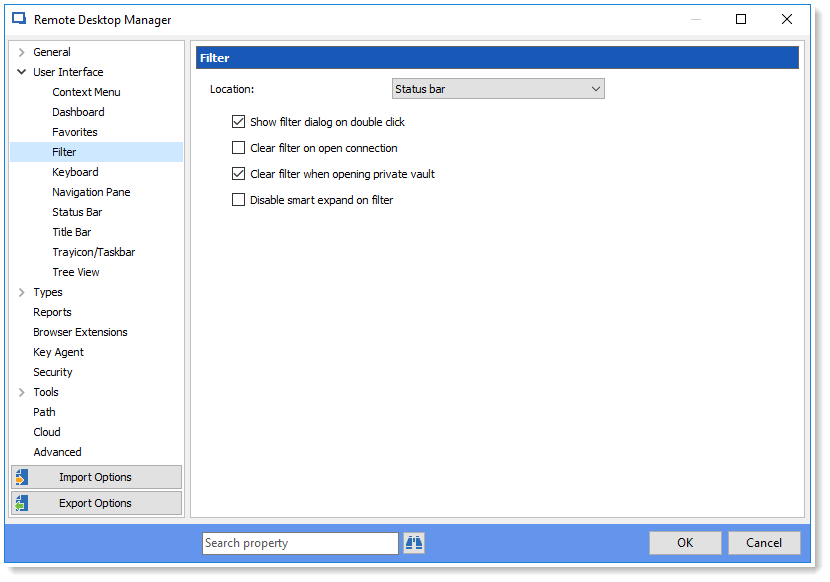
This behavior is caused by a setting in RDM that need to be disabled in order to prevent the tree's expansion while using the filter.
In order to disable this option you will need to go to :
File -> Options -> User Interface -> Filter and check ''Disable smart expand on filter''
Best regards
James Lafleur
smartexpand.png
Hello James,
Thanks for your quick answer.
I had already found this option.
I turned it on but it does not work, tree still expanding on filter.
And yes, I restarted RDM.
The version I use is 13.0.6.0
Best regards,
Martijn de Jong
2018-03-15 14_56_52-Remote Desktop Manager.png
Hello,
I am not sure of what you are trying to do exactly, could you send us a print screen of the behavior you would like to see while using the filter in the tree.
You can either post the print screen on the forum or send it directly to support@devolutions.net .
Best regards,
James Lafleur
Just to understand, this means that you will only see the group and not the sessions matching the filter?
Regards
David Hervieux
Yes,
We have a lot of the folders with the name of the customers.
The customers have a lot of subfolders with a lot of sessions in the subfolders.
It would be nice if I filter on the customer name the tree is not expanding but only filtering.
After the filtering we only have to open manually the customer.
2018-03-16 09_15_49-Remote Desktop Manager [Dashboard].png
I will check if I can add an option to not expand the result.
Regards
David Hervieux
:) Thanks