Question about focus when launching a RDP session

I've been using Royal TS for several years now and our company is testing RDM due to it having the BeyondTrust add-in for RDP. However, there is something in Royal TS that works that I cannot figure out how to get it to work in RDM.
So when I double click a BeyondTrust-RDP server I have created in my tree, it loads up like an RDP session would normally. But we have a prompt that displays your typical Corporate security message where you have to click "OK" to continue. In Royal TS, the focus switches from the tree to the RDP session so I can press "Enter" on the keyboard to press the "OK" button. With RDM, I have to use my mouse to click on "OK." Is there a way to have the tree focus switch to the RDP focus so that they keyboard will control the session without using the mouse to switch focus?
EDIT: Oh, one other thing I noticed. In Royal TS, if you double-click a server in the tree when your server session is locked, it closes the tab so when you double click it again, it will reconnect allowing you to log on automatically (provided your creds are saved). In RDM, double-clicking an open session does nothing. However, one can right click on the server and click on "Reconnect" which essentially does the same thing. Is there an option to change that in settings....to allow a double-click on an open session to be set to "reconnect?" It wouldn't be a use issue except that BeyondTrust passwords are generated every so often so you never know what your password is should your session lock.
All Comments (15)
Hello,
Thank you for posting your issue.
We will investigate this internally.
Just to be sure, what version of RDM are you using?
Best regards,
Mark Beausejour
Hi Mark,
I am currently using the trial: 13.0.6.0
Brian
Hi
Are you using the Connect Mode Direct or Proxy?
Best regards,
David Grandolfo
What do you mean?
Hi,
In the BeyondTrust Password Safe if you expand the Connection tab you will see the Connect Mode option. This option allow you to connect via the Beyond Trust server named as Proxy or you could connect directly to the RDP session just by pulling information from the server named Direct.
Best regards,
David Grandolfo
oh, Proxy is selected. I switched it and that part worked. The focus switched and keyboard works.
Now for the second part of my original post. Anyway to change the double click of the servers in the tree to "Reconnect" sessions?
Hi,
Thanks for the test, and I'm glat to see that it work with Proxy selected. We will test internally with the Direct mode.
Regarding the reconnect for double click. Please go in Files --> Options --> Types --> and check Reconnect on double click.
Best regards,
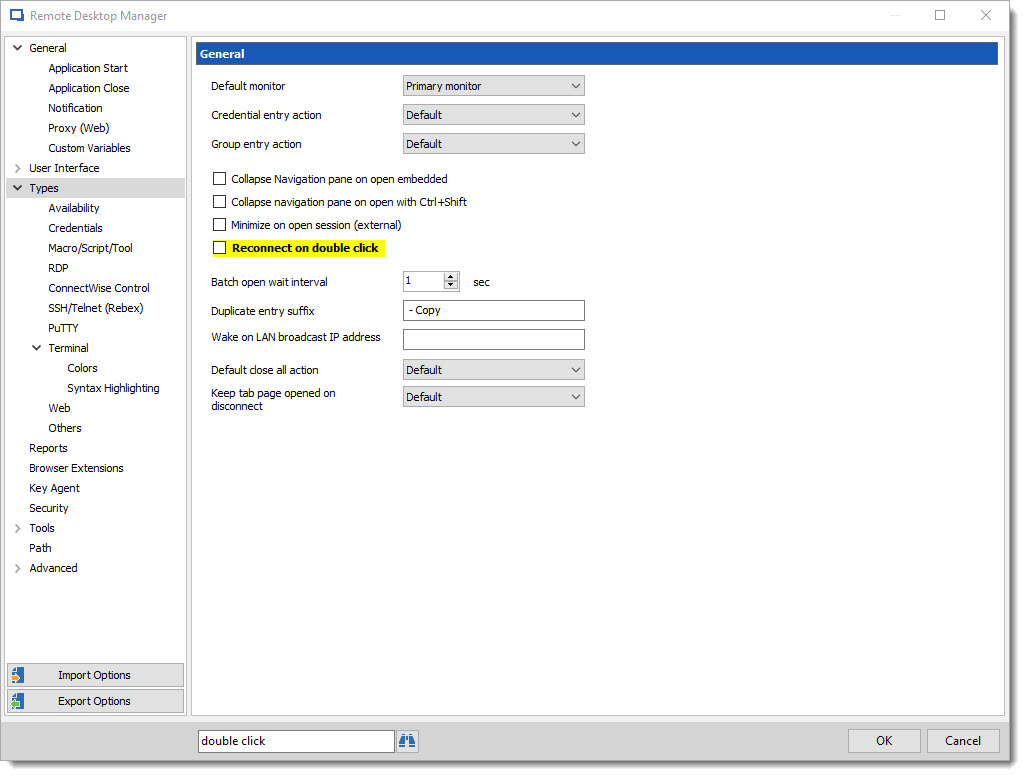
David Grandolfo
Reconnect.jpg
Wow, that is what I needed. Thank you so much for the assistance!
Ok, last question and I promise I am done!
In some cases, when an RDP session is open, there is a green circle with an error in it to the left of named sessions in the tree, notifying a user that an RDP session is open. Since yesterday, I don't see that indication anymore. I am not sure if that changed because I changed that one setting from Proxy to Direct but I no longer see it. So I did some testing and when I changed the theme from Office 2016 to Default, before I restarted the app, the icons showed up. But when I restart the app and remote into various sessions, it goes away. Any way to make these stick?
icons.png
Hi Brian,
First I'm sorry I didn't see your reply. For the questions please do not hesitate to ask us question we are there to help you.
The way the green circle disappears is strange. Do you have this issue only with Beyond Trust session or with RDP,SSH or Web browser session?
Regards,
David Grandolfo
Seems to only be with the Beyond Trust connections. Regular RDP works fine.
I'm currently with BeyondTrust support to repair an issue they have with their API. As soon as we are able to test it internally I will reply and let you know if it's possible or an issue that we should have it.
Best regards,
David Grandolfo
Hi Brian,
Thanks for your patience, I just test Beyond Trust Direct connection to an RDP session and the green icon (active icon) isn't there. I just open an ticket with the engineering department to view if this could be possible because it's open an RDP connection directly not an Beyond Trust connection as the proxy is used for.
Best regards,
David Grandolfo
Thank David! I know my group will be happy to know it's being worked on. :)
Hi Brian,
I didn't get news again from the engineering department. As soon as I have news I will update you.
thanks
David Grandolfo
Hi,
We just release RDM 14.1.0 and this version include the fix for the green icon issue.
We perform tests internally and it's working properly, but if you can confirm that it's also working on your side this could be nice.
Best regards,
David Grandolfo