Embedded Chrome entries no longer working

Hello,
We are using RDM on a terminal server accessing it through a remoteapp - so all users are technically using the software through the same computer.
Suddenly embedded Chrome entries stopped working. It just opens the entry like so:
If it's opened externally it works fine and IE/Firefox works fine Embedded.
It's version 13.0.6.0 of RDM and Chrome is 65.0.3325.146
I know the info here is scarse but please let me know what is needed to debug this.
All Comments (9)
Hello,
I am not able to reproduce your issue with RDM 13.0.6.0 and RDM 13.0.17.0.
Does RDM is installed on a workstation or you are just using RDM on a Terminal Server?
If you have RDM installed on a workstation, do you encounter the same issue?
Best regards,
Jeff Dagenais
Don't have it installed on workstations, no. Tried directly from the terminal server which has RDM installed and it didn't work there either.
Hello,
Do you encounter the same issue with a new Google Chrome entry?
Best regards,
Jeff Dagenais
Just tried creating one and the same happens there
When I open the entry it doesn't bring focus on it. It just opens the tab and the empty browser tab, that can be seen on my screenshot, in the background.
Hello,
I have updated RDM to 13.0.6.0 on my Terminal Server and I do not encounter your issue. There's probably something in my configuration that is not the same as you.
In your first print screen, we see that the Chrome tab is under another tab, what is this other tab?
Could you also post a print screen of your File -> Options -> User Interface window please.
Best regards,
Jeff Dagenais
The Chrome tab shouldn't really be there, I only have the tabbar enabled if there's more than one tab opened in the browser itself. The tab above is just the Chrome entry but with a custom favicon. 
These are my settings. They're not particularly default but I've made my colleagues who got more default RDM configurations try too, and the same trouble happens with them.
Hello,
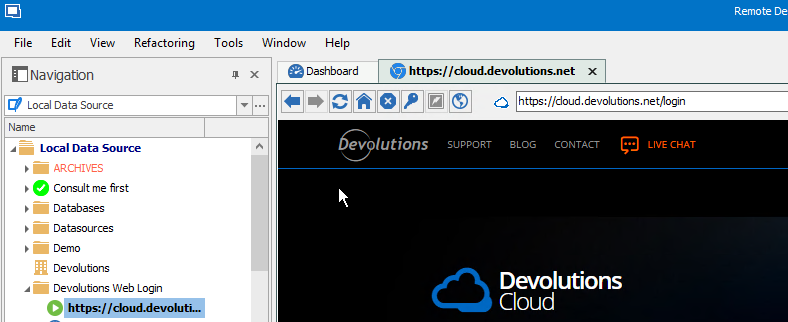
Here's what I see on my side
Do you encounter this issue on all your Chrome entries?
Do you have public URL in your entries or they are all internal addresses?
Best regards,
Jeff Dagenais
2018-03-08_16-21-39.png
Worked perfectly fine until recently but I've no idea what should've caused issues.
It's public URLs as well as internal addresses. My test before was just google.dk, no credentials or anything fancy.
Is there any kind of log I can check?
Hello,
This is very strange.
Could you try RDM 13.0.18.0 to see if that help
https://remotedesktopmanager.com/home/download#Beta
Best regards,
Jeff Dagenais