Teamviewer - Passwordstate credentials
0 vote

I would like to know if there is a possibility to collect Windows credentials from Passwordstate after connecting to a Teamviewer session.
We use a Macro where we store the username and password and run the Macro after we connect to Teamviawer.
What we like to do is to enter the Teamviewer connection settings in RDM and thencollect the credential from Passwordstate like it's working with an RDP session.
I had a meeting yesterday with Mark Beausejour and he suggest me to make a request for this feature.
Best regards
Yves Bender
All Comments (3)
Hello,
I'm not sure to understand. Could you detail the scenario with RDP and how you achieve this?
Regards
David Hervieux
Hello,
I have a entry to start the Teamviewer session.
When the session is started I run a "Typing Macro" to connect with the Windows credential of the user.
What I would like to retrieve the credential from our PasswordState in state of enter it into RDM.
I hope this information will help you to understand my request.
I can also share a remote session with you to show how we are doing it.
Regards
Yves
Hello,
As I understand, you would like to send a password located in a Password State entry to logon on a Windows machine that the connection is established in TeamViewer.
Since we are not able to send the password automatically inside the TeamViewer session, you would need to accomplish this with a typing macro like you have done, however, I will provide you another tip to accomplish this.
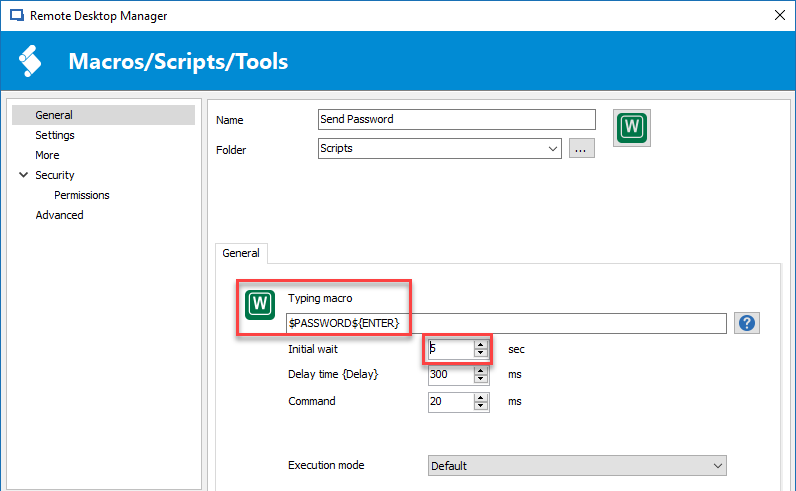
Firstly, the typing macro session should look like the following;
Please note that the initial wait has been configured to 5 seconds, maybe it will be less or more in your case, it's different on every system.
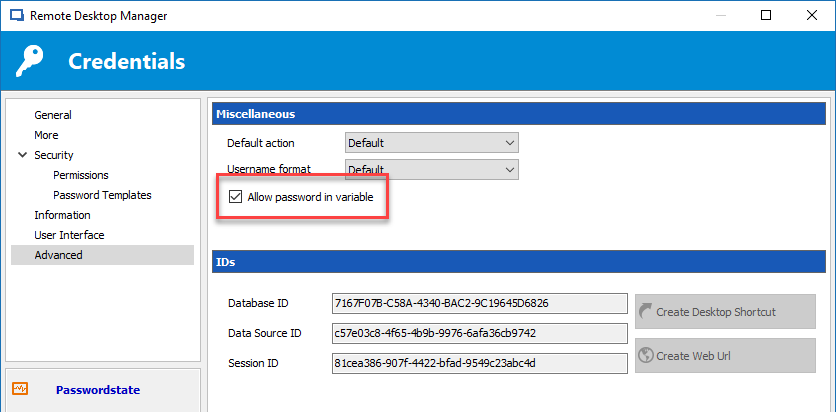
Secondly, in the properties of your Password State entry, you will enable the Allow password in variable in the Advanced section.
Thirdly, in Administration -> Data Sources Settings -> Password Policy, you will enable the Allow password in macro (send keys) option.
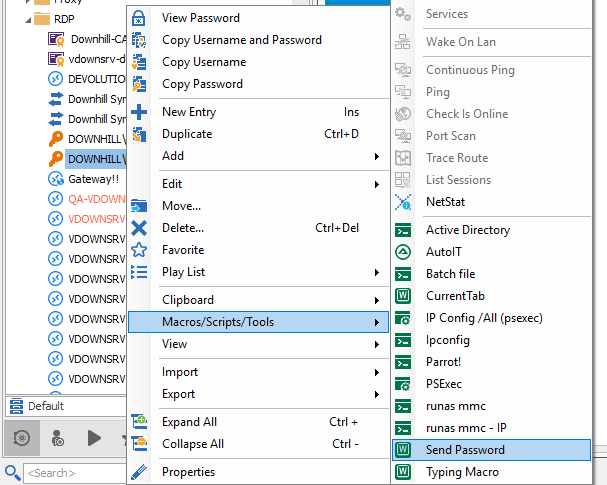
Fourthly, when the TeamViewer session is opened and that the password is ready to be entered, right-click on your credential entry and select Macros/Scripts/Tools -> Send Password.
In conclusion, put your cursor in the appropriate password field and the typing macro will do the rest.
Best regards,
Jeff Dagenais
2018-02-28_14-56-31.png
2018-02-28_14-52-44.png
2018-02-28_14-50-18.png