External/Undocked RDP connection disconnects itself...?

I'm having this weird issue with an undocked RDP connection, where it'll disconnect after I leave my PC idle for 1 hour during lunch. I've configured the display to undock on one of my monitors:
If I do not undock, the RDP connection will stay connected. I don't have any GPOs configured to disconnect my session after X amount of time either and I have a script running in the session to generate a fake mouse click after 5 minutes. So it's definitely not related to those. I've checked my network adapter and disabled Power Management, I've also disabled sleep and USB Selective Suspend under power settings. My hardrive is set to sleep after 2 hours, and all other power option settings are configured correctly.
All my RDP connections are still alive, just the undocked ones are not. If I set the entry to open on an External display (i.e uses mstsc), it'll stay alive just fine as well.
--------------------------------------------------------------------------------------------------------------------
I'm always using the latest beta RDM x64 version.
Local data source.
All Comments (8)
Hi Ricky,
Thanks for the explanation, do you have the same issue if the session if tabbed?
Also, what version of RDM are you using?
We could like to reproduce the issue internally what OS is your computer and the remote computer please?
Best regards,
David Grandolfo
Hi David,
I do not have this issue if tabbed, i.e not undocked. I'm running the latest RDM beta on Win 10 (latest build). Remote computer is Windows Server 2016.
--------------------------------------------------------------------------------------------------------------------
I'm always using the latest beta RDM x64 version.
Local data source.
Hi,
Thanks for this information, I just transferred the post to the QA department to try to reproduce the issue.
Best regards,
David Grandolfo
Hello Ricky,
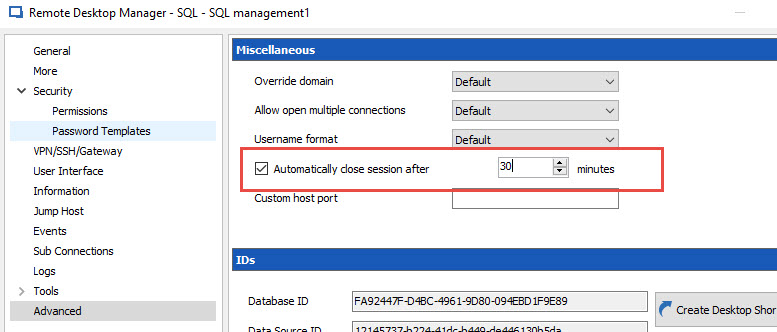
Just one quick questions, Is it at all possible that within the properties of your entry in the advanced tab, the checkbox that allows automatic session closing is currently checked as showed below?
Best regards,
Alexandre Roy
Auto close session after.jpg
Ah I forgot to mention that. I know about that setting and no it is not configured.
--------------------------------------------------------------------------------------------------------------------
I'm always using the latest beta RDM x64 version.
Local data source.
Sorry, looks like this may not be a RDM issue. Just found out that this is happening to a MSTSC connection as well (even though I checked this yesterday and it was fine). Turns out it was a RDS Idle timeout issue - "Your Remote Desktop Services session ended because the remote computer didn't receive any input from you".
If RDM can generate fake mouse clicks or something to keep the session alive, that would be great. I did try to set the "Keep alive" time under the Experience tab in the RDP entry, but that didn't do anything. I guess I could look into using this:
https://serverfault.com/questions/269438/how-to-stop-remote-desktop-from-closing-my-session-due-to-inactivity
--------------------------------------------------------------------------------------------------------------------
I'm always using the latest beta RDM x64 version.
Local data source.
Hi Ricky,
Sorry I wasn't much help, but I'm glad you found out the root cause of the issue.
I'm going to investigate why the keep alive settings wouldn't work for you.
Best regards,
Alexandre Roy
Hello,
Unfortunately I've never been able to send a fake mouse or keyboard message to simulate the activity. This is still on my "need to find a solution" list.
Regards
David Hervieux