Auto typing macro not executed in current tab page

Hi,
Here's the case. I want to execute an auto typing macro on a webpage in which NO element gets the focus by default. I start the typing macro with {TAB} to give the focus to the first element on that page.
When I launch the webpage the auto typing macro fires but the TAB is sent to the buttons in the toolbar of the tab in RDM (the refresh button gets the focus).
When I manually launch the macro by hitting the Execute button the behaviour is the same. When I hit "Execute in current tab page" the right element of the page gets the focus. Is there a way to execute the macro in the current tab page by default?
Regards,
Jasper
All Comments (14)
Hello,
The macro will be executed where the focus is. We suggest to put the cursor in the appropriate field so that the macro can start properly and be executed like it suppose.
Best regards,
Jeff Dagenais
Hi,
I will add a option in the macro to select the tab content.
Regards
David Hervieux
Hi Jeff,
All automation is lost when we need to click in the window first. You probably will understand that I'll go for the solution David suggested by adding new functionality to a newer version of RDM.
Regards,
Jasper
Hello Jasper,
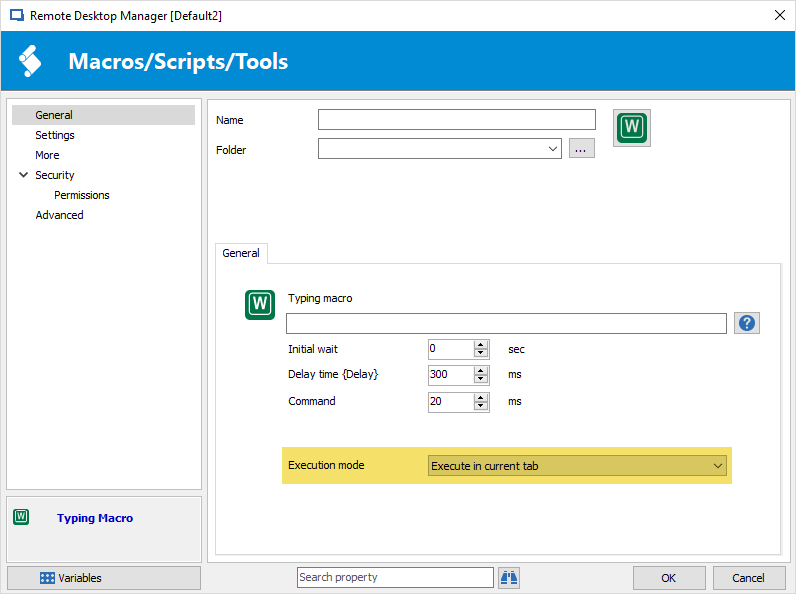
In the typing macros only, the "execute in previous window" checkbox will be replaced by a combo box with multiple choices: default, execute in previous window and execute against selected connection. The last one will be what should fix your issue, as it will make sure to focus the selected connection before running the macro.
This will be available in the next beta. If you have any feedback after you can test it out, it's appreciated :)
Regards,
Hubert Mireault
Hi Hubert,
I would be happy to be a beta tester. When and where will it be available?
Regards,
Jasper
You can find the downloads for RDM here, including the beta version if you scroll down:
https://remotedesktopmanager.com/home/download
The current beta is 13.0.14.0. We should be releasing a new beta version before Friday.
Regards,
Hubert Mireault
Hi Hubert,
I'm struggeling to find the requested option in the beta release. Can you put me in the right direction?
Regards,
Jasper
Hello Jasper,
Unfortunately beta 13.0.15.0 isn't out yet so the option isn't there. I'm hoping we can publish it early this week. We'll keep you updated.
Regards,
Hubert Mireault
Hello,
The beta version 13.0.15.0 is now available;
https://remotedesktopmanager.com/home/download#Beta
Best regards,
Marc Beauséjour
Hi Mark,
Thanks for the notification. I installed the beta release but still having troubles to find the requested change. Can you guide me?
Regards,
Jasper
It's in the macro entry's settings:
Regards,
Hubert Mireault
2018-02-27_9-05-58.png
Thanks. I was looking at the Events.
It worked. Great job guys!
Thanks for letting us know Jasper :)
Hubert Mireault