Embedded UltraVNC causes RDM to not respond when remote computer restarts
Embedded UltraVNC causes RDM to not respond when remote computer restarts

Problem:
We have entries with embedded UltraVNC. When connected with UltraVNC to a remote computer and the remote computer is restarted, RDM will hang and not respond.
What we expect:
When we connect to a remote computer using UltraVNC (outside RDM) and the remote computer is restarted, UltraVNC will wait for the remote computer to be available and reconnect again. We are expecting the same of RDM, while RDM is still responding to user interaction.
What we use:
We're using UltraVNC version of 1.2.1.6 or later. We're using RDM version 13.0.6.0.
All Comments (6)
Hello Niels,
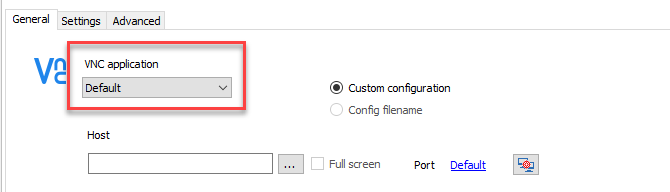
I had a chat with our engineering department and there's nothing much we can do about this, but you can try our own integration in embedded mode.
Just select Default in the properties of your VNC session.
Best regards,
Jeff Dagenais
2018-02-15_14-18-39.png
Hi,
Slight correction.
Using the default VNC application seems to crash RDM per my testing.
Selecting UltraVNC from the combo box seemed to to what you wanted.
Can you make sure sure UltraVNC is selected instead of Default?
Regards,
Jonathan Lafontaine
Yes, UltraVNC is selected VNC application.
I also tried UltraVNC to be displayed as external, but then I'm prompted for username and password, despite credentials are selected. It is possible to pass the username and password as commandline arguments to vncviewer.exe (-user and -password), so it would be helpful if you could fixed that.
Even other settings can be passed this way when using UltraVNC external, while these settings are now disabled.
Hi,
I've fixed external UltraVNC not allowing the username on the command line and embedded UltraVNC asking for credentials.
Next release will at least let you connect with UltraVNC externally.
Jonathan Lafontaine
Good to know. Looking forward to it :)
Checked and working!
The only thing bugging me, is that the options on the Settings and Advanced tab are all disabled. For external use you provide a command line arguments field. But UltraVNC supports all command line settings on the Settings and Advanced tab. Why not port these settings via command line to the external session? Saves me creating a commandline.