Set SSH Fingerprints manually
0 vote

Hi,
is there an option to set SSH fingerprints manually for all users? Preferred as ed25519 Host-Key.
We want to ensure the authenticity of the SSH host, so the option "Auto accept SSH fingerprint" is not suitable.
If there is no possiblity to set SSH fingerprints so far, could you please record this as an enhancement request?
Thank you.
All Comments (18)
Hello,
I had a chat with our engineering department and your request has been added to our ToDo list.
Thank you for your post.
Best regards,
Jeff Dagenais
Hi Jeff,
are there any news on this request?
Do you have a timeframe, when this feature will be available?
Thank you.
Best Regards,
Sebastian
Hello,
I would need to verify this with our engineering department and get back to you.
Best regards,
Jeff Dagenais
Hello,
I had a discussion with one of our engineer and your request is still on the to do list.
Regarding your request, we plan to save the public key inside the data source. Do you think this is a good idea?
Best regards,
Jeff Dagenais
Hi Jeff,
I think it's i good idea to save the public key in the data source.
It should be available for all users.
Thank you.
Best Regards,
Sebastian
Hi Jeff,
are there any news on this?
Can you say, when this feature will be available?
Thank you very much.
Best Regards,
Sebastian
Hello,
I've sent an email to the engineer in charge of that feature request so that he can provide you a timeline on it's delivery, if possible.
Best regards,
Jeff Dagenais
Friendly reminder ;)
Thanks for the reminder! But it is not needed :) I am laying a lot of framework right now with this feature in mind and I am planning to make it the preferred way in RDM for SSH server authentication. I think it could be possible to have it in a month or so...
Denis Vincent
Six months have passed.
Are there any news on this case?
Hello,
Sorry about the long delay. We should be able to implement the feature this week or next week. We'll keep you updated on the issue.
Regards,
Hubert Mireault
Hello,
We've made the changes internally and they will be available in the next beta. You'll be able to load in your public key within your entry, not just the thumbnail. It will verify when connecting if the entered key matches the server's own. If it doesn't it will deny access. If it does, it will connect as usual. Entering no public key will behave the same as it does now.
Please let us know what you think of the feature once it's available.
Regards,
Hubert Mireault
I think this is still not solved because you cannot create this file for other users because it is not added to the datasource.
Maybe it can be easy implemented by being able to configure the location where the known_host file is placed. If this can be placed on a share I have my shared known_host :-)
(I was hoping the path "ssh keys" was the location for the know_host, but this doesn't work)
Regards,
Luuk
Hello Luuk,
The public key can be added to a "Private key" credential type - 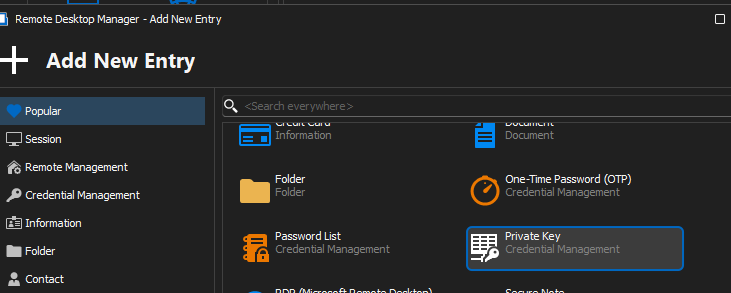
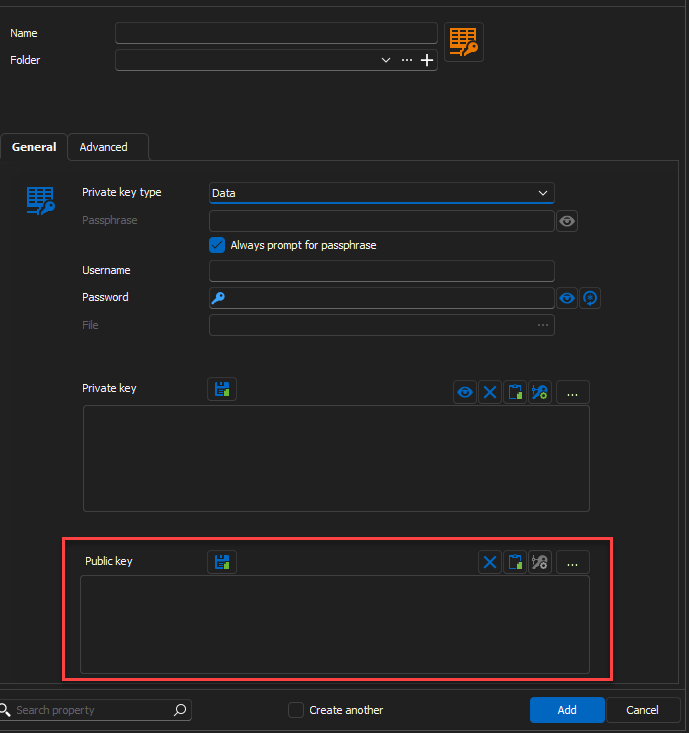
You can then link it to your SSH session: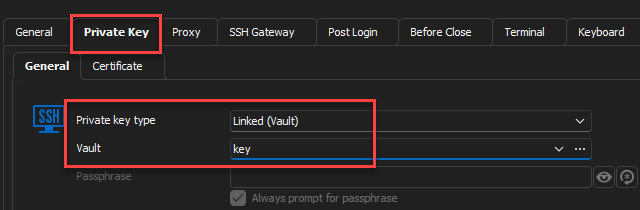
Best regards,
Richard Boisvert
2ea17297-0f4f-4b44-86b7-c47558784d44.png
26a9ab5f-91a5-4615-8dd7-d73544ecc703.png
ada66ab8-ba58-4b39-a8b6-a6381c2f6e2c.png
If I try to save that, it tells me there is no private key data.
but I'm not sure we understand each other,
the request was:
Is there an option to set SSH fingerprints (manually) for all users? Preferred as ed25519 Host-Key.
We want to ensure the authenticity of the SSH host, so the option "Auto accept SSH fingerprint" is not suitable.
where you are pointing me to is personal ssh keypair management.
If I turn on auto accept ssh fingerprint, a file will be created saving all ssh fingerprints. (in users appdata) so every users runs the risk of connecting to a false ssh server the first time they connect
What I would like is to save the public key in the database entry for that host (instead of a personal, local known_host file), Or. to be able to configure the location where the known_host file is located so I can centrally manage it.
Regards,
Lucas
Hello,
You can set a public key in the entry properties by clicking on the “Set Host Public Key” button. 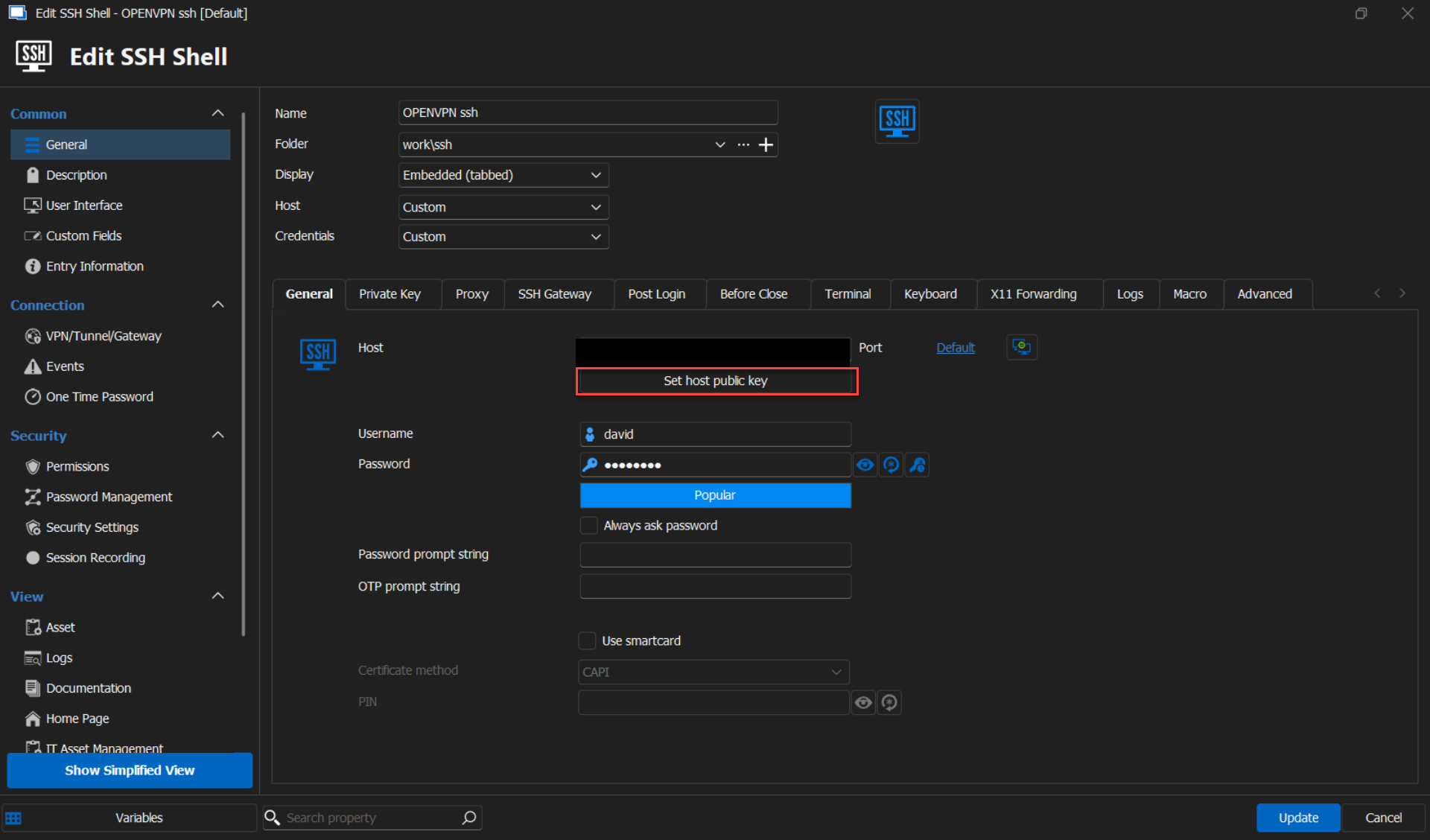
Is this the solution you were looking for?
Best regards,
Carl Marien
204fadf0-a8cf-48d4-8ad0-791582d9b6e7.png
Thanks for you reply, but how does that field work?
Should i point it to a file with a all the public keys or do I need to create a file for every host? I think it is the last and that's just not scalable. And how should I collect the public keys of all my ssh servers?
I think best would be if it is possible to save the public key(s) automatically in the properties of the concerning host. This way it is automatically centralised and shared by all users of the same data source.
If that is not possible, then another way of achieving my goal would be if the location where all known keys are (%LocalAppData%\Devolutions\RemoteDesktopManager), is configurable. Both global and per host. (and can be placed on a share)
Hello,
The 'Set Host Public Key' button is designed to be used for each individual entry. Once set up, the public key will be stored in the database, allowing all users to access the entry correctly.
If you have any additional questions, concerns, or require further assistance, please don't hesitate to reach out. I'm here to help.
Best regards,
Carl Marien