SQL Management Studio with Jump not working

Hello,
We are using the Management Studio Add-On to connect directly to SQL databases.
Without jump (direct) it work fine (RDM 13.0.6.0 / Management studio 17.4), but with Jump the Management studio doesn't start on the Jump host. I connect on the jump host with local admin (last agent 1.3.0.0)
Is there anything I can try to make it working ?
Thanks in advance
Best regards
Gabriel Maret
All Comments (25)
Hello,
Is SQL Management Studio add-on installed in the jump host as well as RDM?
Best regards,
Jeff Dagenais
Hello,
Yes, I reinstalled the add-on on both the jump and the RDM servers.
Best regards
Hello,
Is SQL Management Studio installed on the jump host?
Best regards,
Jeff Dagenais
Yes, The connection work fine without jump from the RDM server or the Jump server. The same Management Studio is installed on both of the servers.
Best regards
Hello,
Thank you for all the information's.
Let us investigate this issue and get back to you.
Best regards,
Jeff Dagenais
Hello,
As per the video in attachment, we have not been able to reproduce your issue.
Could you post a small video of your scenario and/or attach your 2 sessions (without the credentials) so that we can analyze them.
Best regards,
Jeff Dagenais
ssms-jump.mp4
Hi Jeff,
I did some testing.
When the RDM application is opened on the jump host it works. If the RDM application is closed on the jump host management Studio does not start.
**************
Scenario 1 = OK
-----
Jump host : RDM Opened, RDM Agent started
RDM host : RDM Opened
- I open my SQL Management Studio session from the RDM host
- Management Studio open on the Jump host
Scenario 2 = KO
-----
Jump host : RDM Agent started
RDM host : RDM Opened
- I open my SQL Management Studio session from the RDM host
- Nothing append on the Jump host
**************
Attached a video.
Best regards
MGMStudio.wmv
Hello,
Could you go on https://remotedesktopmanager.com/home/download and install RDM Agent 1.3.0.0 on your workstation and the jump server as well?
When this is done, on the jump server, right-click on the RDM Agent icon in the taskbar and select About. We would like to have a print screen of that window if possible.
Best regards,
Jeff Dagenais
Hi Gabriel,
My bad, I ask Jeff to ask you to install v1.3. After re-reading your post I realized you already have v1.3. Simply getting us the About box screen shot will do.
What we are looking for here is: Why is RDM Agent not forwarding the call to RDM correctly? When RDM is already running, the Jump command is sent directly to RDM, cutting out the middle man (RDM Agent). So that explains why it works with RDM already running. In v1.3 of the RDM Agent has diagnostics that detects the presence of RDM and the extension handlers (.RDM & .RDMJ) in the system registry.
Was both RDM & RDM Agent installed using the .msi/.exe installer? The .zip?
Best regards,
Thanks,
Stéfane Lavergne
Hello,
I installed RDM Agent with the exe and msi (downloaded both and started installer from the exe).
Attached the "about" print screen, everything seems to be fine with the agent.
The RDM was installed from the MSI if I remember correctly.
Best regards
2018-02-19 07_45_09-Remote Desktop Manager [IXIONMGMT01].png
I've built a new version with more logging if you give it a try.
- stop RDM Agent, you may need to stop (End Task) other instances running in other remote sessions (Task Manager > Details)
- Unzip the files into the RDMAgent Install directory, overwrite the old files (back them up if you want).
- Start RDMAgent
- make sure logging is enabled, right click > Settings > Log debug message
- Open logs, right click > View logs
- clear the logs
- make sure RDM on the jump server is closed
- try the starting the SSMS jump sessions
- refresh the log window
The log window should contain what happened and why it failed. Send that to us for analysis.
Best regards,
Stéfane Lavergne
RDMAgent.v1.3.1.0.zip
Hi Stefane,
I installed the new version of the agent. This is the last lines of the log :
But nothing is started on the jump host.
Best regards
Very interesting.
All is configured correctly and all is found on your system yet the application isn't starting.
I will modify RDMAgent to favor starting via [RemoteDesktopManager.exe "filepath"] instead of using the .rdmj file association. This, I hope, will resolve the issue.
I have no clue why the .rdmj file association isn't working. If it's missed configured it should fail and then we call directly the .exe with the file.
The build will be available soon.
Best regards,
Stéfane Lavergne
Hi Gabriel,
Could you please give this version of RDMAgent a try?
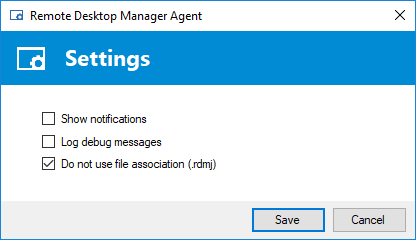
Follow the same steps as before but also make sure to check the "Do not use file association (.rdmj)" check box in the settings of RDMAgent.
Let me know how it goes.
Best regards,
Stéfane Lavergne
2018-02-21_11-09-11.png
RDMAgent.zip
Thanks for the fast answer.
I tried again with the new agent and still no luck.
If i check the temp folder I could see for 1 second the ff4b94d5-176f-4c06-ad2e-baf071fb46b3.rdmj and it disapear.
Best regards
What is going on...
In both instances you see "Process started ID: ####" if the process has an ID then it was started yet, nothing is happening.
So the issue isn't with the behavior of RDMAgent but rather why is RDM not starting properly when called via command line or file associations?
I've attached a simple RDM sessions (command line session that opens notepad.exe in embedded mode). On the Jump server, please save the file to disk and try double-clicking it. Anything? If you rename the extension to .rdmj, same behavior?
Is there anything in the RDM application logs Help > View Application Log?
It's normal that the temp folder is empty, we delete the file after it's processed. Hang on that gets me thinking, RDM is the one that deletes the file... we might be onto something here... I will investigate further but please try the steps above.
Again, thank you for the patience while we try to figure out what is going on.
Best regards,
Stéfane Lavergne
Notepad.rdm
I tried with your Notepad file.
With both .rdm and .rdmj extensions Remote Desktop Manager is started and open a "notepad.exe" embedded Windows.
There is nothing in the Windows & RDM logs.
The problem is only with Sql Management Studio (as I know), with a RDP session it work fine.
Best regards
Looked and the code and tried to get it to fail for a few hours yesterday with no luck.
I'm not ready to give up on this issue, something is going on and we will find it.
...hang on I think I found something. I have two RDM installs on my machine, one with the AddOn properly registered and working and without it. If I launch via command line (RemoteDesktopManager.exe "C:\temp\ssms.rdmj") with the path of the RDM without the AddOn nothing happens. If I do the same with the other RDM then SSMS starts.
You've already doubled checked, as per the thread above, the installation of the SSMS AddOn. Could it be you have two RDM instances on this machine, like I have, and when we start via the command line versus starting RDM with the shortcut that different instances of RDM are starting?
Stéfane Lavergne
2018-02-22_9-42-47.mp4
ssms.rdmj
Stefane,
I have only one instance of Remote Desktop Manager.
I tried with your ssms.rdmj file (started from commandline) and it works, the SQL Management Studio is started and the rdmj file removed.
I removed the SQLServerAddon.dll from the "AppData\Roaming\Devolutions\RemoteDesktopManager" folder, and downloaded it in the "C:\Program Files (x86)\Devolutions\Remote Desktop Manager" folder. Still no luck.
Could it be related to permissions or anything ? (the UAC is disabled). The jump host is a Windows 2016 server and I log on with a local admin account.
Best regards
The mystery continues...
Can you please try one more thing?
- export your ssms session from your client RDM, save it as .rdm
- rename the file to .rdmj
- copy the file over to the jump server
- double click or use the command line to start the session
Does that work?
Best regards,
Stéfane Lavergne
Hi Stefane,
I exported my ssms session and tried to start it from the jump, it's not working.
I updated my ssms session to include the username (not using a credential repository) and it's working.
The problem seems to be related to the use of credential repository, if I check "use custom credentials" and enter my credentials it's ok.
Any way to fix it ?
Thanks for the support :)
Best regards
2018-02-26 14_56_50-Remote Desktop Manager.png
Ah nice, of course, we can fix it.
We will reproduce the issue in house and get on it fixed.
Thank you for your help and patience.
I will get back to you when a new build is available.
Best regards,
Stéfane Lavergne
Hi Gabriel,
It is resolved. This long journey has finally come to an end (24 posts, 15+days) and it's finally over.
Thank you for your patience and your investigative work. I would have never found it without you.
So the end result was when using linked credentials we resolve those credentials prior to the Jump but would leave the flag as "linked credentials" so when it got to the Jump server RDM would try to resolve (again) the linked credentials but couldn't find them and would exit. The fix was actually easy.
The fix will be in the next beta build. You only need to update the client RDM, not RDM Agent or the Jump RDM.
The beta build will be available here: https://remotedesktopmanager.com/home/download#Beta I don't have an ETA for the next build.
Best regards,
Stéfane Lavergne
Hi Stefane,
Cool, good news :-)
I will wait for the next release and connect to my SQL instances :)
Best regards
The 13.0.17.0 beta build is out download here: https://remotedesktopmanager.com/home/download/#Beta
Stéfane Lavergne