13.0.6.0 - remote tools possible issue

Hello,
we have a weird behaviour. We configured a Command Line Script with following command: winrs -r:$HOST$ -u:$TOOL_USERNAME$ -p:$TOOL_PASSWORD$ cmd
Further we activate on the RDP session entry "Allow Password variable" and run the script succesfully against the RDP session - BUT only if the RDP tab is not in the tabbar opened. (This behavior occurs also if the tab is opened, without an active RDP session to the host)
If the tab will be closed, the script for the host works properly. :\:
FYI - (a small additional issue)
We configured in the tools section as credential "Use Repository" .The format must be USER@DOMAIN - if we configure the credential entry to use format {USER@DOMAIN} it does not work properly - only since we changed on the linked tools credential entry the format back to default and set in the username field USER@DOMAIN the correct user format are used.
Thanks!
Regards,
Min
All Comments (27)
Hello,
If I understand correctly, when you open the command line session, it opens but then closes after a few seconds?
For the other issue, I will have a look with my team.
Best regards,
Marc Beauséjour
Hello Mark,
not exactly - the command line session would be opened in both scenarios, but the command is only succesfull when the RDP tab is not opened. If the RDP tab is open, a error message is displayed in the command line window.
Regards,
Min
Hello,
Thank you for the details.
Is it possible for you to tell me what is the error message that is displayed?
Best regards,
Marc Beauséjour
Hello Mark,
sure - the error message is: Winrs error:Internal Error. (But as a said, if the RDP tab from the host is not opened, the command are succesfully)
Attached the mentioned scenario.
Thank you!
Regards,
Min
connection-failed.png
connection-success.png
Hello,
I sent you a private message.
Best regards,
Marc Beauséjour
Hello,
Just to confirm, what is the OS of the system you are trying to use this command line against?
Best regards,
Marc Beauséjour
Hello,
this will be run against various Windows OS's - like Win 7,8,10, Server 2008,2012,2016 - here some informations about the winrs command.
Thank you!
Regards,
Min
Hello,
Thank you again for all the details and your help!
So I have tested this on version 13.0.6.0 and 13.0.8.0 and I can't seem to recreate this. The command works well even if the session is opened.
Is RDM opened as Administrator?
Do you run RDM 64-bit or 32-bit?
Best regards,
Marc Beauséjour
Hi,
I tried following scenario:
I'm running the RDM 32-bit as an user with administrative priviliges on the client machine
Regards,
Min
Could you try for a test to create another RDP connection with no repository and no username format?
Regards
David Hervieux
Hi David,
unfortunately the same behaviour.
the user format for the original session is set to: username field: User@domain.name , because the username format setting does not work (is a additional issue).
Mark and I scheduled a remote session - we wait for the result and report back ;)
Regards,
Min
Hello,
Thank you again for your time today!
We've been looking at this and we think we found the issue.
On your credential entry, could you please go in the Advanced tab and enable the option "Allow password in variable"?
Best regards,
Marc Beauséjour
Hi Mark!
Youre welcome! Interesting - I can confirm that enable this checkbox resolved the issue.
Any idea why it must be enabled when a second tab to the session is opened? Respectively why the parameters work without the checbkox enabled when no other tab is opened? Is it a bug or a feature? :secret:
Thank you!
Regards,
Min
Additional note: the mentioned checkbox is not activate for the credentials that are linked to the session (inherited), and we saw on the remote session that the variables for this credentials are succesfully filled in :\:
Hello,
That is a very good question. I will inquire about this and get back to you.
Best regards,
Marc Beauséjour
Sorry - one additional notice, I just remembered - as we configured the credentials directly in the tools section, it did not work either...
So the behaviour is really curios.. :\:;)
Hello,
I have spoken again with our engineers about this and they made some fixes which should resolve your issue.
The issue was linked to a change that was made to address a user need when prompted for credentials when the session is opened.
We will investigate further if the update doesn't fix the issue with the custom credentials.
Best regards,
Marc Beauséjour
Hi Mark,
thanks for the update! I will try the scenario with the next release and give you feedback! ;)
Regards,
Min
Hello Mark,
a short update:
in version 13.0.13.0
If the "Allow Password Variable" checked in the RDP session and also in the linked tool credentials the connection works.
Unfortunately the custom username format does not work yet.
Regards,
Min
Hello,
Thank you so much for your feedback!
For the other issue, I'm not sure what could be causing this.
Have we tried to recreate the sessions together to see if you have the same issue? Perhaps try in an XML data source?
Best regards,
Marc Beauséjour
Hi Marc,
welcome! Tried it just now with 13.0.13.0 and a xml datasource - same behaviour.
But to be sure: I changed the username format in the linked tools credentials - NOT in the RDP session itself - because for the RDP we want to use the default format - just for the remote tools we need the special username format.
Regards,
Min
Hello min :),
I'm a little new to those method but here is what I found.
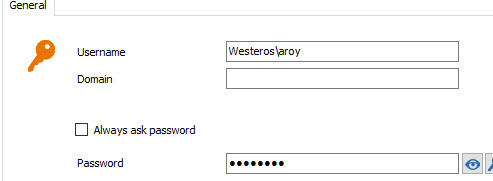
If you changed the username format on the macros it won't grab the domain field in the RDP session tool. If you want to make it work you'll have to leave the domain field empty and set it in the username field instead like this example : westeros\aroy. I've attached a screenshot just in case I wasn't clear enough.
I also tried to make it work with $TOOL_DOMAIN$ but winrs doesn't seems to have a parameter for the domain from what I read.
Give me some news :).
Best regards,
Alexandre Roy
Custom tool credentials login.jpg
Hello Alexandre.
thank you for your investigation! ;)
Of course, winrs need the USERNAME@FQDN.DOMAIN format, so I configured the credential format like this: 
But this will be ignored if I linked this credential to the tools section from my session.
At the moment I already configured the credential username to the format USER@FQDN.DOMAIN but if the username format from the credential entry would work, would this be great :)
Regards,
Min
Hi again,
Okay I think I got it! In the tool section of the RDP session you are using credentials repository linked to a credentials entry, then running the macros on the RDP session using the username default format.
If that is the case, now I do reproduce the issue :). The tool section must be ignoring the username format set on the credentials entry from what I see.
A workaround for you in that case would be to change the credentials username as displayed on the screenshot.
Ill have a talk to Hubert about this issue. Hopefully I got it right this time.
Best regards,
Alexandre Roy
Credentials workaround.jpg
Hello Alexandre,
yes this is exactly my scenario ;)
Thanks!
Regards,
Min
Hello,
I got some news. Apparently this behavior is intended as it will prioritise the username/format option set on the macros. The macros will then fetch the informations from the respective fields in the credentials entry.
The username format (Default) doesn't fetch the domain field, just the username. So the only way you would be able to make it work with your setup at the moment is if you set the domain\username in the credentials username field as displayed in the last screenshot.
Hope this helps :).
Best regards,
Alexandre Roy
Hello!
Alright, thanks for the explantation! Then I will further use the "workaround" :)
Mark, Alexandre - many thanks for identify the issue and resolving ;)
Regards,
Min