Default settings when opening .rdp file

Hi
How can I change the default settings for which an .rdp file is opened?
Regards
Lars Mortensen
Remote Desktop Manager connected with Devolutions Server running newest versions.
------------------------Signature------------------------
Sorry if any of above sounds harsh or provoking, it is NOT meant as such, but I have Asperger's and don't always know.
My intentions is always to be friendly.
-------------------------------------------------------------
All Comments (7)
Hello,
Are you looking to change the default program to open .rdp file?
If yes, this is an option in Windows. Are you using Windows 7, 8 or 10?
Best regards,
Jeff Dagenais
RDM is set to open .rdp files.
I'ts the settings RDM uses when opening a RDP file I want to change.
But I found that I have changed the settings the correct place, but for some reason it's not working.
Remote Desktop Manager connected with Devolutions Server running newest versions.
------------------------Signature------------------------
Sorry if any of above sounds harsh or provoking, it is NOT meant as such, but I have Asperger's and don't always know.
My intentions is always to be friendly.
-------------------------------------------------------------
Hello,
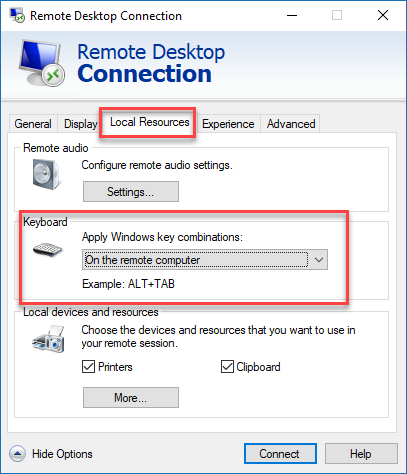
As per the print screen that you sent us in the support mailbox, the setting that you have changed is the Default Setting when you create a new RDP session, the keyboard setting will be set to be use on the remote computer.
Maybe your existing session(s) are not properly configure. Could you go in the properties of your RDP session, click on the Local Resources tab and make sure that the On the remote computer option is selected.
Best regards,
Jeff Dagenais
My existing connections are working as they should.
My problem is if I double-click an .rdp file, key combinations aren't sent to the remote computer.
Remote Desktop Manager connected with Devolutions Server running newest versions.
------------------------Signature------------------------
Sorry if any of above sounds harsh or provoking, it is NOT meant as such, but I have Asperger's and don't always know.
My intentions is always to be friendly.
-------------------------------------------------------------
Hello,
This mean that the .rdp is saved on your desktop, right?
If you edit this .rdp, in the Local Resources tab, those the option is configured properly?
Best regards,
Jeff Dagenais
2018-01-22_09-50-21.png
Ahh, so RDM takes all settings from the rdp file. That, of cause, makes sense :)
Is it possible to overwrite settings when opening RDP files? - So I don't have to edit the rdp to match wat I want?
Remote Desktop Manager connected with Devolutions Server running newest versions.
------------------------Signature------------------------
Sorry if any of above sounds harsh or provoking, it is NOT meant as such, but I have Asperger's and don't always know.
My intentions is always to be friendly.
-------------------------------------------------------------
Hello,
If you want to manage this setting via RDM, I would recommend importing your .rdp in RDM via the File -> Import menu.
Then, launch your RDP session from RDM in external mode. By default, after the import, the display setting should already be set to external.
Best regards,
Jeff Dagenais