Possibility to use credentials from private vault for session-tools
Possibility to use credentials from private vault for session-tools
0 vote

Hi,
can you provide the possibility to use credentials from the private vault for session-tools like for the session itself?:

Kind regards,
Nico
All Comments (10)
Hello,
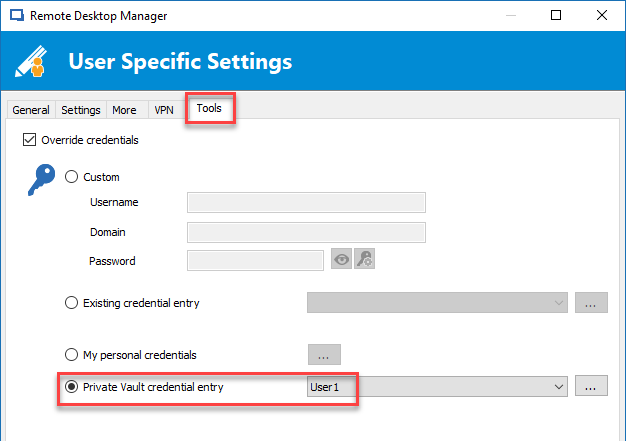
This is possible using the User Specific Settings feature to override the Tools Credentials.
https://help.remotedesktopmanager.com/edit_userspecificsettings.htm
Best regards,
Jeff Dagenais
2018-01-19_14-58-50.png
For test purposes, I have stored in the normal settings as well as in the user-specific settings a Tools password. Under "After Connect - Macro" I have deposited the variable "$TOOL_PASSWORD$". When I start the macro with "Execute Typing Macro" I get as output the password stored in the normal settings, not that from the user-specific settings. Do I have to use another variable to use the user specific password?
Hello,
There's maybe a bug. We will try to reproduce and get back to you.
Best regards,
Jeff Dagenais
Hello,
Could you please send us a print screen of your RDP entry General section and one of your Tools section. This will help us greatly in reproducing your issue
Best regards,
James Lafleur
Hi James,
yes of course:


Kind regards,
Nico
Hello,
The issue has been submitted to our engineering team and we will notify you as soon as we get any update on your issue.
Best regards,
James Lafleur
Hello,
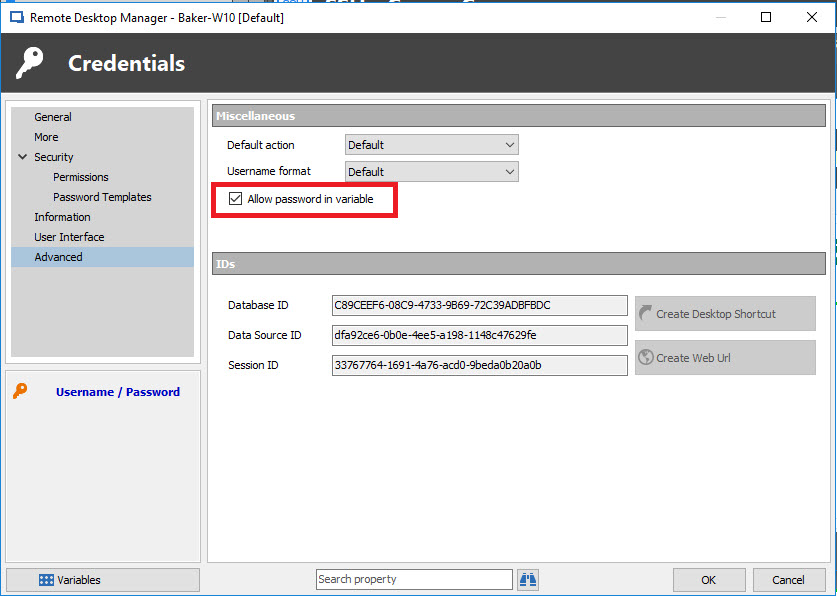
We talked with our engineering department and they told us that this is not a bug. In order to make this work, you need to go to your Credential entry, in Properties - Advanced - Check ''Allow password in variable''.
This should allow you to use your ''$TOOL_PASSWORD$'' variable without having any issue.
Best regards,
James Lafleur
credential.jpg
The usage of the variable "$TOOL_PASSWORD$" gives me the output of the global settings, not of the user specific settings.
In the example that I have previously posted, there are no links to passwords, the passwords are stored directly in the settings.
So there is no need to enable "Allow password in variable" in any Credentials entry.
Hello,
If you enable the option like proposed in the previous topic, is it working or not?
Best regards,
Jeff Dagenais
Yes, I have tried it both with directly stored passwords as well as link to a password in the private safe with the set option.
It does not make a difference, its always taken only the password of the global settings, not the user-specific ones.