When connecting to RDP keyborad changed

Hello,
I observe some issue when you use RDP. If you connect to RDP and have different keyboard layout then system or even i you have that same then sometimes RDM change layout to US and you cannot use on any local application special character. i use polish keyboard and every time i have problem to write using polish char i need close RDP connection opened in RDM (even if on RDP server i have that same layout on my PC) and after that every thing back to normal. Sometimes closing connection isn't enough and i need to close RDM.
There is no regularity when this occur, so i cannot give you any more specific information about issue.
the most affected application to this are Microsoft Office, especially Outlook 2016.
All Comments (3)
Hello Jan,
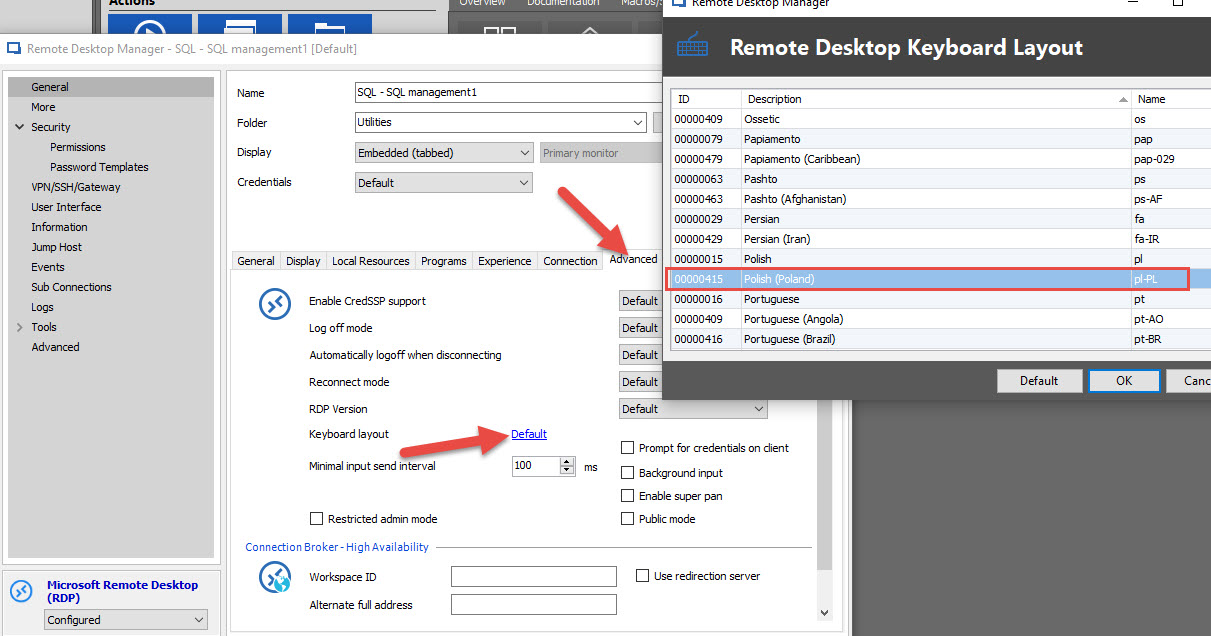
There is an option where you can change the keyboard layout on the remote server that might help you.
When editing an RDP connection, go in General > Advanced tab > keyboard layout.
Best regards,
Alexandre Roy
default keyboard layout.jpg
Yes but in previews version before 4.x, this never happened an didn't need to set default keyboard in connection settings.
I have many connection configured and changing thin i every one is ... lets say its not an option.
Hello,
As I understand, you are using the Free Edition of RDM right?
In the Enterprise Edition, we have a Batch Edit feature that allow you to modify an option in several sessions at the same time.
Best regards,
Jeff Dagenais