What is this play icon on my connection icon?

We just noticed that in the navigation panel, some elements' icon has a little "Play" icon (a right facing triangle) on the bottom right of the icon. What is this? What does this indicate? Please see attached screenshot.
2018-01-09 12_21_01-Remote Desktop Manager [Dashboard].png
All Comments (11)
Hello paul,
This is an indicator to show you that the session is in use by another user.
Best regards,
Alexandre Roy
Interesting, that was our guess too, but this doesn't seem to be the case. I have everyone logged off the server and its still showing. In other words, its inconsistent. How does this detect other sessions? We are talking about RDP sessions i'm assuming?
Hello,
Indeed, this is for RDP session.
If you select the Dashboard of that session, on your right, you will see the same icon. If you leave your mouse hover the arrow, you would see which workstation and which user is using the session.
Best regards,
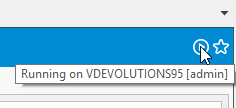
Jeff Dagenais
2018-01-09_13-11-32.png
Ah I see, it looks like this info is stored in the DB? Seems like this is for the RDM session, not RDP. I have no RDP sessions on a server yet it still shows the icon and when i mouse over, it shows me a session from my laptop from days ago (stale). FYI.
Thanks for the clarification.
Hello,
Indeed, this is stored in the database.
You can try to delete/recreate the RDP session to see if that make disappear the blue arrow.
Best regards,
Jeff Dagenais
Hello,
Has this feature been removed? I was unable to see any play icons in my system anymore. I know it has been before. We are currently running RDM 2020.2.19 and DPS 2020.2.10.
I can see a big list of open sessions in the "Opened sessions"-tab.
Best regards
Andreas
Hello Andreas,
What entry type are you using? I'm wondering if this might change something, since I'm unable to reproduce the issue (the play icon still appears for me when opening an entry, for as long as it's opened).
Regards,
Hubert Mireault
Hello,
in this case I tested RDP. I do get a play icon when I am connected, but I do not get the icon if someone else is connected as stated above. Also I do not get the icon in the dashboard view.
In our case we have enable "Warn if already opened" in the properties and that works well. So the client is usually aware of if the session is in use or not.
Regards,
Andreas
Could you make sure the "allow entry states" system setting is enabled? You can check in Administration > System Settings > Vault:
Regards,
Hubert Mireault
2021-02-17_8-15-40.png
That solved it, thank you very much!
Kind regards,
Andreas
No problem, glad it works for you. 🙂
Regards,
Hubert Mireault