Credentials in the 'Private vault' not viewable

Hello,
We are a long term-user of RDM. But the "Private vault" was not known and not used until recent.
I work now with some (of my own) credentials in the "Private vault" (default "Username /password"), and this is handy.
BUT I cannot 'see' and I cannot 'edit' these credentials in my "Private vault". I can use the credentials I have added (thank god they were correct from the first time), but I cannot change them. I have to change them, as a temporary work-around I have added new credentials, so I can continue working, but it would be handy to see my private vault credentials so I'm able to edit them.
What cold be wrong ?
Thanks for tips and help in this matter.
Greetings,
Chris Marreel
All Comments (6)
Hello,
What version of RDM are you running?
What type of data source are you using?
Could you post a print screen to show us what is missing in the Private Vault?
Best regards,
Jeff Dagenais
Hello Jeff,
We are at the moment running 13.0.6, but we already had this issue in the version 12, and it stayed now we are on the version 13.
Screenshot when I to to the "Private vault":
Screenshot when I make a connection, and I select my "Private vault":
Here I see the created credentials, I have created in my "Private vault", and I can use them to make a connection, but I cannot edit them.
We are using a central "SQL-server" (with Integrated security) as "data source"
In the settings the "Private vault" is configured as "Default" (I assume this means it is stored in the SQL-server DB).
Greetings,
Chris
Hello,
Could you should me a screenshot of the default property of a credentials entry when you create it ?
And is everyone of your team experiencing the same issue with thier private vault ?
Thank you,
Best regards,
Alexandre Roy
Ofcourse,
I go to the "Private Vault", there I see a "Credentials"-folder. I do Right-click on this "Credentials"-folder and select "New Entry".
I select the "Username/Password" from the "Credentials"-entries:
And I get the next screen, where I enter the marked fields:
And Click on OK.
The newly created entry is not shown in the "Private Vault":
But I can use it when I make a connection:
Strange, insn't it ?
Greetings,
Chris
Hello, again.
One the following scenarios might help us solve the issue right away.
Are you on an administrator account ?
Are you using a default template for the credentials creation ?
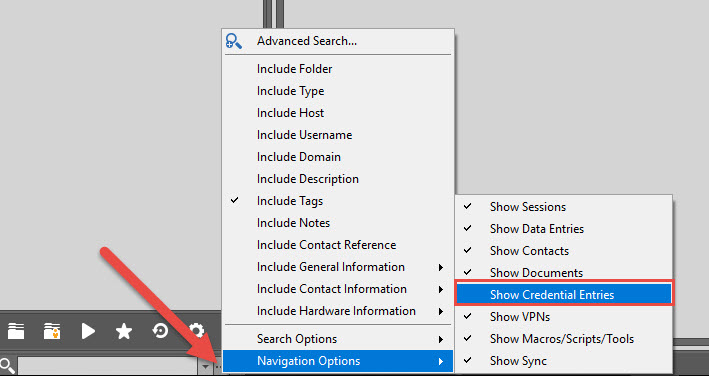
And finally, are you seeing any credentials outside of the private vault. If you do not see any credentials it might be because of the filter search.
See screenshot below and make sure this bad boy is checked up :).
Best regards,
Alexandre Roy
Show credentials entries.jpg
Hello Alexandre,
I can confirm this "Navigaion opstion" was not selected. After selecting this I see, and I can edit my "Private Vault" credentials. So mistery solved !
Thanks for solving this issue!
Greetings,
Chris