Network Scan Remote Sites not / partially working

I'm currently testing the Trial version of Remote Desktop Manager and generating a complete overview of our Network Infrastructure. Using the Network Scan tool to import switches and routers has been working great however we have several sites over the world which don't have the fastest connection.
I noticed that the Network Scan is having problems with picking up everything on these sites. It feels as if the 'Ping before scan' discards the scanned IP address if it didn't reply within a really fast response.
Is there to increase the delay of the ping before the Network Scan starts with the next IP address in the scope? I'd preferably not disable the Ping before scan because scanning an entire /24 takes a lot of time then.
Please see the attached screenshot for what the Network Scan found and some ping results of devices in that subnet which should have been picked up.
I've been able to retrieve the information I need by installing the Trial Version on a local machine on the subnet I wanted to scan but installing the entire software for a simply network scan is quite a cumbersome task if it's needed on a lot of remote sites.
Network Scan.png
All Comments (6)
Hi,
I will assign this to one of our dev to check if we have an option for that. I think it's hard coded.
Regards
David Hervieux
Hello,
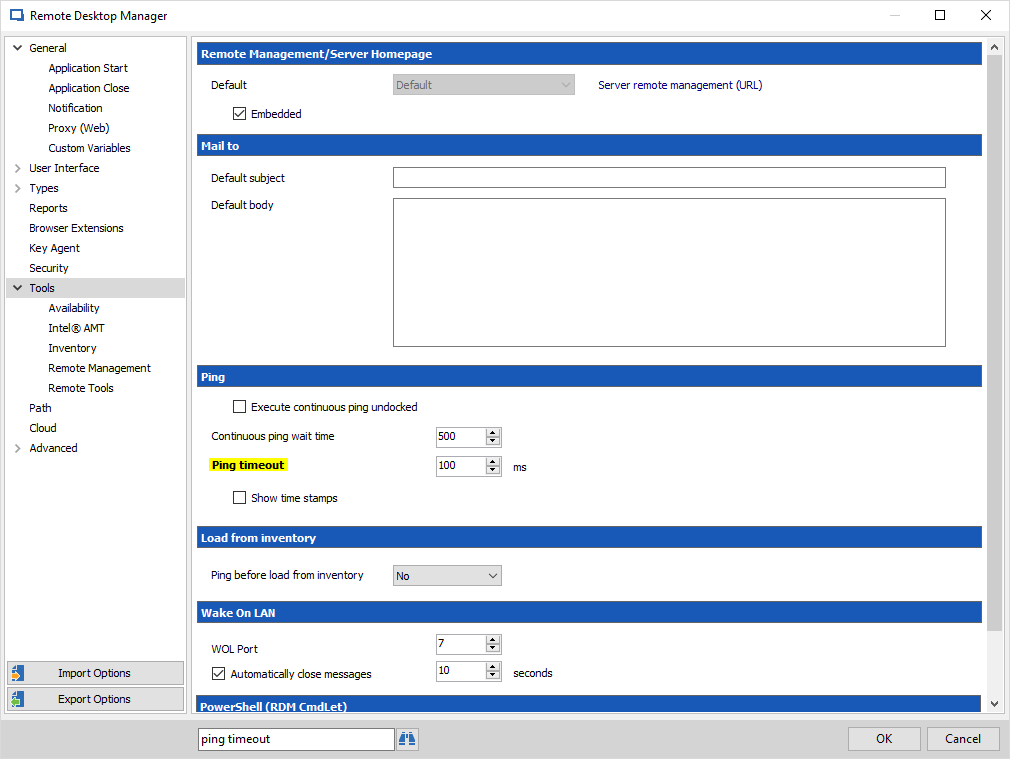
So I checked and what we do is send two pings with a configurable timeout. The default is 100ms which is under the ping time you experience. You can change the ping timeout by going in File > Options > Tools and enter a different value.
Could you try this and see if it works for you?
Regards,
Hubert Mireault
2017-12-20_8-49-50.png
Hi Hubert,
thank you for your response. I've increased the ping to both 300ms and 500ms and checked the response times from the switches which are in between 100-150ms. While I'm getting more objects with the network scan I'm still not seeing every device which is in this subnet.
I just upped to ping value to a 1000ms just to test it out and at the moment this is reporting back all the devices in the subnet.
I am however still somewhat surprised that the value needs to be this high while the ping responses are all under 300ms even with a continuous ping for an extended period of time.
For the machines that can't be reached with a ping timeout of even 1000ms, are you able to successfully reach them outside of RDM? According to the technet article found here, the default timeout for the Ping command is 4000ms. You could try specifying the same timeout in the windows Ping and see if you get a similar result to RDM. Unfortunately if you get the same result outside of RDM I'm not sure we can do anything other than recommend using the windows default timeout of 4000ms.
Regards,
Hubert Mireault
So far I seem to be able to find everything with the ping set to 1000 but it's good to know that if I'll still miss out on a site with even higher response times that it can be upped to 4000.
Thank you very much for your help!