Issues since upgrading to version 13

Hi,
I don't know if this is an issue with the latest release version 13.0.6.0 but the Overview tab of the dashboard seems to be stuck on one particular entry.
Double-clicking an entry no longer opens a session either!
In addition, since upgrading to version 13, I can't seem to get favourites to work. Perhaps I'm not doing it properly but I have my entries saved in an SQL database. I right-click an entry and choose "Flag as Favourite" which adds the entry to the favourites list. However, it doesn't seem to be synchronising with the database.
Please help.
All Comments (13)
Hello,
Could you please send your Application log which is located in the Help tab.
Also could you send us the File-->My Data source information, use the "send to support" button.
Best regards,
David Grandolfo
I've just sent you the logs.
Thanks for your help
Hi,
Thanks for the data source information, Could you go in Files--> Option --> User Interface and change the User Interface and Theme to default, Restart RDM and see if the problem still present.
Also for the favorite issue, are you able to create a folder in the Favorites section?
Best regards,
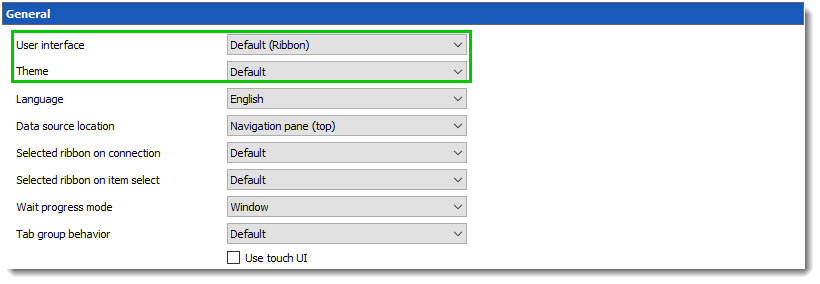
David Grandolfo
theme_default.jpg
Thank you very much for your help. I have a feeling it was an OS issue as I've had Windows updates installed since and the issues have been rectified. I am able to save Favourites.
However, I've noticed a potential bug with the Description tab where it seems to fail to show the Description for the entry but does in the overview tab. See the attached screenshot.
2017-12-21_10-25-54.png
Hello,
In the More section, you have selected URL for the description right?
If it's the case, the website should appear in the Description window at the bottom. If you test with www.google.com as example, is it working?
Best regards,
Jeff Dagenais
No. I am using Text to add instructions relevant to the entry.
I tried with another entry and set it to a URL which is obviously limited to a single line. Entered https://www.google.com and tried again and still the bottom tab for Description is blank whereas the Overview dashboard tab shows https://www.google.com. It looks like the the Description window available from the VIEW bar under "Footer" does not refresh/update for the selected entry. Closing the window then re-enabling it and setting it to "auto-hide" shows the correct information but as soon as you select a different entry, the window goes blank and is no longer updated even when you select the previous entry that had description.
Hello,
Thank you for all the details.
Let me verify this with our engineering department and get back to you.
Best regards,
Jeff Dagenais
Hello,
This is now fixed internally.
Regards
David Hervieux
Happy New Year :drop:
Thanks. I look forward to seeing this in a new update soon :-)
Hello,
Any news on when a new update will be released?
Hi,
We expect to release a new beta today.
Regards
David Hervieux
Any update? It's been a while!
We have a new beta already.
Regards
David Hervieux