Typing passwords: auto type like KeyPass does
0 vote

The auto-typing function with the 'delay' in which you manually need to set the focus is ok - but hard to do.
When you wait to long you lose time; when the delay is not long enough... Note that the speed of user A is not the same as user B ;)
In my opinion KeyPass does a better job. You go to keypass - select the entry you needs and press a option in the menu or press a key-combination and the application automatically selects the last selected window - focusses it ; and executes the auto typing to fill in the username + password.
I would love to see this feature being implemented in RDM. Since KeyPass is opensource you could have a look on how they have implemented it.
All Comments (4)
Hello,
We have a Type Clipboard button in the Actions tab when you launch a RDP session. Is this what you are looking for?
Best regards,

Jeff Dagenais
2017-12-13_21-43-30.png
Hello,
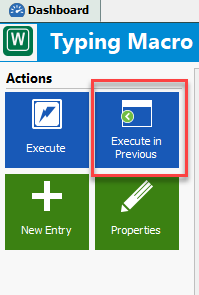
You can also create a typing macro session type and press the Execute in previous window to accomplish this.
Best regards,
Jeff Dagenais
2017-12-13_21-54-56.png
Thanks for the fast answer!
The "Execute in Previous" is indeed the thing I was missing. In this case I am using a TeamViewer (or Citrix Receiver by portal) session, so I dont have the I dont have the "Actions" option available ( no 'Type Clipboard' is possible).
Note that it would be nice if we could assign (custom) menu items and/or (custom) shortcuts to entries.
At this moment I need to:
- Open TeamViewer
- Go select the "login" entry
- Go to Home ribbon and slect Macro/Script ; choose my Makro
- Exec in Previous Window
Preferred solution:
- Add menu item in "Login" entry for my custom Macro/Script with custom shortcut key.
[see also https://forum.devolutions.net/topic28835-typing-passwords-execute-multiple-typing-makros--custom-shortcuts.aspx]
Hi,
I think that I have an idea how we could simplify it. I will add an option in the Typing Macro to force the execute in Previous Windows. You will be able to execute it from the Macro/Script/Tool dashboard.
Regards
David Hervieux