Login Using LAPS Credentials

Hello all,
I tried to do a search and didn't come up with much; before I start writing a Powershell script, I thought I'd ask if anyone knows of a good way to log into a let of PCs using the administrator account I have provisioned in LAPS.
The local admin account has been renamed to $CompanyName Local Admin and the password is set to a 30 rotation through LAPS. While I can pull it up through Powershell or the UI every time I want to log into one of these PCs, I was hoping there would be a direct integration I could use to pull the attribute from AD.
All Comments (20)
Hello,
Our "Custom" Credential type was made for that purpose.
Attached is a RDM credential entry that you can import. It uses a $HOST$ parameter which will grab the host name from a session (RDP, SSH, etc) in which you specify to use your LAPS credential entry using the Credential repository mode.
So
step 1 - import this new entry
Step 2, modify an existing session to point at that credential entry.
Obviously it requires that you have the AdmPwd.PS module installed on any workstattion you run this from. It also requires that you've already registered the target host in LAPS.
Please note that the current script uses your currently logged-on windows username for the final authentication. It can easily be adapted to use another value, maybe even a custom variable that you would define in RDM.
Let us know if you have enough info to get this working.
Best regards,
Maurice
LAPS_Script.rdm
Maurice,
Thanks for the quick reply! I was able to get that script working for the RDP session using the LAPS username and password(s). My next question is on the Macros/Scripts/Tools page, it is possible to run the LAPS script to generate the credentials to use for Computer Management, Inventory Report, Event Viewer, etc.?
I currently have this configured on my test session:
-Tools > Credentials > Allow credentials for tools AdOn
LAPS_Script selected
Hello,
If the LAPS Credential script provided by Maurice is already configured to be used in the session's credential property, you just have to select the Use session credentials option in the Tools tab.
Best regards,
Érica Poirier
Hi,
I'm just evaluating your product and we are interested to use LAPS for RDP. I have downloaded the script and imported to the application. Then I changed my RDP-Connection to use the LAPS-Script, but when I try to connect to my machine via RDP, it says "Connection attempt failes" and it is asking for credentials...
My Test-RDP-Connections is configured as follows:
What else do I have to do so LAPS-Password is automatically fetched from AD?
Regards
Tomtom
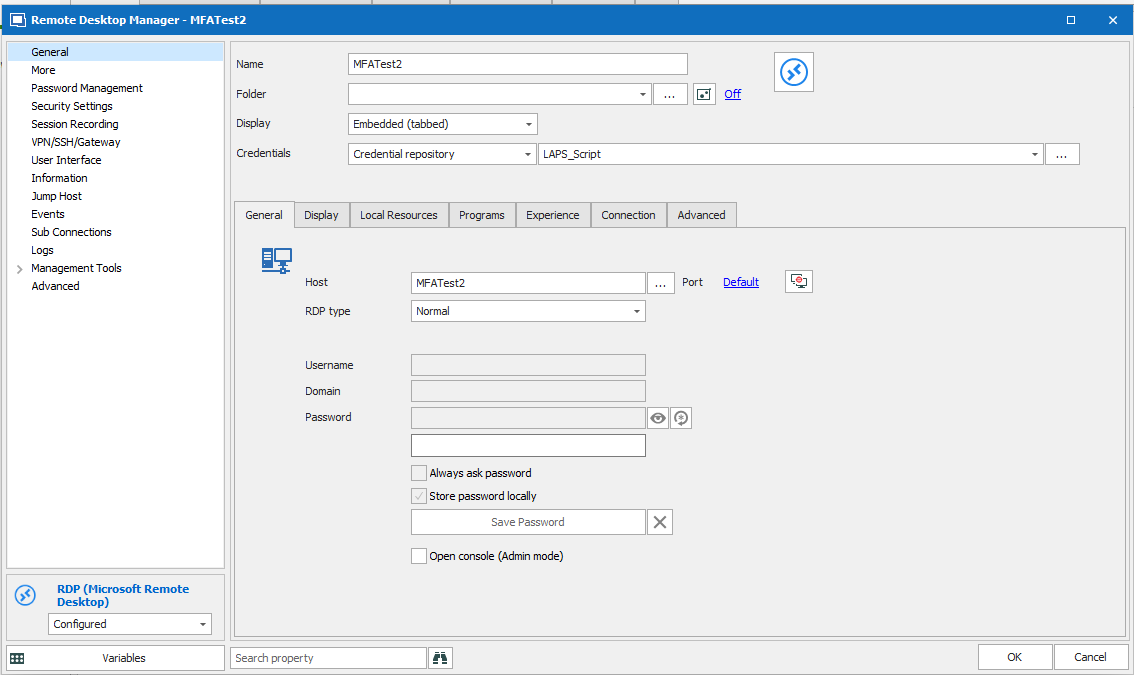
Unbenannt.PNG
Hello,
Its hard to identify the source of the issue, we would need the screenshot of the "Connection Attempt" error.
One trick I used when we implemented the feature is to use this tip, it removes the RDP session from the equation
https://help.remotedesktopmanager.com/tipsandtricks_variables.htm
Are you in a position to test this?
Maurice
Hello,
I get similar result as tomtom83. It says "Your credentials did not work" and options me to enter credentials, offering me logged-on user as default. I'm logged-on as domain user (also run RDM as logged-on user) that has permission to view LAPS passwords.
I am in position to test "the parrot", but I don't really understand the instructions. How to use bat file with RDP connection?
3.gif
2.gif
1.gif
Hello,
I'm back and successfully using LAPS script. I've changed username appropriately (to what we use) in the script and override domain to use host name in advanced settings of RDP session. Is that how is supposed to be used?
Regards,
Saša
I am trying to use the script, but I need to modify it to be able to use different credentials to run laps and get the local admin credentials. How do I set it up to utilize other credentials? Currently when running it, it uses my local user credentials and I get the LAPS did not return any value.
Hello,
A ticket is opened for a similar request for being able to use the LAPS credential entry type and run it as another user. The internal ticket number is RDMW-3051. Once an update will be available, I will update this topic.
Best regards,
Érica Poirier
Just checking if there is any news on this. Has anything been figured out?
Keith
Hello,
This improvement is still in the to do list but it's not yet implemented. I will ask that the priority be increased for having the Run as another user in the LAPS credential entry type.
Best regards,
Érica Poirier
Just wanting to check in to see if there as been any progress on getting this to be able to "Run-As" another user.
Hello,
I am sorry to mention that this improvement is still on the todo list and haven't been completed yet. I will again ask to bump up the priority for this.
Best regards,
Érica Poirier
Hi Erica,
Thanks for the great RDM. "Runa as", that would be an important feature for us as well.
Is there an ETA?
Regards
Stefan
Hello Stefan,
Thank you for your feedback.
Incidentally, we cannot provide a timeline for its delivery. However, I will add your name on the request list and will try again to ask to raise the priority on this improvement.
Best regards,
Érica Poirier
Hello,
After a discussion with the engineering department, it seems that this improvement isn't an easy one to implement. The .Net PowerShell class we are actually using can not use any other credentials as it's not an external PowerShell session. The engineering team will try to find another solution and once any update will be available, I will keep you posted. We are very sorry about that.
Best regards,
Érica Poirier
I know this post is old, but I wanted to update as in the current version of RDM (2021.2.22.0 x64) the $PARAMETER1$ value isn't passed to the script properly.. Replacing $PARAMETER1$ with $HOST$ fixes the issue for now.. see here for details.
This custom credential only works when used from a domain joined computer. I believe this may actually be a limitation in the LAPS powershell module 'admpwd.ps' which this custom credential uses. As we've started moving some computers to native AzureAD joined, this is a problem for our IT staff that still need to be able to manage hybrid joined computers. Could this custom credential be updated to support use from a computer that is not domain joined?
Hello,
Do you have documentation on how to do that even outside of RDM? My google FU didn't reveal that its possible at all.
Maurice
Assuming you have rights to the attribute, you can get it with:get-adcomputer COMPUTERNAME -server DOMAINCONTROLLER -properties ms-MCS-AdmPwd