Select credential box auto collaps
0 vote

Dear Devolutions,
When i use the option open with parameters->Open - select credential entry, the select credential enty box always opens with all folders expanded. See picture. This is very anoying because now i have to manually collaps all folders. CTRL + - does also not work like it does to collaps the tree view.
Is there already a way to auto collaps folders in the select credential entry box, or can CTRL + - be implemented, or a button collaps all/expand all?
Thanks in advance.
15-11-2017 14-25-26.png
All Comments (3)
I will assign this.
Regards
David Hervieux
Hello,
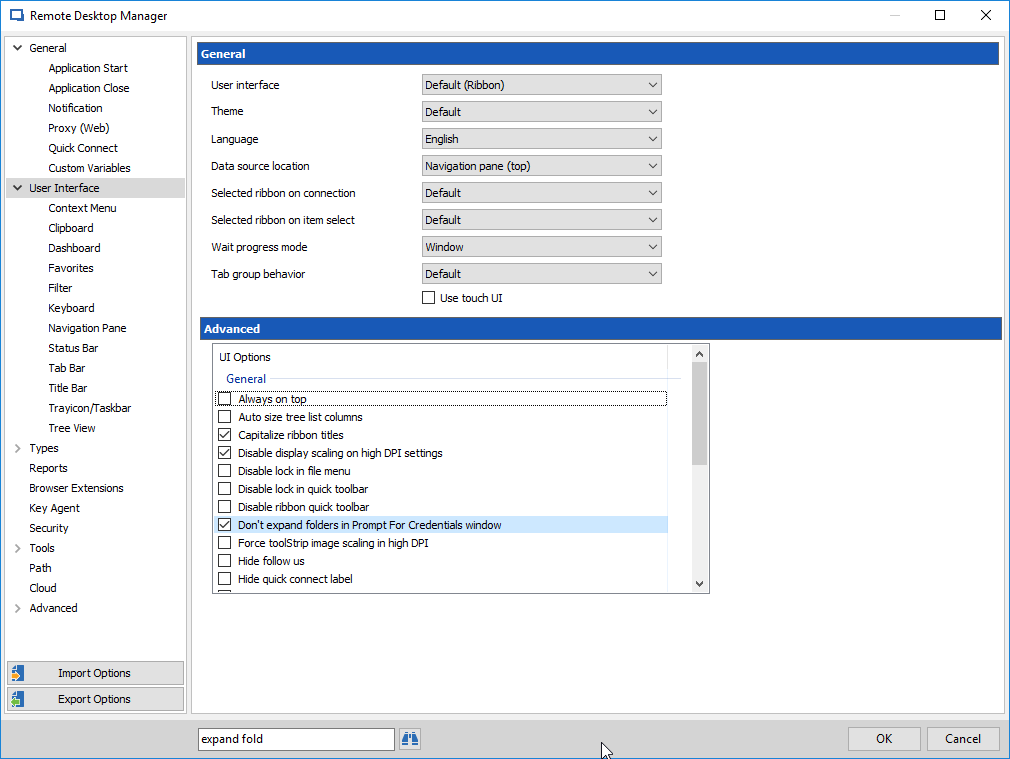
There is an option in File > Options > User Interface called "Don't expand folders in Prompt for Credentials window":
Can you try enabling this option and seeing if it works? We'll still be adding an "expand all" and "collapse all" button but this is the way to change the default state of the folders.
Regards,
Hubert Mireault
2017-11-15_15-48-45.png
Hi David and Hubert,
Thank you for assigning this request. As per Hubert suggested, the above mentioned option works! Now all folders are collapsed when opening the credential box.
Thanks you so much!