Double click to open session doesent work, 13.0.2.0

Hi folks.
After installing version 13.0.2.0, i'm unable to double click to open a session.
Is there any fix for this?
All Comments (78)
Hello,
Thank you for reporting the issue, we'll look into it and try to reproduce the behavior.
Regards,
Hubert Mireault
Thanks. i Downgraded to 13.0.0.0, and it is working.
Hi,
It seems that I partially reproduce your issue, sometime when a move my cursor just a little bit between the 2 clicks notting happen.
Is it happening all the time for you?
If it's the case I belive it might be cause by a combo of options and for that I would need to have your Remote desktop manager configuration file.
Follow these steps https://help.remotedesktopmanager.com/howto_configurationfile.htm and send your remotedesktopmanager.cfg
file to aroy@devolutions.net
Best regards,
Alexandre Roy
Hi again.
It is every time i double click. No matter how many times i click, i doesent open.
Now i have downgraded to an older version, and it is working perfectly again.
I have sendt you the file.
Hello,
Thank you very much for the file, sadly I am unable to reproduce the issue.
I got a a quick test for you that could help me isolate this case faster.
Could you go back on RDM 13 and create an entry in a SQLite datasource and see if the double click work.
That would eliminate a bunch of scenario regarding acces right and the cache.
Best regards,
Alexandre Roy
Hi again.
I updated to 13.0.2.0 again, and now i dont have that problem!
hi,
Ugh, that's odd since it's the same build, well glad that your problem is fixed :).
Best regards,
Alexandre Roy
Hi guys, this is a long term issue of mine. (ask Etienne & Jeff)
I am runnig on a Toshiba Tecra S11 with Windows 7 SP1 Pro 32 bit system, NVidia NVS2100M and with all the updates available including the .NET framework.
I am batteling the problem since the upgrade to the 11.x edition.I think that at the time the UI framework, which RDM is using, was upgraded. When I start the application, everything is working fine, but after a day or three where I put my computer to sleep and wake it up, the items in the Navigation Pane stop responding to the double click click action. They still react to single click and right mouse click, but to start a session i have to either hit the enter key, use the context menu or to click on the open session link in the main view.
When I exit the application and run it again, the double click starts working again for a few days.
I've set all the application shortcuts in File > Options > User Interface > keyboard to None, to avoid conflicts, but without success.
I have a Microsoft Arc Mouse Touch, but I believe, that is not the cause of the problem.
EDIT: I forgot to mention that I am on 13.0.2.0 at the moment since yesterday and so far no problem. But as mentioned before, the issue appears after few days. May be some register overflow in navigation?
Ok here we go. After two days the problem is back.
I have few more observation to share - the session node does not react to the double click, but the folder node does. When the session ode is doubleclicked it does not start the session thoug it loads the Dashboard of the node like a single click.
The last by double click opened session node was one with a TeamViewer configuration.
My TeamViewer version is 9.0.41110 and there are no (nor RDP) sessions running.
Hello marcel,
I see, could you tell me if you do a Ctrl-F5 in the tree view if that fixes it ?
Regards,
Alexandre Roy
Hi Alexandre,
I've already tried the various "refresh" methods, but no success there.
Wen I run the Performace/Debug profiler and then double click the already selected item, it does not record anything.
Then when I click another item, it says just "SelectionChanged : 21 ms" and thats it. SelectionCahnged, no other event is recorded.
I've set the debug level to 2147483647, but the results were the same at any level.
The Connections.log does not register any attempt of RDM to connect to the host.(Still talking about the double click action)
I've tried to run the Sysinternals process monitor to capture the events, but the only recoded event on the already selected and doubleclicked item was a registry "RegOpenKey" action at HKLM\SOFTWARE\Microsoft\CTF\KnownClasses with the result of "NAME NOT FOUND".
I am attaching the Stack of the process.
20171112-RDM-Proc-Mon-event-stack.csv
Hi again,
That is the first time I hear of this issue, not quite sure what is causing this but one thing is certain, you're not the only one getting it.
Can you tell me what type of datasource you are using ?
Regards,
Alexandre Roy
its a "Local Data Source" with 106 entries. (session nodes)
As mentioned before, it takes few days till the issue kicks in.
Is it possible that RDM has some hidden issue with shell extensions like TortoiseSVN?
Data source ID: 381f4392-ecaa-41a1-875b-19f3a252bb94
Data source type: Microsoft Access
Data source size: 158.9 KB
Data source settings size: 160 Bytes
User specific settings size: 0 Bytes
Offline: False (Cache - OpenMCDFv2)
Entries/Items: 122/122
Sessions: 106
Data entries: 0
Credentials: 0
Sub connections: 0
Documents: 0
Contacts: 0
-->Sub total: 106
Session tools: 0
Groups/folders: 16
--> Total: 122
Virtual groups/folders: 1
Custom images: 19
RTF notes: 0
Connection client version: 0x0000000000000000
Hi, some additional discoveries:
While the group node is selected and the main view is displaying the session list, the double click does work on that list but still not in the tree view.
Hello,
Just a quick question, the application has been running for 2-3 day and has been going though multiple computer sleep to end up getting the issue?
After restarting RDM, do the double click work?
Do you have a backup enabled? If so, is it a File backup or an online backup?
Regards,
Alexandre Roy
Hello Alexandre, the answers are:
correct
yes
I have AOMEI Backupper which runs every night. I am not using the integrated backup solution.
Hi,
As it stands right now, this issue is very hard to reproduce as it can take a day or 2 to reproduce while having the application opened.
I do not know what could trigger the entries to not respond to the double click.
We can only guess what is the problem and so far, I got my own ideas on what it could be.
I'll keep an eye on this one and see what we can do about it.
We will contact you if we have further info.
Best regards,
Alexandre Roy
Hi,
I've installed the new 13.0.3.0 version yesteday and also the recent windows update. Today, after 24h, the double click problem is back.
It has to be some issue wit the DevExpres framework. This is a response to a simmilar problem a user od the framework had in the past.
Might the be of help?
Hi,
Thanks alot by the way, that post is really helpful. also it is related to another issue that we had regarding scroll down and collapsing item.
We'll see what we can do.
Best regards,
Alexandre Roy
No problem, you are welcome...
Its enough to visit the DevExpress KB at https://www.devexpress.com/Support/Center/ and search for DoubleClick Tree.
The best parts are the code examples in the results.
I think I've GOT IT! I cant reproduce it every time, but most of the time.
Please set up your laptop so it wont go to sleep when you close the lid. Now start RDM and minimize it to the tray. Close the laptop's lid, wait few seconds, open the lid and try to connect to a session via double-click.
This problem is due rendering while using hardware acccelerration. Its like when you connect to a computer without a LCD connected using teamviewer or VNC. Then when you open a prowser (no matter if its IE or Chrome), there is no content rendered on the page.
You have to disable the hardware acceleration in the browser to get the page content rendered.
I think that in this case its some bug in the devexpresss framework.
@Jens - do you have your system set up as described above? (no sleep mode when lid is down)
I have added some debug information and this will be in the next minor update. When this happen next time just enable the Debug console and try to double click.
Regards
David Hervieux
Hi David, I will do just that. Any ETA on the update?
I did a fix this morning for a potential freeze when closing an RDP session and I want to make sure that I did not break anything. I'm pretty sure that I will be able to release the update Monday after the QA tests.
Regards
David Hervieux
I hope you managed to also put in the fix for the crash when you close the continuous ping tab. See my other ticket.
Hi,
Have you tried the new release? Do you have the link for your other ticket?
Regards
David Hervieux
Hi David,
I've already responded via mail, but somehow the response didnt find its way here...
so here it is again:
I've installed the 13.0.4.0. version, but it does not look like the debug code would get in to it.
I have checked all the debugging options but nothing got captured/recorded.
The Double-click problem still continues to lurk around in this version.
This means that the double click event is not even triggered. I will check if the mouse down is triggered.
Regards
David Hervieux
Yup. just let me know when you have something to test.
I'm facing the same Problems. Sometimes it can be solved by closing and restarting RDM.
The newest beta 13.0.6.0 has the Problem too, 13.0.5.0 was way better.
Just for a test when this happen. Could you verify if this happen also in the Private Vault and in the group dashboard. I want to know if it's only in the main navigation tree.
Regards
David Hervieux
The problem persists. I cant confirm the other locations as I am nor using them. What I've also noticed is that the update button on New version window doesnt work as expected. The window just closes and nothing happens. When I restart RDM, it starts to work as usual. There has to be some common denominator.
I've also noticed a new, one not so nice, behavior which started wit the 13.0.5.0 version. When you have say 2 sessions open and you let the computer in session one to reboot in say 30 seconds, then you switch to another session, after the tab closes the current tab is switched to the dashboard. This is very annoing while working with multiple sessions.
Just a short update from me.
I had the problem last week, 2 days in a row. But then it dissapered!
I think there might be somthing deeper, somthing unkonwn. Maby a driver og hardware issue.?
The computer i use is a HP Labtop, all HP programs removed.
The display adapter is a Intel HD Graphics 4600, Intel Processor, my mouse is a wireless Logitech M750.
I have 2 monitors connected.
In the bove mentioned sense, this is not HW related. I have a Toshiba Tecra laptop with NVidia card. I think that the problem is related to the used .NET framework and the power management settings in regards of the closed lid.
When I came to my office today, I had my laptop rebooted. Then I closed the lid and put it in to the docking station to work on a external monitor. Now when I doubleclick on a session, it does not open. Single click works though. The doble click behaves like a single click which I can see on the Dashboard where the content aligns wit the session item.
Could you try any other grid and check if the double click still works? For example the grid from the File->Data Sources.
Regards
David Hervieux
Just now having the Problem with double-click not functioning. It's not working in Public Vault AND private Vault.
But in Data Sources grid, double-click works fine. The Problem can be resolved by closing and starting RDM mostly.
By selecting the entry and pressing "Enter", the sessions opens.
Could you give a try to the latest beta? I have updated the third party (DevExpress).
Regards
David Hervieux
The latest beta 13.0.8.0 still has this issue. I'm facing it right now.
Maybe interesting for you, I'm using a portable Version of RDM, but I cannot say, if it only happens there.
I have this same issue on the latest version of RDMF: 4.0.4.0
Yup 13.0.8.0 still suffers from this problem.
I think i found the trigger: when i open the application, it works OK. it will work OK until i close a session to a host that has a vpn profile associated with it. after that, it no longer updates the overview pane and doubleclick stops working.
No VPN profiles are used on my end.
Hi, I have added more debug log in the click. This should be in the next beta release. I still don't understand the problem source.
Regards
David Hervieux
So far on 13.0.14.0 the problem persists. the debugger records only the "SelectionChanged : 28 ms" event. The behavior is the same as single click.
Today i've noticed one more side effect of the double click issue. When the problem is present and I want to drag&drop a menu item from the tree in to another folder, it asks if I am sure nd when confimed YES, it does nothing. The item is not moved at all.
Everything starts to work again after the restart of RDM.After rthe restart of RDM
Guys, please when the double0-click problem is present, try to move some item in a different folder using drag & drop if it works.
Thanks
Do you see the double click problem if you switch to the Mobile view?
Regards
David Hervieux
hi there,
no.
the overview pane still suffers from the same issue though.
Still having the same issues with 13.0.19.0 Beta.
We are at 13.5.0.0 and the problem is still present.
Some new remarks:
- when I switch from vault treeview to recently used entries - the double click works there (going back to vault does nothing)
- putting the entry to Favorites and trying to open it from favorites does not work
- the different Vault views work as follows (sory took me a while to find the view switch)
View > Vault > Tiles = works
View > Vault > Details = works
View > Vault > Large Icons = works
View > Vault > Tree View = does not work
View > Vault > Mobile View = works
So, all in all, the bug must be somewhere in the tree list framework.
Hello,
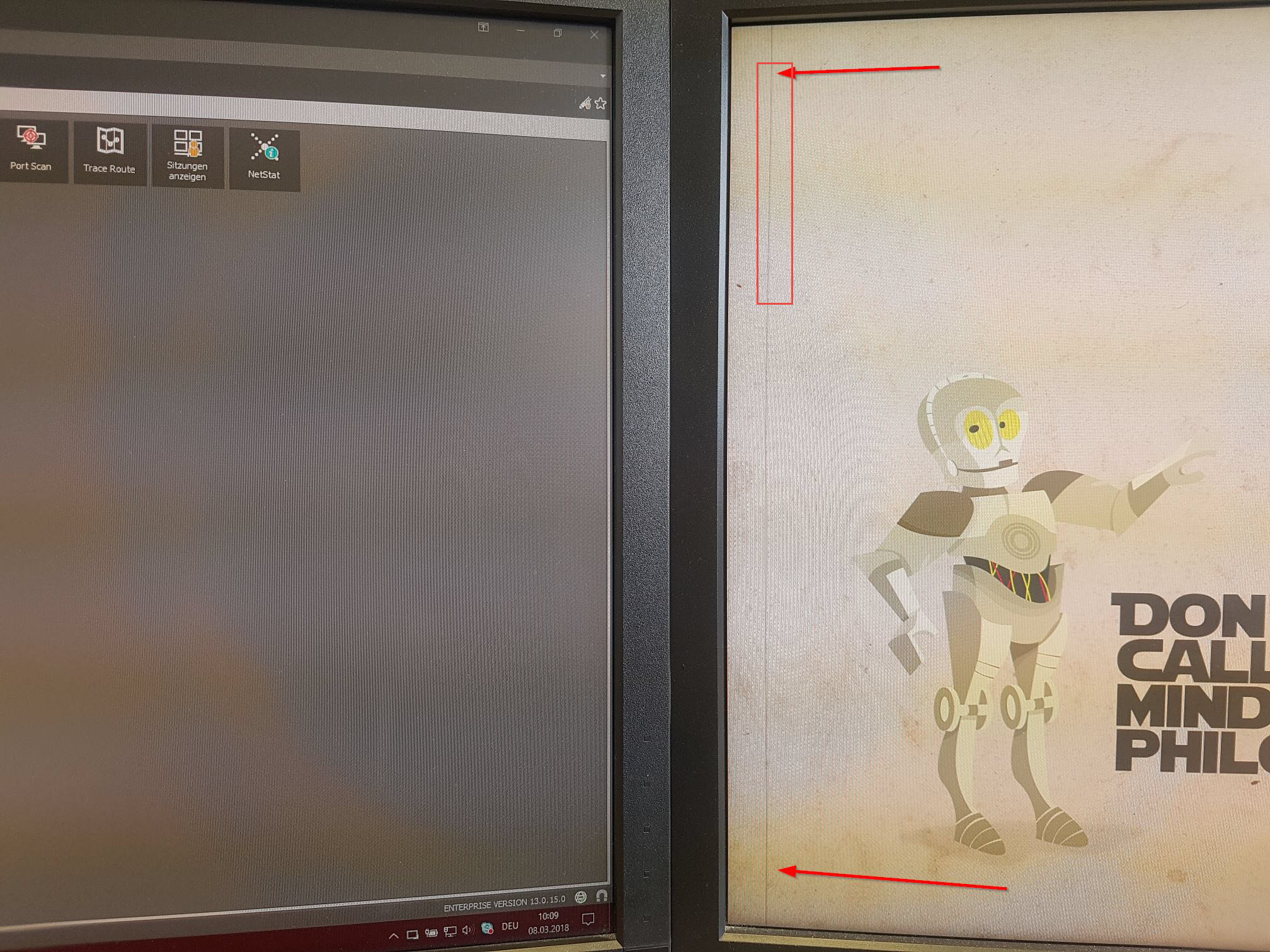
We've had a UI issue report recently mentioning that when that UI issue happen, thier double click to open session is not working unless they restart the application.
That user use 2 monitor and when this happen he has a vertical line on his second screen, looks like a missplaced window.
Just came here to ask if you do still have the issue, do you have that same UI Issue as displayed on the screenshot below ?
Best regards,
Alexandre Roy
UI Issue Vertical line.jpg
I am working on a external monitor connected to a docking station or on the laptop's monitor, but never in the multi monitor configuration.
The Monitor has a 1920x1200 and the laptop 1600x900px resolution (at 100% zom). I allways properly disconnect the external monitor and putthe laptop to sleep. Later I just wake the laptop up. During this time theRDM is minimized in the tray.
I have RDM allwas in full screen or in tray minimized mode. I am not using RDM in windowed mode.
Hello again,
Do you go often in the *File* Menu ?
Best regards,
Alexandre Roy
Very rarely. I spend most of the time between the navigation frame, The dashboard and the sessions.
Hi Marcel,
just another short question - do you work often with undocked windows or with the tabbed feature or ?
Regards,
Min
I am allways working with tabbed interface in regards of RDP. The teamviewer session and VNC sessions open in new windows. But I dont think that the connection type has anything to do with the issue as the connection opening action is the last of the steps on double click.
The problem is that the double click is not even registered as Double click by the UI elements.
I rarely get the error any more.
But i have 2 screens connected to a dock.
When i get the problem, i just have to close down RDP manager, and reopen it.
hello,
Quick question to most of you, do you use the option to start RDM as a Maximized window on startup ?
Regards,
Alexandre Roy
Nop, "last saved" wich is always maximized. So i guess i should be using it as that's exactly what i want.
Alex - RDM starts in full screen mode, and the setting is "Last saved".
I think I am getting on something,
If you *Unmaximize* RDM (Restore), does your application overlap on the second screen a little?
Regards,
Alexandre Roy
I am not using the two screens at once, so there is no point. Resizing the window has no effect. The only fix is the restart of RDM.
Aight,
This bug might be related to the layout itself, found out that deleting the .lyt files in %localappdata% > Devolutions > RemoteDesktopManager, can potentially fix the issue.
@Marcel, before you delete those 6 months old .lyt file, I Would like to use them for further test if you do not mind.
send them at aroy@devolutions.net.
If anyone encounter the issue again after deleting those .lyt files please update this post.
Best Regards,
Alexandre Roy
I have deleted those files in the past with no success. the issue persists.
Alex, please wait till the issue reappears, then I will move those files and send them to you.
Sure that works, Thank you :).
Regards,
Alexandre Roy
I am having the same issue. If I could supply files that may help, please let me know which ones and how to send them to you.
hello,
@engageant are you on the lastest build 13.5.8.0 ? This will confirm that the last possible fix we made did not work.
Regards,
Alexandre Roy
Just upgraded - will post again if it happens.
Just occurred on 13.5.8.
Hi,
I've recieve 2 RDM configuration files of the UI from 2 customer so far that encountered the issue, It helped me alot to theorise what could be the root cause, but havn't got luck yet. I would like to have yours too if possible, just so I can compare your options with the 2 others and see what y'all got in common.
The file is located in %LocalAppData%\Devolutions\RemoteDesktopManager and is called "RemoteDesktopManager.cfg".
Please follow these steps http://help.remotedesktopmanager.com/howto_configurationfile.htm and send it to a aroy@devolutions.net.
If anyone else encounter this issue I suggest you do the same so I can gather as much data as possible to reproduce this issue.
General question I will ask often based on the experience I got with this issue.
1- Do you undock sessions tab often?
2- How many screen do you work with?
3- Do you close the application everyday or does it still run while the computer is in sleep mode?
4- And does the issue manifest right after the computer come out of sleep mode [EDIT] 5/17/2018
We know the issue goes away after an application restart so that is the current workaround.
Really appreciate the time you guys spent helping solving this issue.
Best regards,
Alexandre Roy
Hi,
Double-click to open session didn't work after my upgrade last friday but I found that this problem only occurred in the 32-bit version (RDM EE 13.5.6.0). In the 64 bit version everything works fine.
Our Team is using the 13.5.6.0 64bit version and have this issue, we have multiple reports of it (I'm having it as we speak and verified the 64 bit version is running) . If you need anything for testing please let me know.
--
Eric Sakariasen
Connetic IT Support
The next RDM version will have a major update with the third party. This could help. It's really not a simple bug to fix.
Regards
David Hervieux
Hello,
Came in with another theory, I just need to know, what kind of anti-virus application do you use ?
I bet most of you will have same product.
regards,
Alexandre Roy
Win 10 Defender
--
Eric Sakariasen
Connetic IT Support
Hi guys, I am running ESET NOD32 Antivirus 11, but I dont think that ESET has anything to do with it.
ESET Endpoint AV v6.6 here.
@Marcel Lipovsky
You're probably right, my guess is already wrong seeing you're not all on the same anti-virus. I thought about an application that you might have all in common might be the case. This bug is a real mystery and there is defenetly something you all have in common that we do not know and it's probably something that we do not have inside our environment as we have not heard of anyone having encountered the issue before.
I guess knowing if there are more than 1 person is having the issue in your environment would clear that question out.
Regards,
Alexandre Roy