After upgrading to v. 13 some SSH sessions are not working

Hello,
I've just upgraded to v. 13 and now I have some of my SSH sessions that are not working fine.
When I try to connect I receive this error:
Negotiation Failed. Server signature is not valid.
I've tried to downgrade to v. 12 and they work fine.
Any suggestion?
Thanks
All Comments (31)
Do you use a Rebex SSH session?
Regards
David Hervieux
Hi David,
yes I'm using Rebex
Thanks
Could you try to convert it to our default SSH client instead of Rebex? You can copy the session before.
Regards
David Hervieux
Hello David,
With the default client is working fine, but we need to solve also with Rebex for two reason:
1) with the default client some function key are not working fine
2) we cannot easily convert sub connections
and 3)... if it was working before update I expect that will work again. Convert and tests hundreds of sessions need time
Do you have plan for fix this issue in next release?
Thanks
Fabio Grasso
We just have updated the Rebex component for the next minor update. I hope this. I will publish this version later today.
Regards
David Hervieux
Hello,
I have similar problem with the update to 4.0.2.0
I see an error messages saying "Negociations failed. The connection was closed by the server."
It works fine with SSH-Shell, but it's difficult for me to change all my rebex sessions to built-in.
Best regards
@Fabien,
If you are using the Enterprise Edition of RDM, it's possible to convert easily your Rebex session into our native SSH Shell.
To do so, select your sessions and go in Edit -> Batch Edit -> Batch Actions and select Convert Putty/Rebex session to SSH/Telnet/PortForward session
I recommend trying with 1 or 2 session(s) to begin to make sure that the changes are applied properly.
Best regards,
Jeff Dagenais
You can also download the zip from RDM enterprise et replace all the Rebex dll for a test.
Regards
David Hervieux
When should this be released? Hundreds of SSH connections we have suddenly stopped working in 13.0.3.0 and converting them loses all kinds of settings.
Hello,
Here's the Rebex DLLs we use in the latest (and internal) version of RDM. Could you unzip them and see if this fixes your issue?
Regards,
Hubert Mireault
Rebex.zip
No luck. Same error.
Hi, we are somewhat having the same problem.
This happened quite recently on existing, normally working, ssh rebex sessions.
Changing to native ssh resolves the issue, but thats not durable.
We are on version, 13.0.3.0, thanks.
Martin
Same to me, the zip file provided doesn't fix the issue with Rebex session, I'm also on 13.0.3.0.
Hello,
One last try with this, could you try these DLL files. They are from an earlier version of RDM dating from september. If this works, we'll use them for the next RDM minor build and contact Rebex to see what might be wrong with their latest version. If this doesn't work, we'll go for another older version of Rebex.
Sorry for the inconvenience, we're unable to reproduce the issue here and since it's with a third party, it's difficult to figure out the underlying issue.
Regards,
Hubert Mireault
Rebex.zip
No luck here. Same error with my connections.
Hello,
Unfortunately, we cannot revert to an even earlier version of the Rebex DLLs or it would cause issues with the code. The workaround is to revert to a version of RDM 12 that used to work for you. We opened a ticket with Rebex to see if they can fix the issue or otherwise guide us as to what we need to do.
If you want to try again, there was a release made just today, but seeing as the issue is present in a lot of versions, I don't think it would be fixed in this one. I attached the DLLs to this post, as usual.
@VirTechSystems You mentioned settings being lost when converting from Rebex to the Native SSH Shell, do you know which settings exactly? We would like to improve the conversion if it's not perfect.
@Fabio What do you mean by the function keys not working as expected in the Native SSH Shell? Could you describe what you mean? For the subconnection conversion I haven't encountered any issues either.
Regards,
Hubert Mireault
Rebex.zip
Hey Hubert,
The settings that I noticed were lost are:
Recording>File name (log)
General>KeepAlive interval
I'm converting from Putty/Rebex to SSH Tunnel.
Thanks.
The change for the recording and the keepalive will be available in the next minor version of RDM. Hopefully with this you'll be able to convert the rebex entries to native SSH if you want to.
Rebex got back to us and hinted toward the host key algorithm settings. Could you try only enabling the appropriate host key algorithm that your server is using as a test. For example, my test server is using an RSA key, so I set it up this way:
Otherwise, would it be possible for you to provide us an access point to see the issue on our end? I don't think we would need credentials since this issue should happen before any authentication is required. It may help us and Rebex diagnose the issue.
Regards,

Hubert Mireault
2017-11-21_15-37-17.png
And if you could enable advanced rebex logging, located in File > Options > Advanced, it will create a file called AdvancedTelnetSSH.log in the same place as your option file (in the advanced tab, this tells you where that is). I may need to forward this to Rebex to allow them to diagnose the issue, you can send it to me through email at hmireault(at)devolutions.net or private message me on the forum.
Regards,
Hubert Mireault
The bulk of our ssh connections are to Fortinet routers. I'm not really sure what algorithms and encryption settings are being used.
I will send you the log via private message.
Thanks for your help in getting everything tweaked and back to working.
Thank you, I received the logs and forwarded them to Rebex. When I get an answer from them I'll update this thread.
Regards,
Hubert Mireault
So Rebex got back to us with their analysis of the logs. They said that the server supports both DSA and RSA and that the component tried DSA, which might be why it failed. Could you try setting the host key algorithm to RSA (uncheck all of the other ones)?
They told us to set the "Preferred host key algorithm" value to RSA but this option is currently not exposed in RDM. I'll add this but it will only be available in the next update.
Regards,
Hubert Mireault
I tried only RSA again on a few connections and they still aren't connecting. Did something change between updates to change how the host key algorithms are chosen?
Thanks.
Hello,
This is unfortunate :( When 13.0.5.0 is out we'll have the preferred algorithm setting so I'd like you to try that out and send the logs again so I can forward them to Rebex.
On the RDM side, the only thing we did was continually update the Rebex component, we haven't changed how we send the host key algorithm settings. I'm not sure if anything changed on the Rebex end of things, especially since we only noticed it now.
If you want to track the issue, you can follow the thread here: http://forum.rebex.net/7525/terminal-error-negotiation-failed-server-signature-valid?show=7534
Regards,
Hubert Mireault
Hi,
we had the same "Negotiation failed. The connection was closed by the server." with some Linux hosts.
In my case switching off the "DiffieHellmannGroupExchangeSHA1" was the solution...
Regards,
Jens
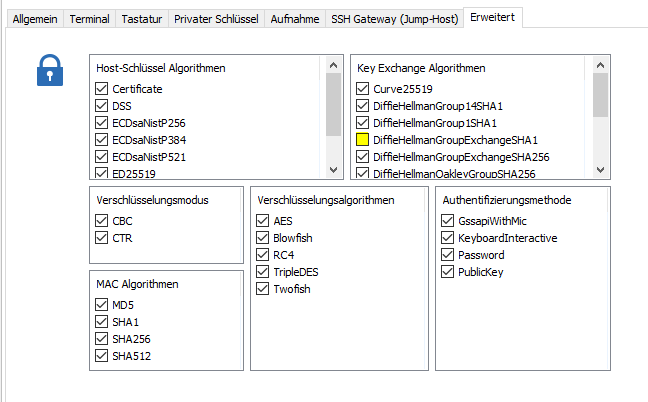
2017-11-27 19_51_09-Remote Desktop Manager - .50.250 proxy r.png
Disabling that makes the connections start working here, too. Some kind of error with SHA1?
How can this be set for all sessions?
Thanks.
Hi,
this can be done via Batch Actions and Custom Powershell Command;
Enter this command and click OK:
$connection.Putty.SshKeyExchangeAlgorithms = "Curve25519;DiffieHellmanGroup14SHA1;DiffieHellmanGroup1SHA1;DiffieHellmanGroupExchangeSHA256;DiffieHellmanOakleyGroupSHA256;DiffieHellmanOakleyGroupSHA512;ECDiffieHellmanNistP256;ECDiffieHellmanNistP384;ECDiffieHellmanNistP521"
$RDM.Save();
This setting match the screenshot from Jens.
Best Regards,
Min
Thank you Min :)
We'll forward the information to Rebex to understand what exactly is happening.
Regards,
Hubert Mireault
Any news on this issue, is this resolved in any new patches?
@Martin Hansen,
Are you using a SSH Shell or SSH Shell (Rebex) session?
If you are using a SSH Shell (Rebex) session, could you try our native SSH Shell session to see if it's working with this type of session.
https://help.remotedesktopmanager.com/sessions_sshshell.htm
Best regards,
Jeff Dagenais
And to add to what Jeff said, we added an option for the preferred host key algorithm in the SSH Shell (Rebex)'s advanced tab. Rebex told us changing this could help the issue but otherwise we don't have a solution that works for everyone. We recommend using the native SSH Shell since we have more control over its behavior.
Regards,
Hubert Mireault