I downloaded Free Edition and i used Advaced/Reconnect/Smart Reconnect but doesn't work
I downloaded Free Edition and i used Advaced/Reconnect/Smart Reconnect but doesn't work

I downloaded Free Edition i create a quick connection and i used Advaced/Reconnect/Smart Reconnect but doesn't work ,remote goes's idle then disconnect my session, i must reconnect manually all the time, how to fix that? thank you
All Comments (4)
Hello,
When you mean quick connection, do you mean that you are using the Quick Connect toolbar or you have created a session in the navigation pane?
Could you post some print screens of your configuration please.
Best regards,
Jeff Dagenais
ok sure, first of all i downloaded and install this version: Free Edition Version 3.6.5.0 | 144.2 MB | 09.06.17
Ok now i will try to log with some rdp ip user and pass, here:
and i also make this config:, if u need something more just ask: 
and my session is close and not reconnect anymore and receive some idle mesage and that's it, i don't know how to fix this or how to config
thank you
i don't have administrator rights on that rdp, so i can't install or modify registry inside that's why i prefer a tool to automatically log me in after im disconnected
Hello,
Indeed, the smart reconnect allow you to resend the credentials to the remote host when the connection is lost, but the action to reconnect needs to be done manually (ex: right-click on the RDP tab and select Reconnect).
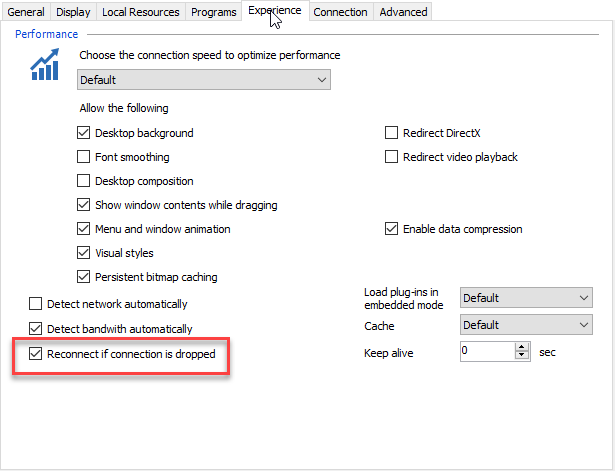
If you want that the RDP session reconnect by himself if the network connection is lost, you can try to check the the Reconnect if connection is dropped option in the Experience tab.
Best regards,
Jeff Dagenais
2017-10-23_08-54-14.png