Secret Server Credential super slow

Hello, Trialing RDM to replace another product we're currently using.
I'm having issues with the secret server integration, it works however when it tries to do anything that would require accessing secret server the whole program goes not responding for probably about 2 minutes but does eventually work.
This will happen if you try to pick the secret from the secret server credential store on a new RDP connection. Also happens after you've set up your RDP connection and simply click open session. It'll just sit there not responding for a while and then it does actually work.
Our secret server is locally hosted, I even installed RDM on the server that hosts our secret server and used https://localhost/SecretServer/webservices/SSWebservice.asmx for the service url but still had the same issue. Oddly it did get worse when running it that way RDM would now sometimes throw a timeout error.
We have thousands of passwords in secret server looks like it may be searching them all every time?
The delay is the killer for us our engineers are constantly jumping on and off sessions and that isn't workable for us. Is there something that we can do to speed it up I'd like to try and solve it because the program looks really great and we're going to be looking at the server too.
Thanks in advance,
Craig
All Comments (15)
Hi Craig,
Could you send us a print screen of the Secret Server session?
Also, are you using the Prompt for list or By name as a selection?
Could you test both of the option if you have the same problem?
Best regards,
David Grandolfo
Hi David,
I've tried all 3 selection types they all seem to have the same slowness issue.
Attached is what I get when I click the ... on the standard method. Sits like that for a minute or two then brings up the list to select secrets from
Cheers,
Craig
1.jpg
Hi,
I will ask our team to verify if we do many call of if it's the Secret Server implementation that does the query. I think that we only call their API.
Regards
David Hervieux
Hello,
I identified a few things that may cause slowness when authenticating to the server and made some changes.
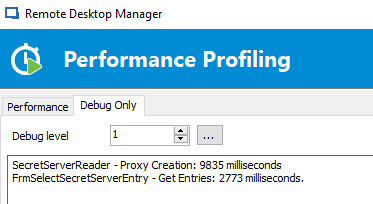
I also added a few debug messages which might help pinpointing where RDM hangs. To enable these log messages, open the profiler (Help > Profiler), switch to the "debug only" tab and put the debug level to 1. Then, try to open an entry that uses your secret server credential. The output debug should look like this:
Both of these are not available in the current version but will be available in the next beta. If the slowness is from the calls to the secret server WebAPI I'm not sure we can do anything, but if it's on our side we'll look at what can be done.
Regards,
Hubert Mireault
2017-10-23 3-58-03 PM.jpg
Hi again,
I installed the 13.0.0.0 version today and did some testing with the debugging on. What do you make of the info below?
Here's my findings.
* Got this when I picked from the secret server credential on the group the connections inherit from
SecretServerReader - Proxy Creation: 7637 milliseconds
FrmSelectSecretServerEntry - Get Entries: 71261 milliseconds.
* Got this when I then connected the session inheriting the creds from the group. It sat at not responding before the opening in console line appeared. Noticed it didn't have the second FrmSelectSecretServerEntry come up, but did have the proxy creation twice.
SecretServerReader - Proxy Creation: 357 milliseconds
SecretServerReader - Proxy Creation: 231 milliseconds
Opening in Console / Admin mode
* Created new SS cred and made it the default lookup option clicked the ... to select got this (missing FrmSelectSecretServerEntry)
SecretServerReader - Proxy Creation: 4505 milliseconds
FrmSelectSecretServerEntry - Get Entries: 72228 milliseconds.
* After selecting the entry it went not responding again for an even longer time and got this (missing FrmSelectSecretServerEntry)
SecretServerReader - Proxy Creation: 374 milliseconds
* Clicked ok to save it and it went not responding again got this
SecretServerReader - Proxy Creation: 527 milliseconds
* Modified the group i used earlier to use the new lookup SS cred I just created. Instant, no log.
* Connected the same session as before, got not responding again (missing FrmSelectSecretServerEntry)
SecretServerReader - Proxy Creation: 364 milliseconds
SecretServerReader - Proxy Creation: 226 milliseconds
Opening in Console / Admin mode
Each time it went not responding there was a 2-3 minute wait
Craig
More testing, created a ss credential that uses the name lookup option, set the group to use it. right click on a session and select view password. goes not responding again for about the same time. It then pops up the window with the correct details. only 1 entry in the profiler.
SecretServerReader - Proxy Creation: 338 milliseconds
Connecting the session has the same results.
Hello Craig,
Sorry for the delayed reply. I've looked at what calls we do and for the "GetEntries" call we log, the requests made to the secret server API are "SearchFolders" and "SearchSecrets". We don't do anything else that could take a long time processing. This means the calls to the API themselves seem to be what's taking a long time. For the other hangs, we will take a look at it, but it's difficult to diagnose as it may be deeper seated inside of RDM and not only with Secret Server.
We would need to be in contact with the Secret Server team to see if anything can be done to speed up the API calls or to otherwise diagnose the issue. Since you're one of their clients, we recommend you contact their support team and CC our own (support@devolutions.net), they wil work together for the continuation of your case.
Regards,
Hubert Mireault
An update on this i've logged a support ticket with thycotic last week (case 00198276). They are currently looking at the secret server logs.
My trial ends in 2 days, is there anyway of extended it. Will be a little hard to troubleshoot if I can't use the program.
Thanks guys.
Hello,
I just sent you a new Trial key via Private Message
Etienne Lord
Hi Folks,
So I have some news Thycotic got me to run some sql queries against the ss db this one in particular "EXEC sp_updatestats @resample = 'resample';" has sped it up so it works in about 3-5 seconds. So yay usable now.
I have one more question, I have the Secret server credential set to Use "My Account Settings" on the General, general Tab. It shows my user name on that screen. However when I go to select from list a credential using that secret server credential it pops up the "secret server database opening" screen and it only has the domain filled in(cause I filled it in the domain box on the general tab of the credential). Doesn't seem to use my account settings credential to connect to secretserver.
Thanks,
Craig
Glad to hear they managed to help you speed it up :)
For the second issue, this is weird. When I put in my username in the My Account Settings it is properly used by the Secret Server entry. What datasource type are you using? Is it SQL server?
Regards,
Hubert Mireault
Using devolutions server with sql db. However today it seems to be showing my name up on the ss entry screen,not sure whats going on there so I guess don't worry about it.(I closed and opened it multiple times yesterday but still had the problem)
Thank you for the information, we'll stay on the lookout. If the issue comes back for you please let us know.
Regards,
Hubert Mireault
Actually I just found where it does it.
If you have a pick from list secret server credential when you assign that as a credential to a connection and click pick from list it pops up the box without pulling your my account settings.
Good catch Craig :)
I found what was causing the issue and it will be resolved in the next RDM build.
Regards,
Hubert Mireault