First RDP connection not 'full screen'

Hi,
Ever since I started using the Beta 12.9.3.0 the first session I connect to always isn't nicely fitting in RDM.
The second and up do fit themselves nicely within the embedded frame.
A reconnect on the first session solves it, but to me this sounds like a bug.
https://www.screencast.com/t/AUla336vxHY0
Cheers!
Sjoerd
All Comments (20)
I will ask the QA to reproduce it. This is a strange bug indeed.
David Hervieux
Hello,
To reproduce the issue, I would need this bit of informations from your side.
Is it always the same sessions that has this display issue?
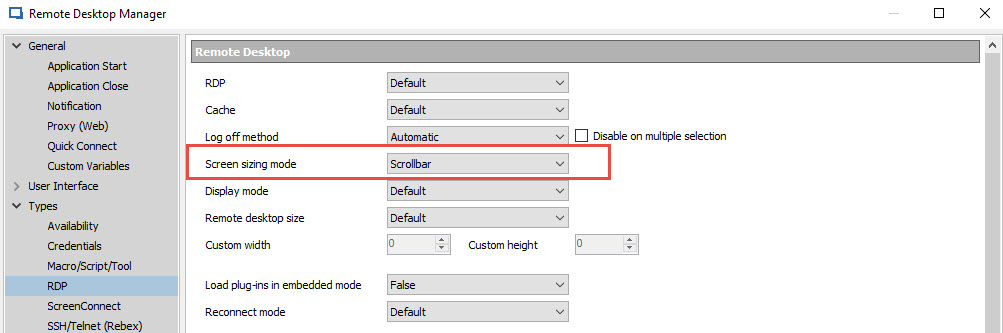
What are the default display settings set to in File > Option> Type > RDP > Screen Size Mode.
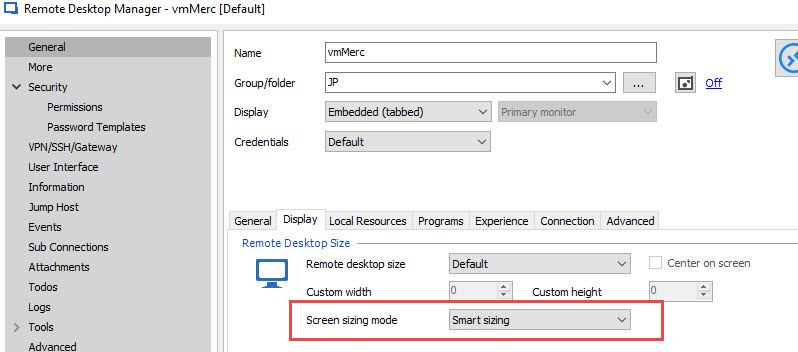
Also I would need the sessions display property.
Best regards,
Alexandre Roy
RDPdisplay.jpg
ScreenSizingMode.jpg
Hi Alexandre,
It appears that setting the default sizing mode in the Options dialog to Smart Sizing solved it.
I guess that in the upgrade this setting changed, or maybe the default changed? not sure... anyway. It's fixed now.
Thanks!
Cheers!
Sjoerd
Hi Alexandre,
I'm getting back on this because the Smart Sizing is causing the first session to be a little blurry. When I connect another session everything is ok.
So I do feel that something is off ever since 12.9.x.
Cheers!
Sjoerd
Hi,
It's possible that the application does not calculate the right size. Could you check the resolution shown in the tooltip (mouse over tab page). You can compare it with the one in the diagnostic.
Regards
David Hervieux
Hi David,
What do you mean with Diagnostic?
@Alexandre, I have checked and both the global settings and the session itself are set to Scrollbar. When I tried Smart Sizing it appears to look ok, but the sessions looks blurry. Using the Scrollbar settings I see the scrollbar on the first session.
This happens only on the first connected session.
Any tips?
Cheers!
Sjoerd
The diagnostic in the ribbon Help. The workspace size should match the resolution. Just a quick test, if you open a web site embedded as the first connection, do you get the same problem when you open the first RDP?
Regards
David Hervieux
Hi David,
Nope when connecting to an embedded webbrowser session it does not happen. Only when connecting to an RDP session.
Checked the diagnostic and it appears that that workspace resolution is smaller then what the first connected RDP session has.
Does this make sense?
I even installed the same beta version on a different machine and do not have the issue on that machine. Even dumped my .cfg file and started RDM with a brand new config. Still the problem exists....
Cheers!
Sjoerd
Could you post the resolution values? Perhaps it's a problem with the rounding when it's an odd value.
Regards
David Hervieux
This is the res. for the session: 1578x944
This is the workspace res.: 1578x918
Cheers!
Sjoerd
David, one more thing, after reconnecting the same resolution (1578x944) is on the tooltip.
Cheers!
Sjoerd
And the good resolution (the expected) is 1578x944?
Regards
David Hervieux
When the session is reloaded (Reconnect) everything is ok and that resolution stays the same.
Cheers!
Sjoerd
I will tried a potential fix. This is not in RDM 12.9.6 but the next.
Regards
David Hervieux
Hi David!
We have upgraded today to version 13.0.3.0 but this problem is still in there. However it's not on all computers. So I have no idea why this is happening.
Any clues?
Cheers!
Sjoerd
Could you try to open the debug windows in Help->Profiler
Open you connection and let me know if you see something. I have added a small log in this version.
Regards
David Hervieux
Hi David,
This is the result. Not sure if it helps...
Main thread (UI)
----------------------------------------
SelectionChanged...
Connection.GetLog : 122 ms
SelectionChanged : 750 ms
reload: False hasSecurityChanged: False hasChanged: False
LoadConnections [Devolutions Server : DVLS]...
DisposeAndClearConnections : 0 ms
LoadConnections [Devolutions Server : DVLS] : 95 ms
Cheers!
Sjoerd
This is the result when you open the connection?
David Hervieux
Hi David,
This is fixed in 13.0.6.0!
Thanks
Cheers!
Sjoerd
Great. I'm glad that my ugly workaround worked.
Regards
David Hervieux