Tabs, Synchronizers and MMC

Hi
Really impressed with the product so far but I have a few (hopefully simple) questions from a new user...
1) I have used the option section to set continuous pings to run undocked but when I do a tab still shows up in the main RDM interface, is there a way to prevent this?
2) I have set up a bunch of Active Directory and Hyper-V Synchronizers to Synchronize Automatically but the list of sessions doesn't seem to get updated. If I look in the Background Services log I can see that they appear to be running as scheduled (every hour). If I manually open aone of the Synchronizers then the list of sessions does update. Any advice on what I might be doing wrong?
3) Is it possible to open an MMC console as a session? It would be nice to be able to have some of my tools (e.g. Active Directory Users and Computers, DNS Management etc) open up as an embedded session.
Thanks a lot
Alan
All Comments (18)
Hello,
Just to be sure, what version of RDM are you using?
Best regards,
Marc Beauséjour
12.6.8.0 64bit
Hello,
Thank you for your reply!
For your questions;
1. This is normal behavior. The Undocked Mode will not remove the tab in the Dashboard as it is needed if you want to put it back in.
I will check with our team if something can be done.
2. Could you please show us what you have configured in File -> Background Services?
3. What MMC Console would you like to use? We have this article that might help;
https://help.remotedesktopmanager.com/tipsandtricks_mmc.htm
However, not all Snap-ins are supported.
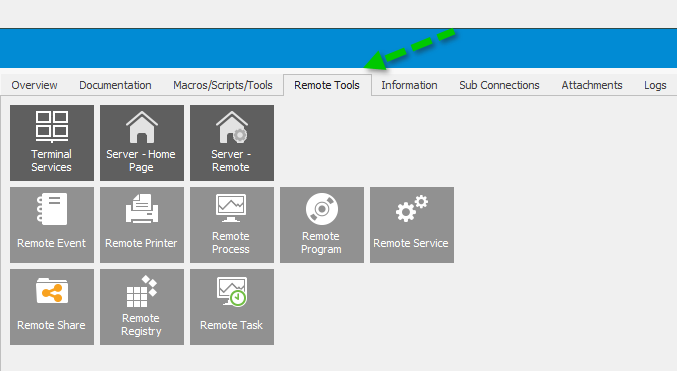
It is also possible to access some of those tools directly from a session in the Dashboard;
Best regards,
Marc Beauséjour
2017-10-04_16-38-57.png
1) Thanks :)
2)
I have the "Enable the execution of synchronizers" check box ticked.
I have 3 ActiveDirectory Synchronizers and 3 HyperV synchronizers each one with the "Automatic Sync" checkbox ticked
I have the "Execute automatic synchronize every" option set to 60 minutes.
The "Last Synchronization" column does update with the new time every hour but new items aren't added to the list of sessions
3) Thanks I'll take a look at the article and see if it helps. Primary ones would be ADU&C, DNS, Certificates but the more the better really. RDM just seems a great place for consolidating toolsets. I can have a folder called DCs with RDp Sessions for each DC, powershell sessions for the same, and it would be nice to also be able to add in ADU&C etc and end up with one place I can go to quickly manage all of my domains. Same would apply for SQL and other services.
Thanks for the response
Alan
Hello!
Thank you for the details. I will troubleshoot this to see if there's an issue. Could you please confirm if you have the same behavior with the 32-bit launcher?
For ADU&C, we have an entry called the Active Directory Console which you can learn more here;
https://help.remotedesktopmanager.com/sessions_adconsole.htm
Best regards,
Marc Beauséjour
Hello
Yes I am having the same issue with the 32 bit version.
Thanks
Alan
Hello again
I have just been playing with the MMC link you provided and seem to have hit a brick wall. I run RDM with a normal domain user account and I need to launch MMC with different account credentials (those for my admin account). Unfortunately the credential set for the tools in a session (step 7 in the guide you linked to) don't seem to be honored when the "Run as Administrator" option is selected in the Execution Mode tab (required for MMC). The "Run as Administrator" option and "Run as different user" option seem to be mutually exclusive so any time I select to run the MMC elevated (as required) I can't then specify credentials (it just uses the credentials RDM is run under). What I need is to be able to select both options.
I can partially work around this using the PowerShell Tool instead of the CMD one. When using PS I can leave the "Run as Administrator" option blank and select "Run as different user" option instead, this gets PowerShell running with the correct credentials. I can then add "-verb RunAs" argument to the PowerSehll command that I run to force it to run elevated (whithout having to select the checkbox to do so). This is effectively allowing me to both RunAs a different user and run elevated. The only downside to this approach is that I can't open the DHCP mmc and specify the DHCp server to connect to so I would need to save a preconfigured MMC console to my local disk (one specifying the DHCP server to use) and open that rather than the default dhcpmgmt.msc which ties the solution to the machine I have done that on.
Is there any way to get the CMD tool to allow me to run both elevated and using credentials specific in the credential repository? Alternatively is there a way to save a custom msc file within the RDM database (so it is available wherever I run RDM) and then call that as the file for mmc.exe to open? [edit: I don't have the Store in Database option with the DB type I am using so this won't work]
Thanks
Alan
Hello,
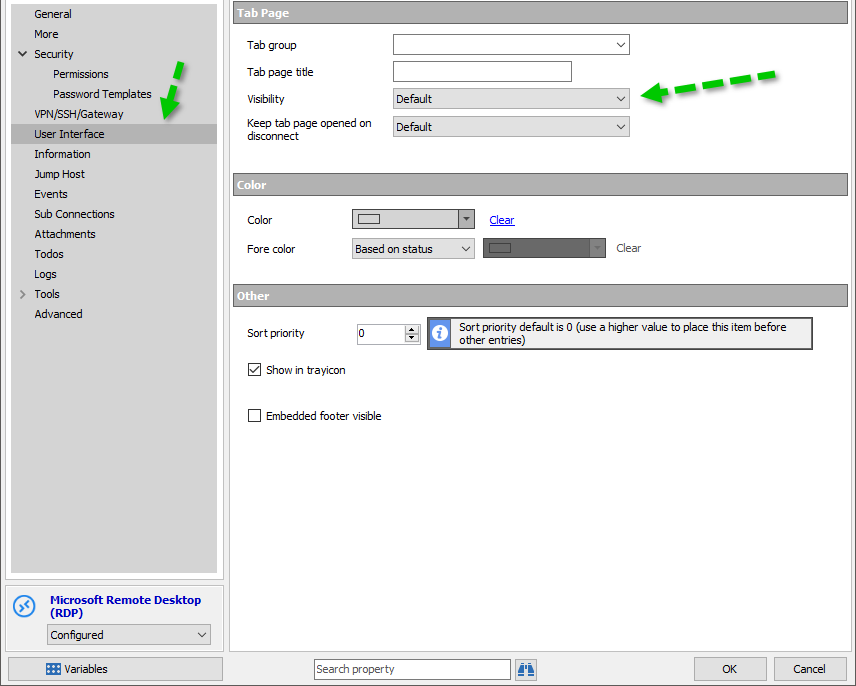
For the Undocked mode, we have found this option which should do the trick. Please go in the Properties of your session then under User Interface, in the Visibility drop-down menu, select False;
For the Synchronizer issue, could you please press on CTRL+F5 inside RDM and see if the Sessions appear when the Synchronizer is executed?
For MMC, I will reply shortly on that.
breg
Marc Beauséjour
2017-10-05_11-09-31.png
Hi and thanks for the reply
It is just the continuous ping window I want to hide the tab for. If I hide it for my own sessions then they also don't show a tab when executed. Is there a way to apply the setting you show to just the continuous ping tool?
CTRL+F5 does force a sync inasmuch as the time in the Remote Sessions window updates but new sessions still aren't added to the console tree.
Thanks
Alan
Hello,
Thank you. We will work on the Continuous Ping.
For the Synchronizer, I'm unable to reproduce your issue.
Could you please show us the configuration of you AD Sync entry? What type of data source are you using also?
For your request on MMC, we will look into it.
Best regards,
Marc Beauséjour
Hi
Is there somewhere I can send the screenshots of my settings for the synchronizer?
Thanks
Alan
Hello,
We can continue to troubleshoot this via email.
Please send the details to support@devolutions.net .
Best regards,
Marc Beauséjour
I've attached a png containing most of the settings. Nothing has been entered on the Login tab. The Filters tab is set to Server. Search is Subtree/root. Advanced no silent mode and Action set to None.
If I run the preview it shows the missing servers. If I manually open the Synchronizer it correctly adds the missing servers. It is just the auto synch that isn't working. It even works if I set a Scheduled Task in windows to run the commandline as specified in the Advanced section.
Cheers
Alan
rdm.png
Let me know if you need more details and I will email them to you :)
Hello,
Thank you. I'm currently testing with the details provided.
I see that you use a template for the Synchronizer. Are the settings in the Template similar to what you have shown us?
Best regards,
Marc Beauséjour
Hello,
Coming back to MMC, could you please have a look at this article as well?
https://help.remotedesktopmanager.com/tipsandtricks_runas_builtinrunas.htm
It doesn't appear to be possible to make both work at the same time.
The solutions offered in the article should help.
Best regards,
Marc Beauséjour
The template is a Shared Template and the only thing it is doing is setting the credentials on the general page to Credential Repository and specifying a set of credentials I have defined in the repository.
I'm not seeing a solution in the article to allow both credentials and elevation? The Windows RunAs tool allows me to specify creds but not elevation. I have managed to come up with a PowerShell solution though and another one using PSEXEC.
Cheers
Alan
Hello,
Thank you for your reply. The article was to provide clarity on the reason why RunAs and Run as administrator are exclusive.
I'm happy to see you have found a solution. Please let me know if you encounter other issues with MMC.
For the Synchronizer, I think I have reproduced your issue but I'm not entirely sure.
I will discuss this with our engineers tomorrow.
Best regards,
Marc Beauséjour