Google Authenticator Validation

On the server, when I open the RDM 01.png is shows up. as you can see this is before user login. it seems the application itself has 2factor.
I don't have a user called "RemoteDesktopManager" and I can do admin jobs via different clients.
01.PNG
All Comments (11)
So I found out what happened. I enabled the "Force application Security with Google Authenticator" (02.png).
Now the problem is when I disable this option, the application is still asking for Google Authenticator. Is there any way to get rid of the authenticator or at least rest it?
Update:
Repairing and re-installing the RDM client did not fix the issue.
02.PNG
Hello,
Have you set the Google Authenticator in the Server Settings of your DVLS instance?
Please consult this online help topic for more information.
https://helpserver.devolutions.net/2fasetting_summarydialog.htm
Best regards,
Érica Poirier
No, not at moment, it was set to "required" but I changed it to None.
I resolve the issue by deleting the RemoteDesktopManager.cfg and RemoteDesktopManager.bak. I lost the settings but at least the google authenticator is no longer an issue. Hopefully, I didn't cause any issue by deleting these 2 files.
Here is to re-create the problem:
Disabling the "Force application Security with Google Authenticator" should remove the need for Google Authenticator but it didn't. This is not related to users 2factor authentication. This is for the application itself.
Please confirm and fix in the next version.
Hello,
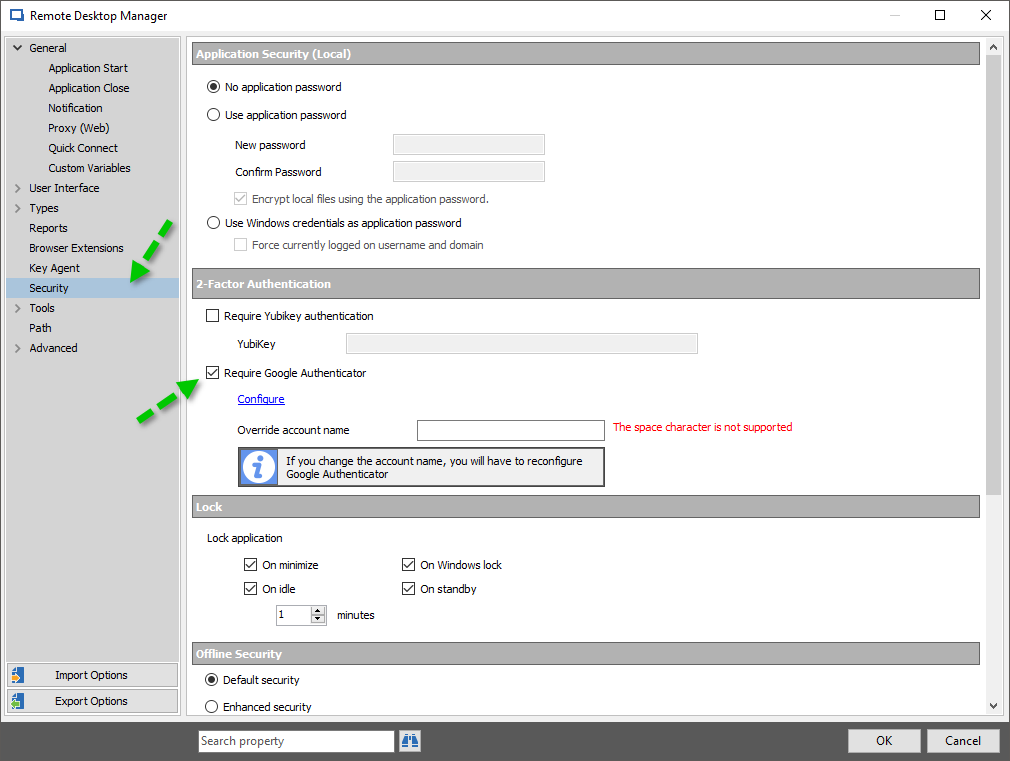
When enabling the option in the Data Source Settings, it will modify the Configuration file. Even though you have removed the option in the Data Source Settings, the local option for 2FA is still enabled. It cannot be removed from the Configuration file.
To disable the local option, you simply have to go in File -> Options -> Security and disable the 2FA option;
Best regards,
Marc Beauséjour
2017-10-06_14-04-49.png
Mark,
Thanks for Info, However in my situation, I didn't have the code for Google Authenticator so I couldn't get to the file>option. In addition, There was no option to reset the code.
It would be nice to have a recovery option for this kind of situations.
What harm can be done by deleting the config files? This happened on the server's RDM client and I want to make sure it won't cause me a problem in future.
Hello,
Deleting the CFG file resets all the settings in the application.
We are working on something similar as stated here;
https://forum.devolutions.net/topic26955-user-switchable-twofactor-authentication.aspx
Is that what you had in mind?
Best regards,
Marc Beauséjour
Mar,
the link is for the users' 2factor authentication and actually it has been fix. There is an option to use alternative 2factor authentication in new version. users can choose a different method if they forgot their phone.
My issue is for the the application's 2factor. As you mentioned in your previous post with the screenshot, the option is within the application, not on the server. There is no option to reset the google authenticator or use alternative authentication for the applications's 2factor authentication.
What I hoping to have at least the rest functionality for the application's 2factor (my second post - 02.png).
Hello,
My apologies. I went too fast when looking up the details.
I will verify with our engineering department if we can do something.
Best regards,
Marc Beauséjour
Hello,
Thank you for your patience.
I have discussed this with our engineers and unfortunately, there is nothing we can do on the application side for the 2FA due to our architecture.
Best regards,
Marc Beauséjour
It seems deleting the config file is the only option left then.
Thank you.