User data migration

Hi guys,
we need to migrate some RDM users from User A to User B and these users have a lot of user specific settings in the session entries. Is it possible to migrate these user specific settings somehow? I know that it is possible to import the sessions/credentials (even the private vault), but i did not find a solution for the settings so far. Do you know any way to do this?
Best regards,
Hermann
All Comments (17)
Hello,
It is possible to export and import the User Specific Settings (USS). Please go in File - My Account Settings - User Specific Settings List and then select all entries to export them with the Export button. And use the Import button to import USS for this user as well.
Best regards,
Érica Poirier
Hello Érica,
sometimes the easiest things are hard to find. I search with google and inside the RDM-Help with no success.
Thanks a lot for pointing me in the right direction, the import/export works as expected!
Best regards,
Hermann
By the way, is it possible that your forum does not work anymore with Firefox? Every time i create a post and click to send/create it it disappears from the message box but is not getting saved, only when i use IE i can create the posting.
Hello,
I have sent an email to our web team so that they can verify the issue that you have with the forum and Firefox.
Thank you for your feedback.
Best regards,
Jeff Dagenais
Hello,
We are not able to reproduce the issue that you have with our forum in Firefox.
What version of Firefox are you running?
What are the exact steps that you do to reproduce the issue?
Are you using specific extension(s) in Firefox?
Best regards,
Jeff Dagenais
Hello Jeff,
i will record a video that shows the problem while answering to your post. The firefox version i use is 55.0.3 (32 bit).
The extensions that are installed and activated are:
- ace Document Control (CRM)
- German Dictionary (de-DE), classical spelling standards
I just want to let you know that this might also be a client related problem, i did not try to re-install Firefox. If you can't reproduce it after seeing my video i will try that step next.
FYI, i will send you a link to the video through e-mail (support@devolutions.net)
Best regards,
Hermann
Hello,
Thank you very much for all the details.
I have transmitted the video and the information's to our web team so that they can try to reproduce your issue.
Best regards,
Jeff Dagenais
Hi guys,
one more question. Is there any way to migrate the local favorites from user A to user B?
My first attempt was to export the local favorites like you do with session entries (right click, Export/Import session entries), but this did not work since not the favorites itself got exported but the session entries themselves.
I know that the local favorites are stored in the file RemoteDesktopManager.ext and you can copy/paste it to have the same favorites for your user on another machine. But if you try to copy it to a different user it does not recognize the file/content of the file and the favorite list on the target user remains empty.
After reading a little bit through the RemoteDesktopManager.ext i found the <UUID> string and made my second attempt, I tried to change it manually (removed the string from user A, entered the string from user B) but with no success.
Do you have any other method to migrate the local favorites to another user?
Best regards,
Hermann
Hello,
I had a chat with our engineering department and as of now, there's nothing we can do.
However, they will add a feature to be able to export/import favorites in RDM.
Best regards,
Jeff Dagenais
Hello Jeff,
thanks for letting me know, that's great support from your side!
Best regards,
Hermann
Hi Jeff,
since 13.0.6.0 is out already i wanted to ask how it looks with the export/import Favorite function?
Right now it seems only possibly to export them, but an Import is not possible (function is grayed out in the context menu)
Any ideas on that?
Best regards,
Hermann
Hello,
To shared favorites or to import it you could copy the favorites.xml which is located in the Local App Data.
Best regards,
David Grandolfo
Hi David,
i tried to copy the favorites.xml but this did not work, it even confused me more.
Imagine the following situation:
You have one PC with One Windows User, inside this Windows Session you have two RDM-Users that need to have the same favorites (that's the goal).
If you go now to %AppDataLocal%\Devolutions\RemoteDesktopManager\SOMECOMPLEXUSERID you will find "one" Favorites.xml which seems to be used by both RDM-Users.
If i change the favorites for user A the IDList-Value inside the Favorites.xml gets changed, if I change the favorites in user B the same file gets changed. What is even more strange is that both keep their individual favorites even if they use the same file.
I can only suppose that the IDList-Value is a combinated value for both users within this Windows User/Session and the RDM-Database splits this up to the proper RDM-Users.
Any suggestions or corrections? :-)
Best regards,
Hermann
Hello,
Regarding your question, copying the Favorites.xml file will allow both Users to use the same Favorites. Unfortunately, if one of them makes any change to their favorites, they won't have the same favorites anymore. You would have to manually copy this file every time you want them to use the same favorites.
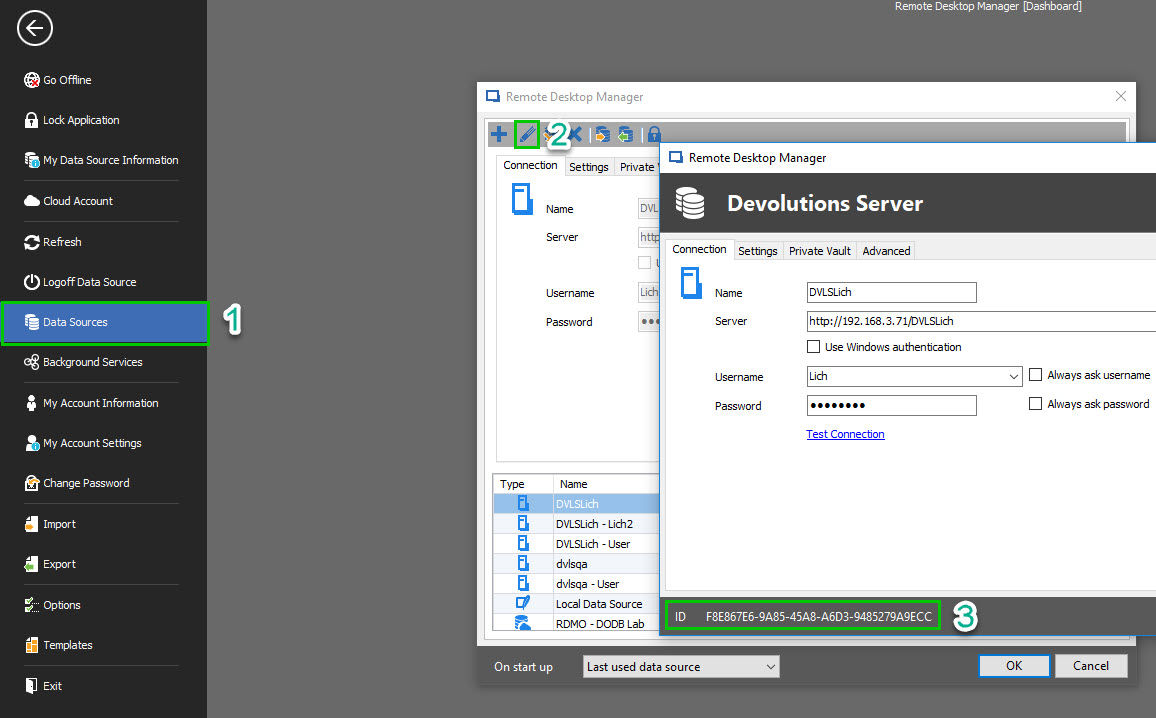
Here are the steps to locate and copy the Favorites.xml file
Go to File ->Data Sources-> Edit-> Click on the ID in the bottom left corner of the window, this will copy it to your clipboard.
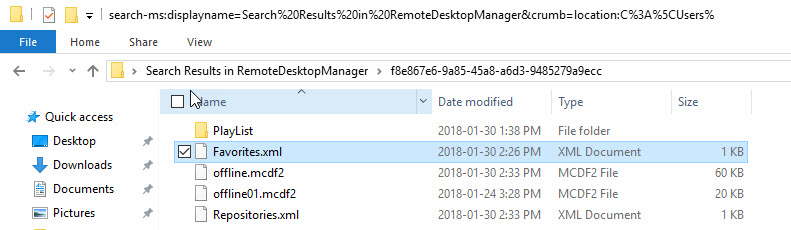
After this, go to %Localappdata% -> Devolutions -> RemoteDesktopManager and copy the ID in the search field.
Copy the favorites.xml file and paste it in your other user folder
Best regards,
James Lafleur
favorites.jpg
DataSource.jpg
Hi James,
sorry for the late reply. I tried what you suggested to replace the Favorites.xml but it did not work as expected, the favorites stayed as they were before, no change at all. After that did not work i tried to rename the Favorites.xml to see if there would still be Favorites. To my surprise the system just recreated the Favorites.xml with the favorites that where there before.
It seems to me that the Favorites are saved in another place and synced to the XML-File or something like that.
Any ideas?
Best regards,
Hermann
Hello,
Unfortunately it is not possible to share your favorites between your users. The Favorites are directly tied to each User.
The best workaround, would be that you create a Folder on your Data Source in which you could create shortcuts to the entries you wish to flag as favorite and to share this folder to your users. This could act as the Favorite feature.
Best regards,
James Lafleur
Hi James,
thanks a lot for the effort, at least we know now that it is not possible to copy the favorites from user A to user B in an "easy" way.
I'll tell our users to do that manually.
Best regards,
Hermann
Hello,
Thank you for your feedback and let us know if you need anything else.
Best regards,
James Lafleur