Password rules

Hi all,
is there a way to ensure, that all users are restricted to a specific password rule which I'm able to configure on a database level?
I've seen the forbidden password list and the password restrictions, but it seems that I'm able to get around of all of that.
I would like to force the whole team to use passwords that have 10 chars, 2 digit, 2 special chars in all new entries or edits they perform on existing entries.
Furhter, on an adminsitrator level, I would appreciate to be able to create a folder for internal test environments, where I can disable this strict password policy.
All Comments (1)
Hello,
To achieve what you what, you would need to enable the Password Complexity feature.
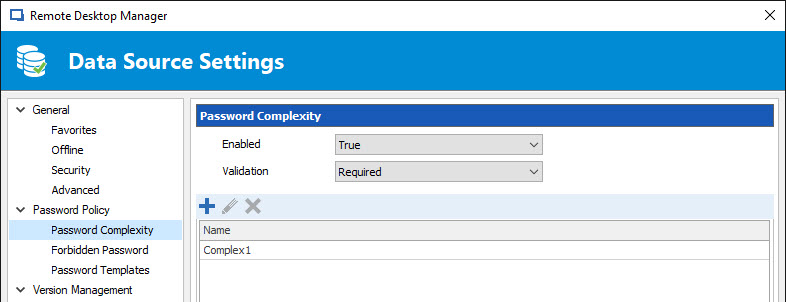
To do so, please go in Administration -> Data Source Settings -> Password Policy -> Password Complexity. In the Enabled section, select True. In the Validation section, select Required. The last thing that you need to do is to create your Password Complexity by clicking on the + button.
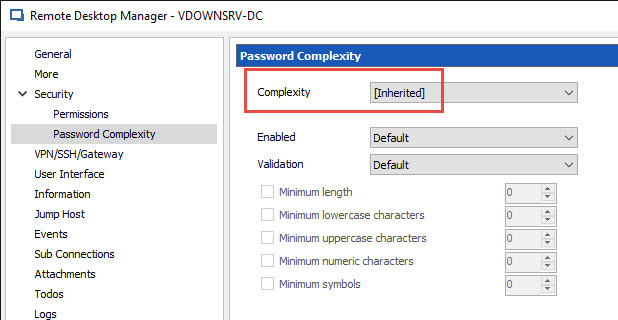
Then, in your child sessions, in the Password Complexity section, select Inherited.
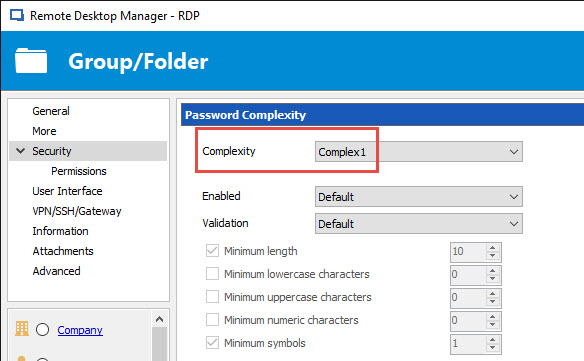
At the parent folder, in the Security section, select the Password Complexity that you have created in the data source settings.
Please note that you can bulk change your child session using our Batch Edit feature.
https://help.remotedesktopmanager.com/edit_batch.htm
Best regards,

Jeff Dagenais
2017-09-11_09-39-46.jpg
2017-09-11_09-38-15.jpg
2017-09-11_09-34-21.jpg
2017-09-11_09-33-01.jpg