Access Offline Mode

Hi guys,
in previous versions there was a "Offline"-Button at the Login-Screen, with that button you were able to choose to either start online or offline which was very comfortable. In the recent versions this button has disappeared, does anybody know another solution to choose between online / offline at the application start? I for myself know the following methods:
- Get Asked for Online/Offline mode at startup (message box appears, annoying for users that don't use the offline mode. Problematic in bigger deployment environments)
- Go Online/Go Offline through the file menu (you have to be connected/logged in to have this possibility)
- Some kind of auto detection for offline mode (never really worked for me)
- Start Offline Mode every time the application starts (can be enabled in options)
It would be nice if there was a way to regain that Offline-Button, or to have at least a commandline parameter to start in offline mode.
Best regards,
Hermann
All Comments (7)
Hello,
What version of RDM are you running?
What type of data source are you using? If it's Devolutions Server, please let us know which version you are using.
Best regards,
Jeff Dagenais
Hello Jeff,
we are using Remote Desktop Manager Enterprise 12.0.8.0 (soon 12.6.6.0) with Devolutions Server 4.0.7.0 (soon 4.6.0.0).
Best regards,
Hermann
Hello,
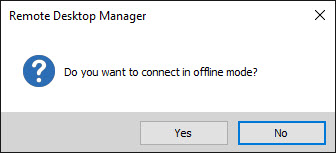
Is this the window that you are looking for?
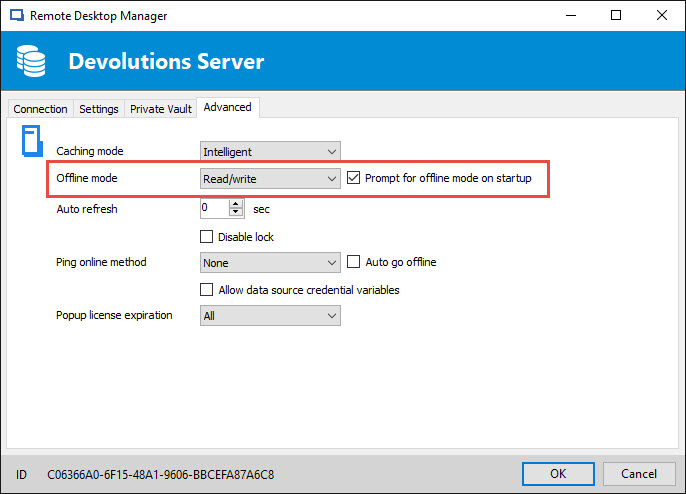
To enable that option, please go in File -> Data Sources -> Edit -> Advanced tab and check the Prompt for offline mode on startup.
Best regards,
Jeff Dagenais
2017-09-05_09-10-37.jpg
2017-09-05_09-11-09.jpg
Hi Jeff,
this is not the window i was looking for, this is the offline mode dialogue that i listed as Method 1 in my previous post. I was looking for the Offline-Button, it was placed next to Login/Cancel
This button existed around version 10/11 and disappeared after an upgrade.
I'd like to have that button back or a commandline option to start either in online or in offline mode, or if you have, any other way to select the desired mode at application start.
The Question dialogue you showed does offer this option, but we have few hundred clients where some use the offline mode and some not, therefore the people that do not use the offline mode need to either disable the question dialogue in the Datasource Settings or click on "No" every time they start the application.
Best regards,
Hermann
Hi Hermann,
Good point, I will look at putting it back in the login dialog. Off the top of my head I don't see a reason why it wouldn't be possible.
Best regards,
Stéfane Lavergne
Hi Stefane,
that is great to hear, I am sure our users will be very happy to see this feature coming back :-)
Best regards & Thanks a lot,
Hermann
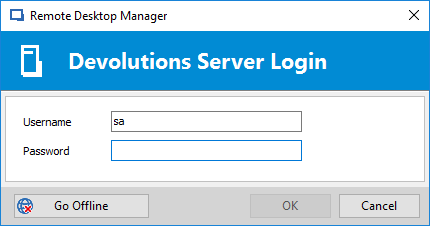
It's done and will be available in the next beta release.
Stéfane Lavergne
2017-09-12_8-37-40.png