Need help

Hi,
Finally i found time to start implementing RDM in our office, but i am getting stuck :-(
- Windows Server 2012R2 with SQL 2008R2
- RDM 12.5.4.0 Enterprise Edition
- Created a datasource with an RDM_User
- Created an admin account for myself ( Active Directory )
Issues:
1: When i start RDM from another machine, with another user ( say user "jane doe" ) which is not in the database ( totally absent in RDM ) , this user can connect to the database and see the other users and even delete them.
( this is strange because Jane Doe is not a RDM user, still she can start RDM and connect to the database and do anything see likes )
I tried the "force application security with Windows Credentials", but then Jane Doe gets a popup asking for the password.
2: When i create a user account in RDM for Jane Doe, she can start RDM, connect to the database, and even while she is a user with readonly rights, she can delete my admin account.
So how can i make sure normal users cannot change anything in RDM, and that only RDM users can connect to the database and use RDM.
Thanks for the help !!
Alex
All Comments (7)
Hello,
I suspect that the "jane doe user" is a member of a specific AD group and that AD Group has been added in SQL Server Management Studio.
Is this possible?
Best regards,
Jeff Dagenais
Hi Jeff
I removed the account for Jane Doe from RDM and made sure that she was not not listed in SQL.
On the database the "force application security with Windows Credentials" is on.
When Jane starts RDM she gets a login prompt and she can login to RDM, connect to the database and change whatever she wants.
Her account is not a member of any groups.
What i noticed:
When i login with my own account ( admin ) and click on a user and goto permissions i get "groups are only available if the user is not an administrator", when i login as Jane Doe i get the same message !!, it looks like ( although she is not a user in RDM ) she is seen as an Admin in RDM.
Alex
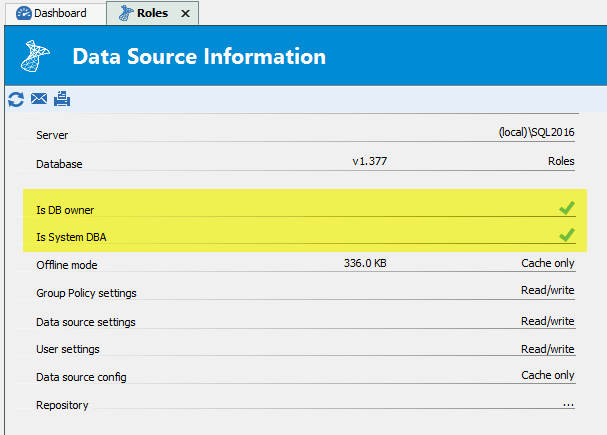
With an instance of RDM logged in as Jane Doe to File -> My Data Source Information
Are the "Is DB Owner" or "Is System Admin" checked? If so, it's normal than Jane Doe can do everything in RDM since they are also full admin on the database. The question then becomes what/where is Jane Doe being granted the admin privileges.
Stéfane Lavergne
2017-09-01_12-04-23.png
Hi,
When i do this with my own admin account it says i am not a db owner and not a System DBA, under username it says "rdm_admin" ( which i created to connect to the database )
Jane Doe has the same result ( except she is not allowed the "reveal password" )
Looks like it has something to do with the usage of the rdm_admin account to connect to the database, but what ??
Alex
Somewhere there was a hint to use a service account for connecting to the database, cannot find it anymore in the manual :-(
Looks like when a user starts RDM it connects to the database using this serviceaccount instead of using the real user
Alex
Hello,
The user that is used to connect on the data source can be found in the File -> My Data Source Information report or by editing the data source via the
File -> Data Sources menu.
What is the username in the report and/or the data source configuration for Jane Doe?
Not sure about the service account to connect to the database in our online help, however, we have a blog that explain how to use the custom authentication mode in RDM. Is this what you are looking for?
https://blog.devolutions.net/2016/10/new-sql-server-custom-authentication-mode.html
Best regards,
Jeff Dagenais
Hi,
I started from scratch ( also updated the version ), now Jane Doe is not an admin anymore :"-)