Unable to connect to any RDP

I'm not sure when Remote Desktop Manager Free stopped working for me but I haven't been able to use it to make any RDP connections.
Version 4.4.2.0
I get the following error for every RDP connection:
[10:55:09:468] [5234:b029b000] [INFO][com.freerdp.client.mac] -[MRDPIPCClient initLoggingWithFilter:filePath:fileName:] 117 - Log initialized headless
[10:55:09:470] [5234:b029b000] [DEBUG][com.freerdp.client.mac] -[MRDPIPCClient configureInternal] 90 - configureInternal
[10:55:09:485] [5234:b029b000] [ERROR][com.freerdp.common] freerdp_set_param_uint32 2273 - freerdp_set_param_uint32: unknown id 148 (param = 100)
[10:55:09:485] [5234:b029b000] [ERROR][com.freerdp.common] freerdp_set_param_uint32 2273 - freerdp_set_param_uint32: unknown id 149 (param = 100)
I am still able to use the Microsoft RDP client and other RDP clients. Please let me know if more information is needed.
Thanks
All Comments (3)
Hi,
A a bit of information could help us.
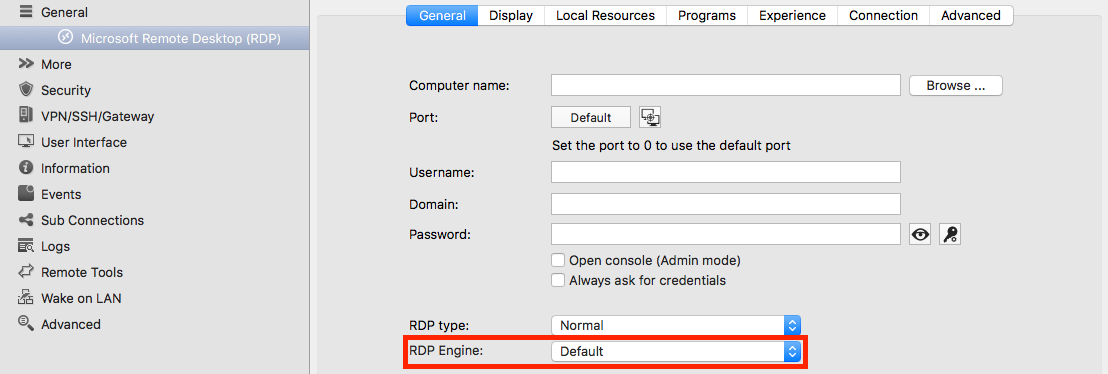
What RDP engine are you using?
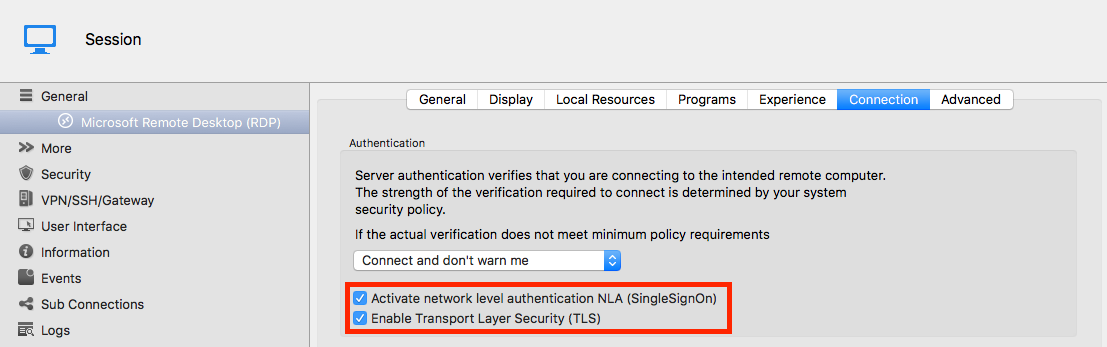
Are NLA and TLS enabled?
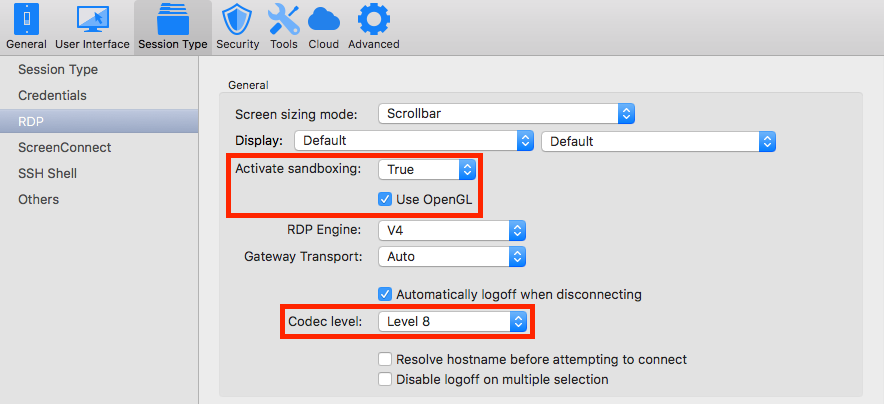
Is OpenGL enabled?
What is your Codec Level?
Here's where you can find the previously mentioned settings in your session settings:
The RDP Engine, OpenGL and Codel Level have default values in the preferences. Here's where you will find those:
In the first place, I'd try disabling the OpenGL since it's the only thing I can't think of that has changed (somewhat) recently. Though I don't think this should have an impact on whether or not your connection connect.
Best regards,

Xavier Fortin
Preferences_UseOpenGLRDPEngineAndCodecLevel.png
RDPEngine.png
OpenGLAndCodecLevel.png
NLAAndTLS.png
Hi Xavier,
Thanks for you response.
For this particular connection (trying to connect to a windows 7 enterprise desktop) I have these settings.
RDP Engine: default - V3
NLA: not enabled
TLS: enabled
Use OpenGL: default - Use OpenGL checked
Codec level: Default - Level 7
Hi,
Was there any reason for you using the Engine V3? It is no longer actively supported and should only be used as a last resort. This is very likely your issue, can you try switching this to V4 and see if this helps?
Best regards,
Xavier Fortin